EasyManua.ls Logo

Zenit EM - Page 8

Zenit EM
23 pages
Print Icon
To Next Page IconTo Next Page
To Previous Page IconTo Previous Page
Loading...
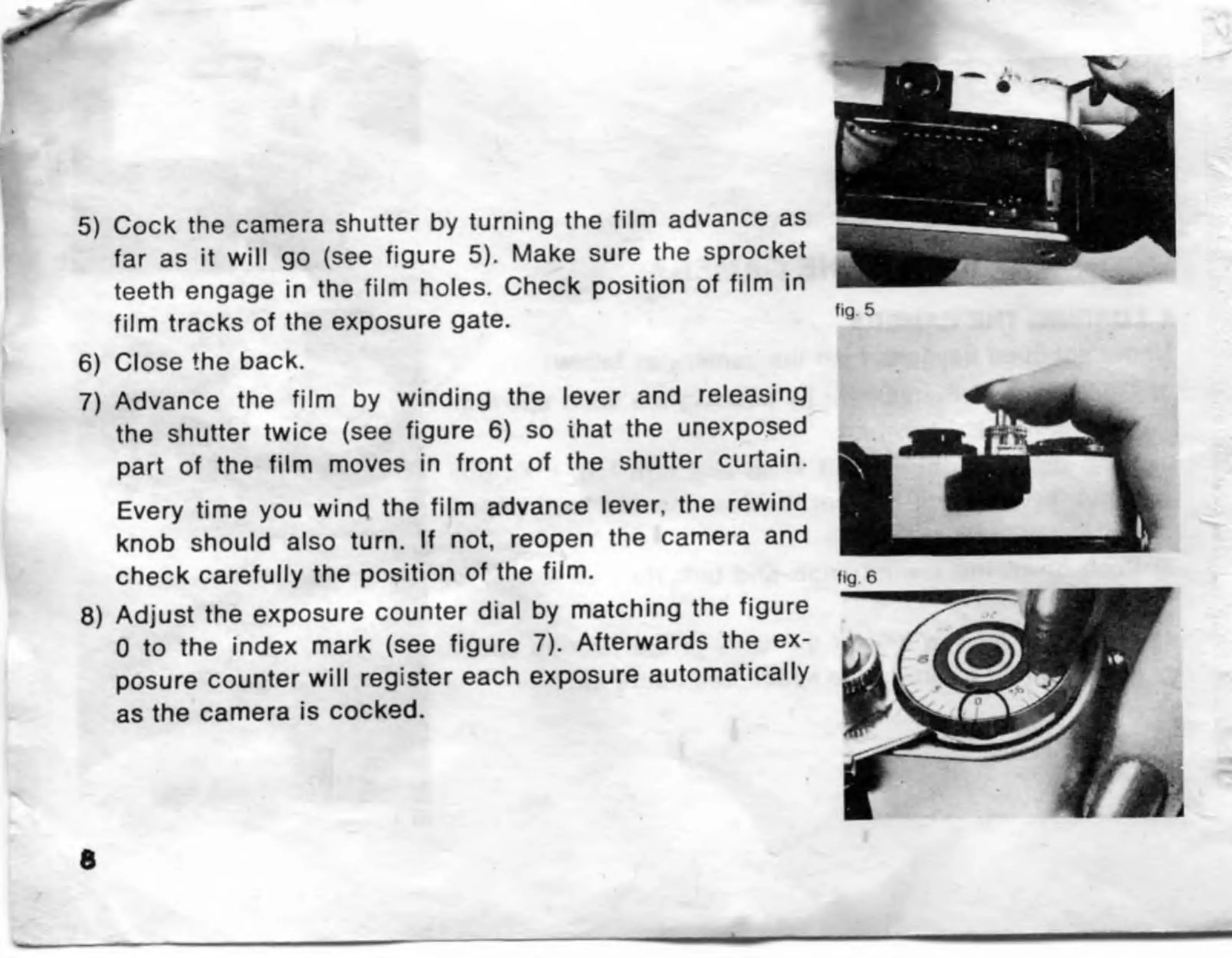
5)
Cock
the
camera
shutter
by
turning
the
film
advance
as
far
as
it
will
go
(see
figure
5).
Make
sure
the
sprocket
teeth
engage
in
the
film
holes.
Check
position
of
film
in
film
tracks
of
the
exposure
gate.
6)
Close
the
back.
7)
Advance
the
film
by
winding
the
lever
and
releasing
the
shutter
twice
(see
figure
6)
so
ihat
the
unexposed
part
of
the
film
moves
in
front
of
the
shutter
curtain.
Every
time
you
wind
the
film
advance
lever,
the
rewind
knob
should
also
turn.
If
not,
reopen
the
camera
and
check
carefully
the
position
of
the
film.
8)
Adjust
the
exposure
counter
dial
by
matching
the
figure
0
to
the
index
mark
(see
figure
7).
Afterwards
the
ex¬
posure
counter
will
register
each
exposure
automatically
as
the
camera
is
cocked.

Related product manuals