P,G 3oI I RE,o.Fu.c.o.s
f
Controlupto
sevendifferent
deviceswith
your remote!
mL
ew
L
iv
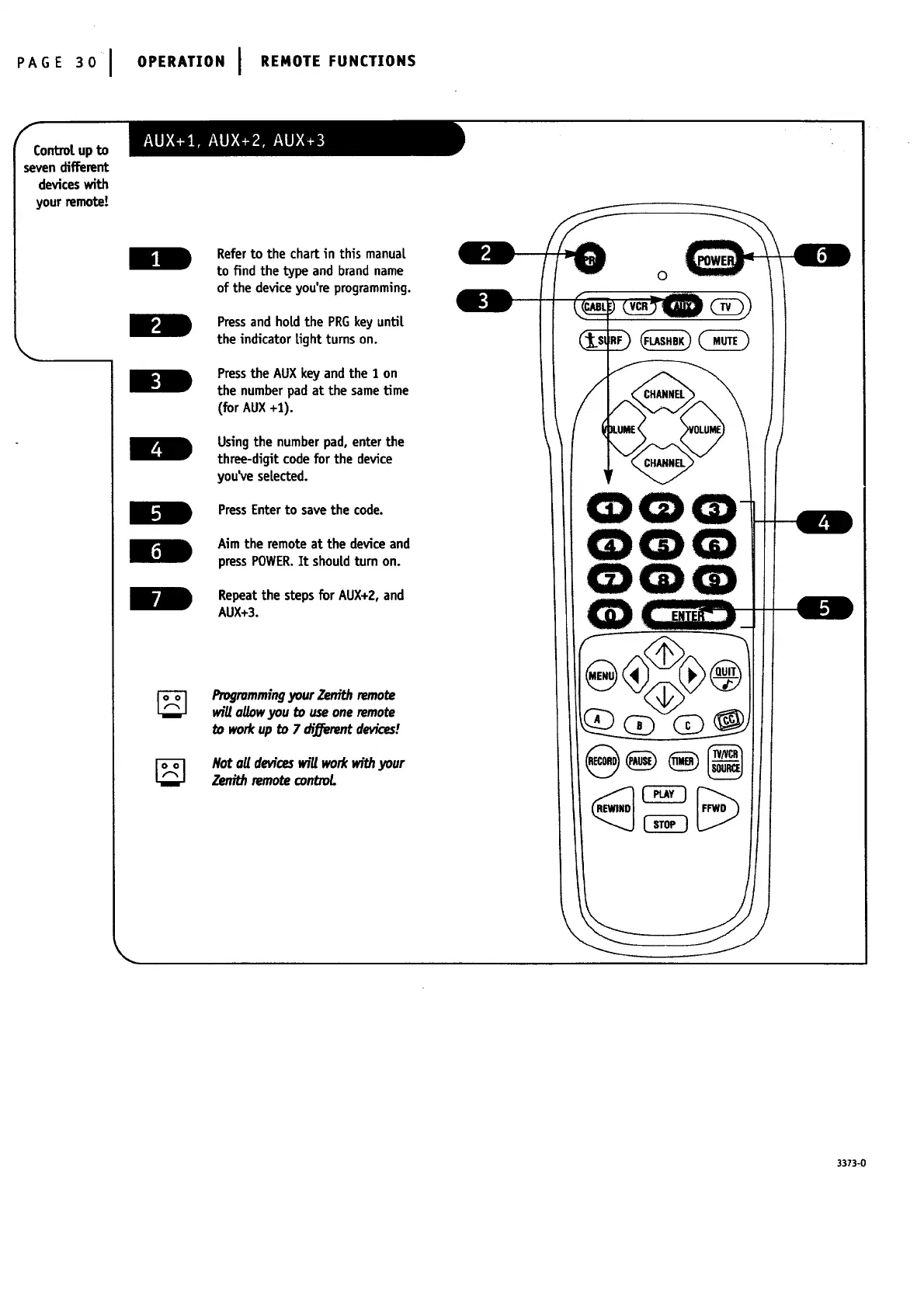
Refer to the chart in this manual
to find the type and brand name
of the device you're programming.
Pressand holdthe PRGkey until
the indicator tight turns on.
Pressthe AUXkey and the 1 on
the numberpad at the sametime
(for AUX+1).
Usingthe numberpad, enter the
three-digit code for the device
you_e selected.
PressEnterto savethe code.
Aim the remote at the deviceand
pressPOWER.It shouldturn on.
Repeatthe stepsfor AUX+2,and
AUX+3.
Progrommingyour Zer_.hremote
will oUowyou to useone remote
workup to 7 di:_erentdevices!
Not oUdeviceswill workwithyour
Zenith remotecontroL
0
_(_
@
3373-0




 To Next Page