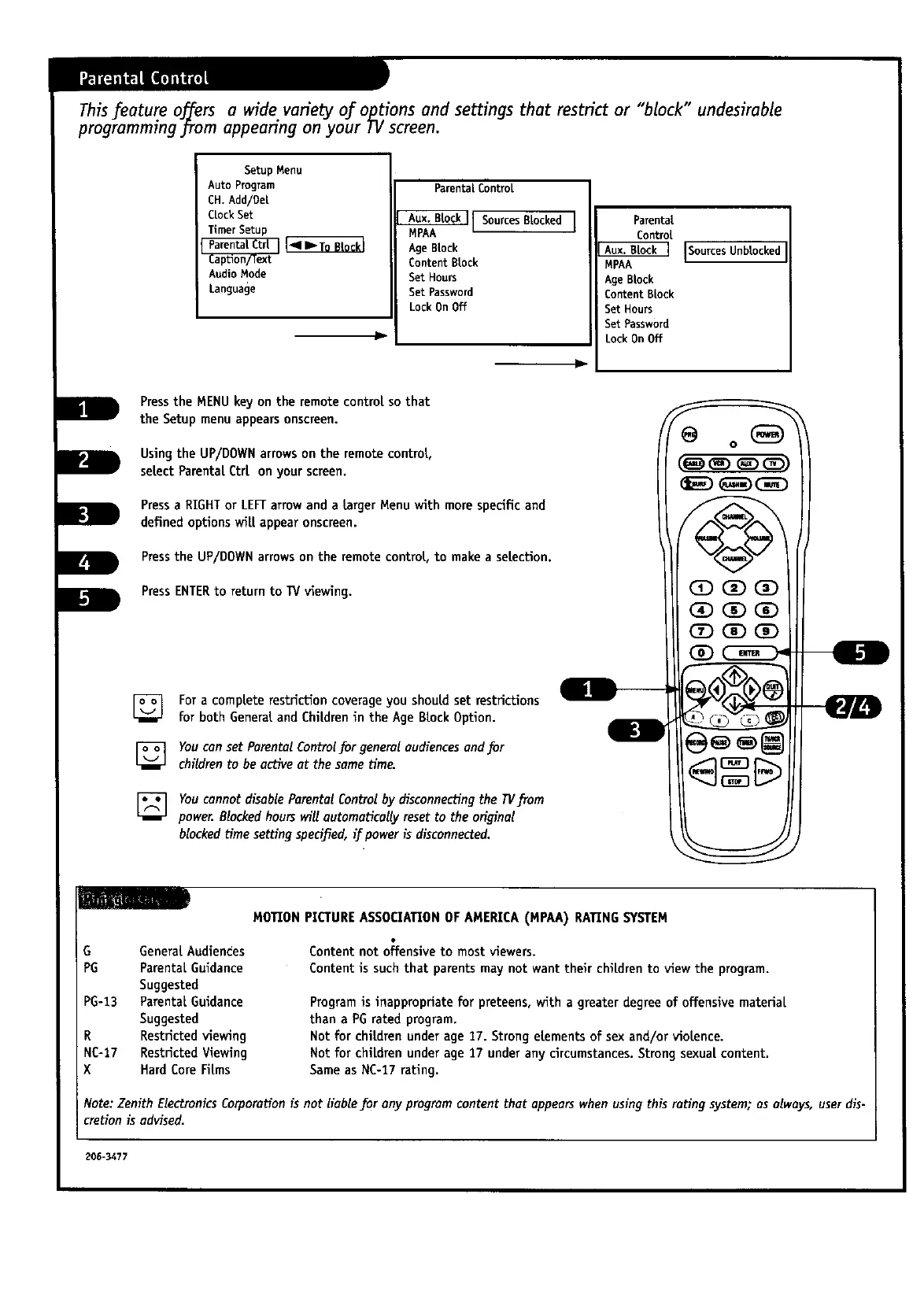
This feature offers a wide variety of o_tions and settings that restrict or "block" undesirable
programming from appearing on your I v screen.
SetupMenu
AutoProgram
CH. Add/Dei
ClockSet
TimerSetup
AudioMode
Language
ParentalControl
Aux. B[o_[ SourcesBlocked ]
MPAA
Age Block
Content Block
Set Hours
Set Password
Lock On Off
v
Parental
Control
ISources Unblocked
MPAA
AgeBlock
ContentBlock
Set Hours
Set Password
Lock OnOff
Pressthe MENUkey on the remotecontrolso that
the Setup menu appears onscroen.
Usingthe UP/DOWNarrowson the remote control,
select ParentalCtr[ on your screen.
Pressa RIGHTor LEFTarrowand a target Menu with more specificand
defined optionswill appearonscreen.
Pressthe UP/DOWNarrowson the remote control, to makea selection.
PressENTERto return to 13/viewing.
[_ Fora completerestrictioncoverageyou should set restrictions
for both Generaland Childrenin the Age Block Option.
[] You can set Pamntal Controlfor general audiences and for
children to be active at the sametim_
[] You cannot disable Parental Controlby disconnecting the TVfrom
power. Blocked hours will automatically reset to the original
blockedtime settingspedfied, if power is disconnected.
(D(iD_
I
O
G GeneralAudiences
PG ParentaLGuidance
Suggested
PC-t3 ParentalGuidance
Suggested
R Restricted viewing
NC-17 Restricted Viewing
X Hard CoreFilms
MOTION PICTUREASSOCIATIONOF AMERICA(MPAA) RATINGSYSTEM
Content not o_fensiveto most viewers.
Content is such that parents may not want their children to view the program.
Programis inappropriate for preteens,with a greater degree of offensive material
than a PGrated program.
Not for childrenunder age 17. Strong elements of sex and/or violence.
Not for chiLdrenunder age 17 under any circumstances.Strong sexual content.
Same as NC-17rating.
Note: Zenith Electronics Corporationis not liable for any programcontent that appears when using this rating system; as always, user dis-
cretionis advised.
206-3477



 To Next Page