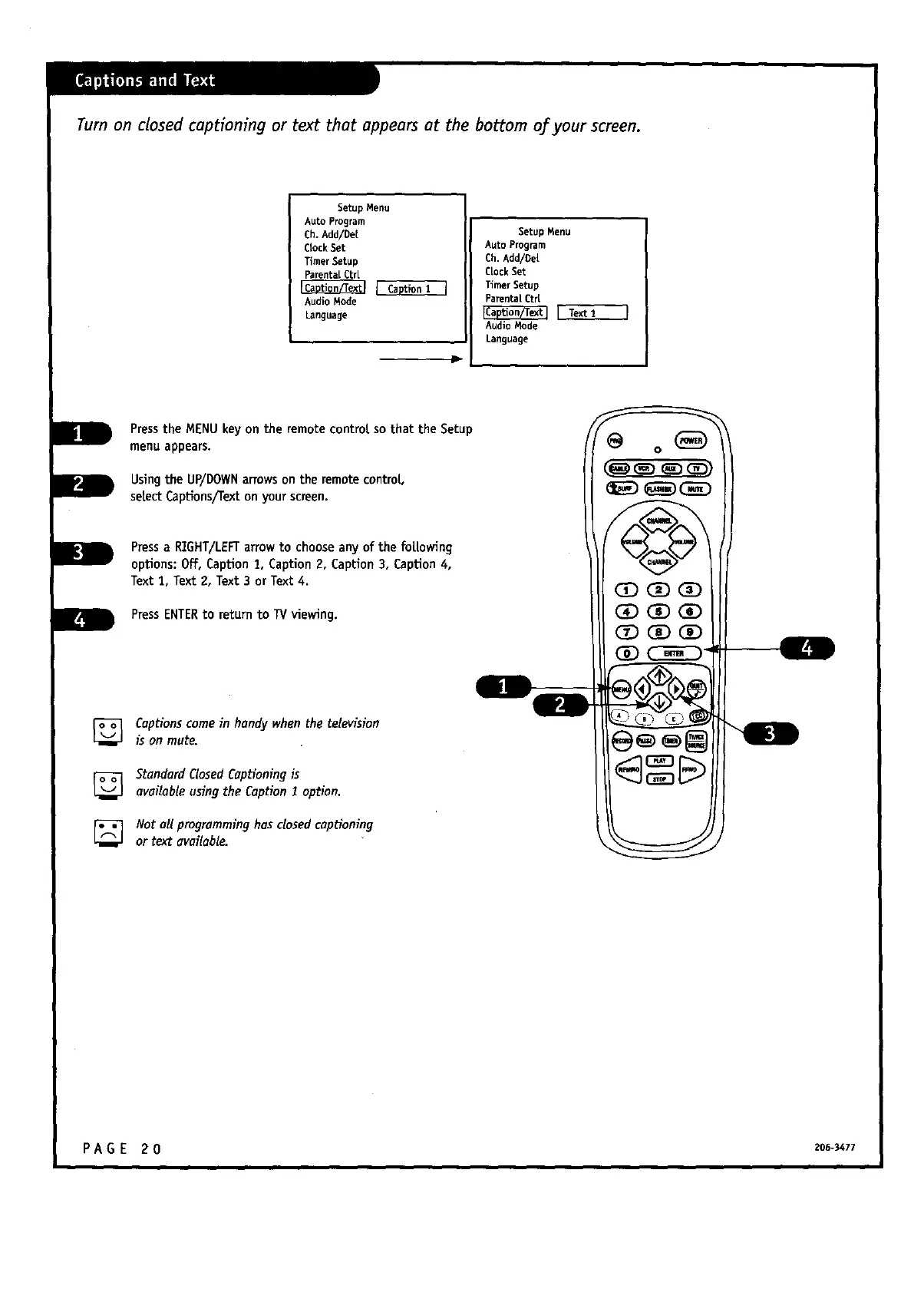
Turn on closed captioning or text that appears at the bottom of your screen.
Setup Menu
Auto Program
Ch. Add/Det
CrockSet
TimerSetup
Parentat Ctr[
Audio Mode
Language
Setup Menu
Auto Program
Ch. Add/De[
Clock Set
Timer Setup
Parental Ctrl
[ Text 1
Audio Mode
Language
Pressthe MENUkeyon the remote control,so that the Setup
menu appears.
Using the UP/DOWNarrowson the remote control,
selectCaptions/Texton your screen.
Pressa RIGHT/LEFTarrowto chooseany of the fol.lowing
options: Off, Caption1, Caption2, Caption3, Caption 4,
Text 1, Text 2, Text 3 or Text 4.
PressENTERto return to W viewing.
Captions come in handy when the television
is on mute.
StandardClosedCaptioning is
availableusingtheCaptionI option.
Not aUprogramming hasclosedcopHoning
or text available.
PAGE 20 zo_-_cn



 To Next Page