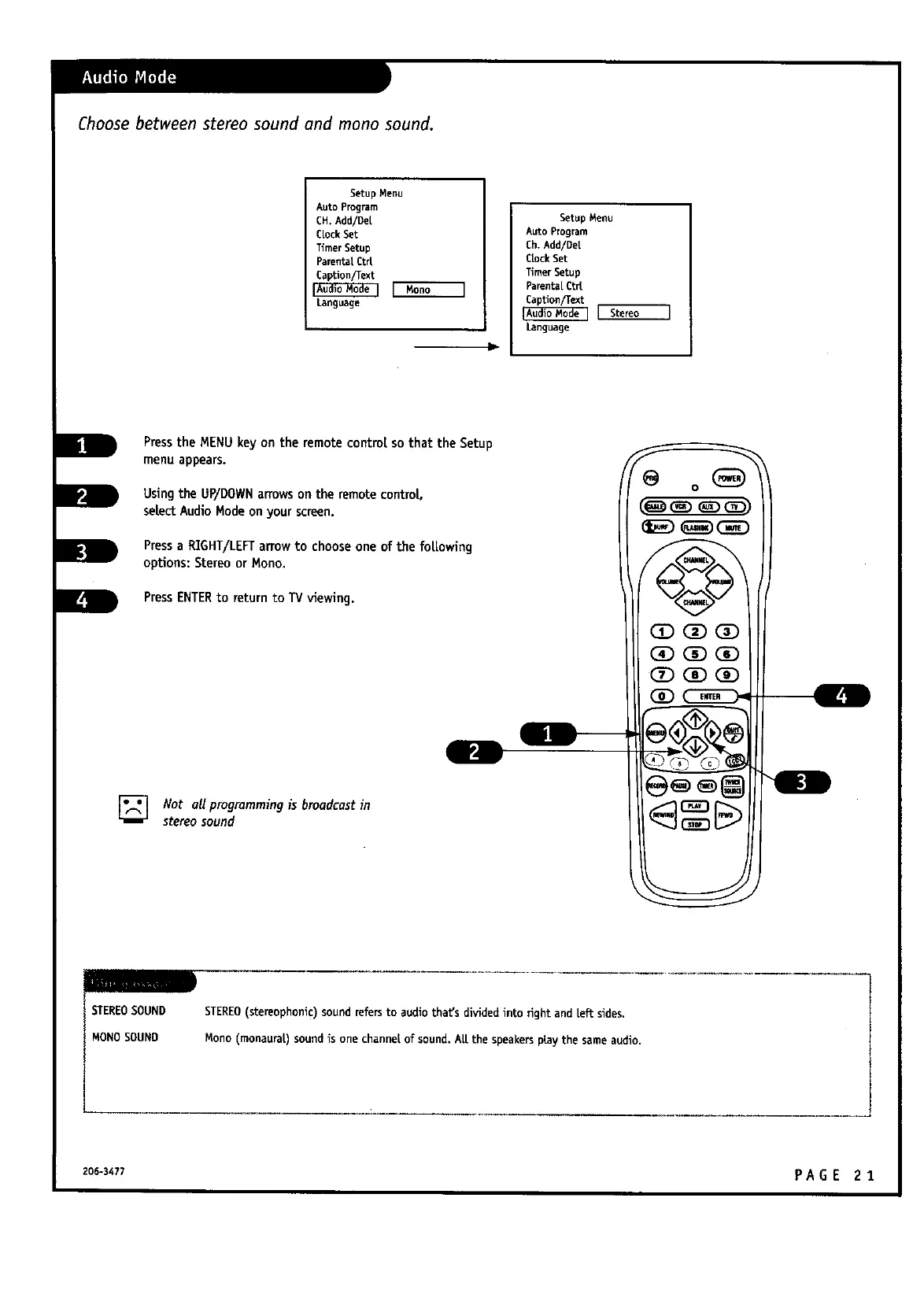
Choosebetween stereo sound and mono sound.
Setup Menu
Auto Program
CH. Add/De[
CLockSet
TimerSetup
ParentaLCtrt
CapUon/Text
Language
]
Setup Menu
Auto Program
Ch. Add/Det
CLockSet
Timer Setup
Parenta[Ct_
CapUon/Text
[ Stereo
Language
PresstheMENU keyon theremotecontrolsothattheSetup
menu appears.
Using the UP/DOWNarrows on the remotecontro|,
selectAudioModeonyour screen.
Pressa RIGHT/LEFTarrowto chooseone of the fol.Lowing
options:Stereoor Nono.
PressENTERto return to TV viewing.
[] Not all programming is broadcastin
stereosound
(D(D_
(D_OD
STEREOSOUND
MONOSOUND
STEREO(stereophonic)soundrefers to audio that's dividedinto fight and Left sides.
Mono (rnonaura|)soundis one channe|of sound. ALLthe speakerspraythe sameaudio.
206-3477 PA G E 2 3.


 To Next Page
 Loading...


