EasyManua.ls Logo

Zenith E - Film Loading Instructions

Zenith E
18 pages
Print Icon
To Next Page IconTo Next Page
To Previous Page IconTo Previous Page
Loading...
10
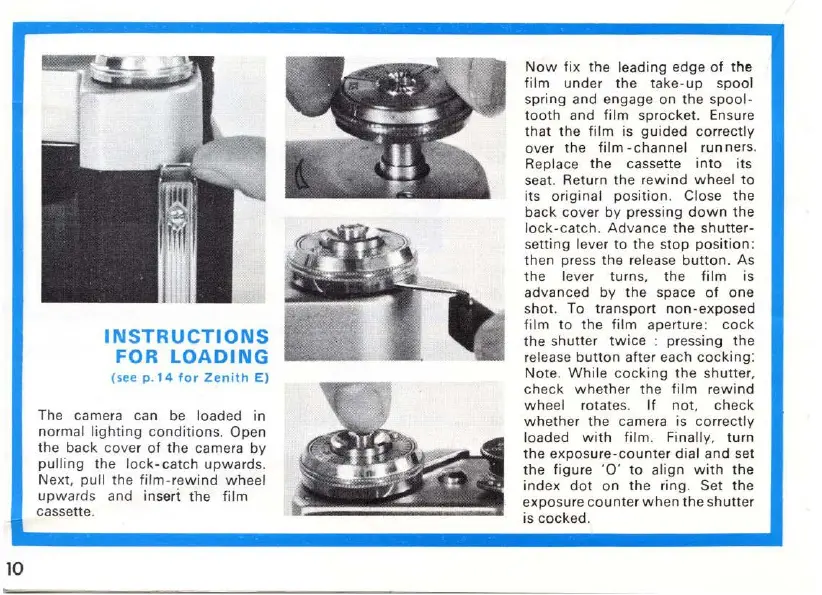
INSTRUCTIONS
FOR
LOADING
(see
p.
14
for
Zenith
E)
The camera can be loaded in
normal
lighting
conditions.
Open
the
ba
ck
cove
r
of
t
he
camera
by
pulling
the
lock-catch
upwa
rds.
Next,
pull
the
fil
m-
rewind
w heel
upw
a
rd
s and inseri
the
film
cassette.
Now
fix
the leading edge
of
the
film
und
er
th
e
take-up
spoo
l
spring and engage
on
the
spool-
t
oot
h
and
fi
lm
sprocket. Ensure
t
hat
the
film
is
guided
co
rrec
tly
over
the
film
-c
hanne
l runners.
Replace
the
casse
tte
into
its
seat. Return
the
rewind
wheel
to
its
origina
l
position.
Close
the
back
cover by pressing
down
the
lock
-
catch
.
Advance
the s
hutter-
setting lever
to
the stop
po
sition:
then
press
the
release
button.
As
the
lever turns.
the
film
is
advanced
by
the space
of
one
sh
ot
. To trans
po
rt
non
-e
xpo
se
d
f
ilm
to
the
film
aperture:
cock
the
s
hutt
er
twice
:
pr
essing
the
release
button
after each
cocking:
Note
.
Whi
le
coc
k
ing
the
s
hu
tter.
check
w h
et
her the fi
lm
r
ewin
d
wheel
rotat
es.
If
not.
chec
k
whether
the camera is
correctly
loaded
with
film. Fina
ll
y,
t
urn
the
e
xposure-cou
nte
r
dial
an
d
se
t
t
he
figure ·
to
align
with
the
in
dex
dot
on
th
e ring. Set the
exposur
e c
ount
er w hen
the
shu
tt
er
is
coc
ked.

Other manuals for Zenith E

Related product manuals