EasyManua.ls Logo

Zenith E - Exposure Settings and Controls

Zenith E
18 pages
Print Icon
To Next Page IconTo Next Page
To Previous Page IconTo Previous Page
Loading...
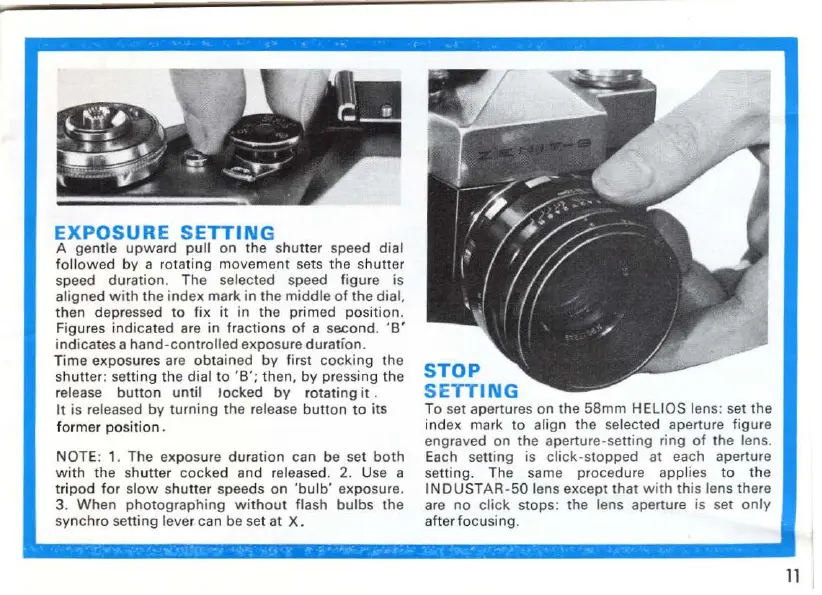
EXPOSURE
SETTING
A gentle
upward
pull on the shutter speed dial
followed
by
a rotating movement sets
the
shutter
speed duration. The selected speed figure is
aligned
with
the
index
mark
in
the
middle
of
the
dial,
then depressed
to
fix
it
in
the
primed posit
ion.
Figures
indicated
are
in
fractions
of
a second.
'B'
indicates
a
hand-controlled
exposure
duration.
T
ime
exposures are
obtained
by
first
cocking
the
shutter: setting the
dial to
'B';
th
en.
by
pr
essi
ng
the
release
button
until
locked
by
rotating
it
.
It
is released
by
turning
the release
button
to
its
fo
rmer
position.
NOTE: 1. The exposure
duration
can
be
set
both
with
the
sh
utter
cocked
and
released. 2. Use a
tripod
for
sl
ow
s
hutter
speeds
on
'bulb'
exposure.
3.
When
photographing
without
flash
bulbs
the
synchro
setting lever can be set
at
X.
STOP
SETTING
To
set apertures on
the
58mm
HELIOS lens: set
the
index mark
to
align the selected aperture figure
engraved on
the
aperture-setting ring
of
the
lens.
Each setting is
click-stopped
at
each aperture
setting. The same procedure applies
to
the
INOUSTAR-50
lens except
that
with
thi
s lens there
are
no
click
stops: the lens aperture is set
only
after focusing.
11

Other manuals for Zenith E

Related product manuals