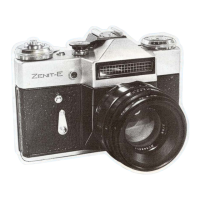
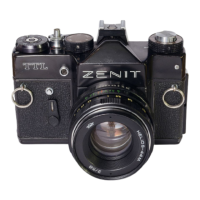
The Zenith 12 XP (and Zenith 11, with noted differences) is a 35mm single-lens reflex (SLR) camera designed for taking still photographs. It is a "system" camera, meaning it can accept a large number of different lenses and additional accessories, with those from the Helios range being particularly recommended. The camera is sturdily built for use in varying conditions but requires careful handling as a precision optical instrument, protecting it from shock, damp, dust, sand, and sudden temperature changes.
Function Description:
The Zenith 12 XP is designed for general photography, offering manual control over exposure settings. It features a horizontal travelling focal plane shutter, a through-the-lens (TTL) exposure meter, and a mechanical film transport system. The camera allows for various shooting modes, including standard exposures, time exposures, and self-timer operation.
Important Technical Specifications:
- Format: 24 x 36mm, using standard 35mm cassettes of 12, 20, 24, or 36 exposure colour or black and white film.
- Shutter: Horizontal travelling Focal Plane type, with speeds of 1/30, 1/60, 1/125, 1/250, and 1/500th second, plus 'B' (brief time) for longer exposures. It is linked to the self-timer, providing approximately 7 seconds delay.
- Flash Synchronisation: Electronic flash at 1/30th sec. through a 'Hot-shoe' (18) or a standard 3mm co-axial socket (5).
- Viewing/Focusing System: Eye-level pentaprism/instant return mirror shows an upright, laterally correct image. It features a bright Fresnel focusing screen with a central microprism spot. The viewfinder shows an overall area slightly smaller than the total film area, ensuring everything seen in the viewfinder appears in the finished picture.
- Exposure Meter:
- Zenith 12 XP: Built-in CdS cell with L.E.D. indicators in the viewfinder. Power source: two Mallory D386 cells (recommended replacement once a year). Calibrated for 16-500 ASA/13-28 DIN.
- Zenith 11: Selenium cell with match-needle read out. Does not require batteries. Calibrated for 16-500 ASA/13-28 DIN.
- Frame Counter: Additive 0-36 manual resetting type (4).
- Standard Lens (Helios 44M-4):
- Focal Length: 58mm
- Construction: 6 elements in 4 groups
- Diaphragm Type: Fully automatic instant re-open.
- Aperture Range: f/2-f/16 with click stops at full and half apertures (except between f/11 and f/16).
- Distance Scale: 0.5m to Infinity.
- Filter Size: 52mm screw.
- Lens Mount: 42mm thread, accepts standard single pin automatic lenses and accessories.
Usage Features:
- Loading the Camera: Always load in subdued light. Ensure the indicator on the Shutter Release Button (3) faces the front. Depress the Shutter Release Button (3), advance the Film Transport Lever (2) in short strokes until it stops, and press the Shutter Release Button (3) again. Lift the Rewind Knob (16) to open the back. Insert the film cassette into the Film Chamber (21) with the projection to the bottom. Push the Rewind Knob (16) down, turning slightly to seat it. Draw out enough film to insert the leader tip into any of the Take-up Spool's (22) slots, ensuring the second hole engages with a tooth. Ease film forward with short strokes of the Transport Lever (2) until it stops, ensuring the lower Sprocket Teeth (26) are properly engaged. Fire the shutter and advance the film by short strokes until both top and bottom sprockets are engaged. Tighten film on the Take-up Spool (22) by turning the flange anti-clockwise and in the cassette by gently turning the Rewind Knob (16) in the direction of the arrow until resistance is felt (especially for 12-exposure films). Close the camera back until it clicks shut. Complete wind-on if necessary until the Transport Lever (2) stops. Fire the shutter and advance the film again. The Rewind Knob (16) should revolve during this process. Set the Frame Counter (4) to zero. Set the Film Speed Selector Dial (15) against the Indicator (17) according to the film's ASA or DIN speed. Only click-stopped numbered or intermediate positions should be used. For 1000 ASA film, set the selector to 500 ASA and use the next faster shutter speed or close the aperture ring by one full stop.
- Setting Shutter Speed: Set the Speed Dial (1) according to the subject. The dial is marked in fractions of a second (e.g., "60" is 1/60th second). It can be turned in either direction but not between "500" and "B", and must not be left between marked speeds. For outdoor shooting, a speed of at least 1/125th sec. is suggested.
- Focusing: Look through the Viewfinder (27). Focus by turning the Focusing Ring (12) clockwise for close distances and anti-clockwise for far distances until the subject is sharp and clear on the viewing screen. For critical focusing, use the inner of the two rings in the center and adjust until the image is clear and undistorted.
- Depth of Field: The Depth-of-Field Scale (13) indicates the range of sharpness. Depth of field is greater at small lens apertures (e.g., f/16) and less at large apertures (e.g., f/2). It is also greater with more distant subjects and increases nearly twice as much beyond the subject than in front of it. To use, focus on the subject, then read distances against the two marks for the chosen aperture. The left figure indicates the nearest point in focus, and the right figure indicates the furthest.
- Using the Meter (Zenith 12 XP): Focus on the subject, set the Lens Aperture Ring (9) to a middle range (e.g., f/8), and press the Shutter Release Button (3) halfway. This activates the meter.
- Over-exposure: Upper red light comes on. Turn the Aperture Ring (9) clockwise to reduce light.
- Under-exposure: Lower red light comes on. Turn the Aperture Ring (9) anti-clockwise.
- Correct Exposure: Both lights flash rapidly in sequence.
- If correct exposure cannot be achieved within the aperture range, alter the Shutter Speed Dial (1) up or down and repeat. If lights move from top to bottom without flashing, choose the exposure at the point of change.
- Helpful Hint for Better Exposure: The meter averages light. For unevenly balanced light (e.g., backlit subjects), take a close-up reading of the main subject to exclude distracting areas, then return to the original viewpoint.
- Using the Meter (Zenith 11): The Zenith 11 has a built-in selenium exposure meter that does not require batteries. Set the film speed using the Aperture Indicator Dial (15a) (two scales for ASA and DIN). Point the camera at the subject (tilt downwards for bright skies). Turn the Shutter Speed Indicator Dial (15b) until the ring of the Exposure Meter Cursor (19b) is centered over the Exposure Meter Needle (19a). Read off combinations of speed and aperture. Only white speeds can be set directly on the camera; 2-15 represent fractions of a second (information only), and 1-30 are whole seconds for time exposures. Always ensure the Exposure Meter Window (15c) is not obscured. In dim lighting, if the needle rests near the right edge, place your hand in front of the window. If the needle moves when blocked, the meter is functioning; remove your hand and determine exposure. If no movement occurs, light is insufficient, and a time exposure or flash gun is recommended.
- Photography with Flash: The meter cannot be used for flash. The Speed Dial (1) must be set to "30-X". Aperture is determined by camera-to-subject distance, usually found in flashgun instructions. Some flashguns have built-in computers. Remove the square shield from the Accessory Shoe (18). A lightweight gun can be slid into the shoe; connect the plug to the Flash Sync. Socket (5). A heavy gun requires a flash bracket screwed into a Tripod Bush (23); connect the lead to the Flash Sync. Socket (5). Set the Aperture Ring (9) per flashgun instructions. Switch on the gun, wait for the "ready" light, focus, and shoot. Replace the accessory shoe cover after use.
- Time Exposures: For exposures longer than the meter range (1/30th at f/2), use the "B" setting on the Speed Dial (1). Exposure should be determined by a hand-held meter or estimation. Use a tripod for best results. Set the Speed Dial to "B". Set the Aperture Ring (9). Focus and cock the shutter by advancing the Film Transport Lever (2) in short strokes. Fit a cable release into the Shutter Release Button (3). Depress the cable release; the shutter will stay open until pressure is released. If no cable release, depress the Shutter Release Button (3) until the shutter opens, then turn it fully anti-clockwise to the "T" position. The shutter remains open until the button is returned to normal. Do not leave the shutter locked in "T" longer than necessary to minimize battery drain.
- Self-Timer: The Self Timer (7) provides about a seven-second delay. Place the camera on a tripod or firm surface. Set speed and aperture. Frame and focus in the Viewfinder (27). Cock the shutter by advancing the Film Transport Lever (2) in short strokes. Depress the Shutter Release Button (3) halfway until the lens closes down, then turn it fully clockwise to the "V" position. Turn the Self-Timer Lever (8) down until it stops. Press the Self-Timer Release Button (7) and move into the picture area. The Lever (8) will slowly return, firing the shutter. Do not leave the Shutter Release locked in "V" longer than necessary to minimize battery drain.
Maintenance Features:
- Changing Batteries (Zenith 12 XP): The meter is powered by two Mallory D386 cells, which should be changed every twelve months. To remove, place a coin in the slot of the Battery Cover (19) and turn anti-clockwise until the slot is horizontal. Remove the cover and old batteries. Fit two new batteries with "+" outwards. Replace the battery cover with the slot horizontal, locating the two cover arms in the camera body slots. Push inwards with a coin edge and turn to lock in the vertical position. Use a clean linen cloth when handling batteries to avoid grease from fingers affecting electrical contacts.
- Troubleshooting:
- Frame Counter skips numbers or counts incorrectly: Film Transport Lever (2) not fully wound before setting the counter to '0'. Correction: Advance the Transport Lever fully before setting the counter to '0'. Always wind the Transport Lever before setting the counter.
- Self-Timer does not trip shutter: Self-Timer Lever (8) not fully wound or Transport Lever (2) not wound. Correction: Wind the Self-Timer Lever fully until it points downwards with no further movement. Always ensure the Transport Lever is fully wound before setting the Self-Timer Lever.
- Film will not rewind: Rewind release not engaged. Correction: Refer back to page 17 for instructions.
- After Sales Service: Do not attempt to mend the camera yourself. Zenith and its accessories are backed up by top-class service facilities with factory-trained specialists.
Removing Exposed Film: Replace the lens cap. Press the Shutter Release Button (3). With a fingertip, depress the Film Rewind Sleeve (arrowed above) into the cut-out portion of the surrounding sleeve; it will click and stay down. Lift out the Rewind Crank (16) and rotate clockwise in the direction of the arrow. You will feel the film rewinding into the cassette; stop when resistance ceases. Lift the Rewind Knob (16) fully to open the camera back. Remove the exposed cassette. Advance the Film Transport Lever (2) in short strokes until it stops. The Film Rewind Sleeve will return to its original position. Fire the shutter. The camera is now ready for your next film.

 Need help?
 General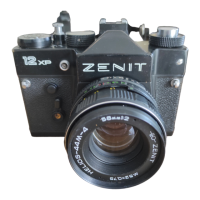

 To Next Page