10
Rear Panel Connections
Do not touch the inner pins of the jacks on the rear
panel. Electrostatic discharge may cause permanent
damage to the unit.
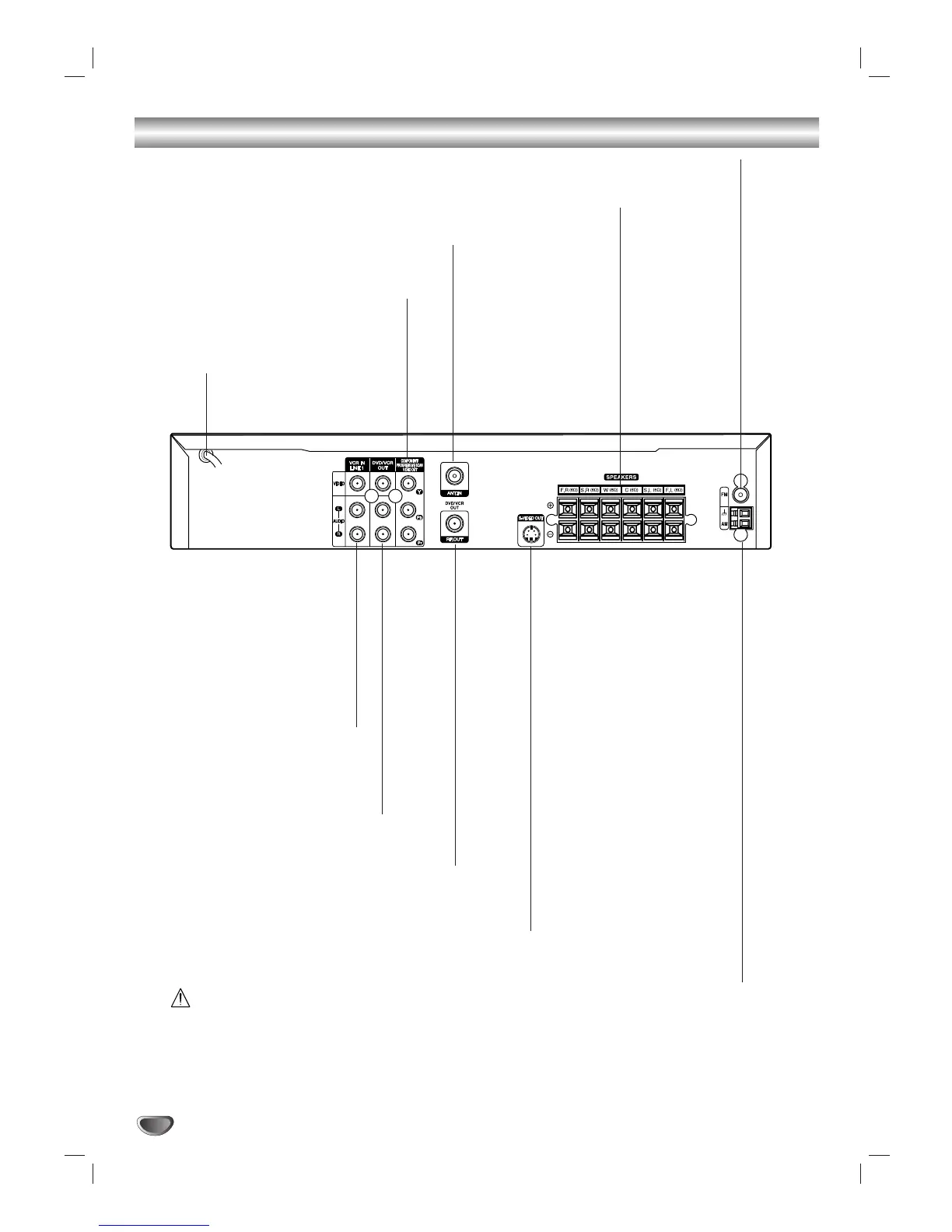
VCR IN LINE 1
(VIDEO IN/AUDIO IN (Left/Right))
Connect the audio/video output
of an external
source (Audio system, TV/Monitor,
another VCR).
ANTENNA IN
Connect the VHF/UHF/CATV antenna
to this terminal.
DVD/VCR OUT VIDEO OUT/AUDIO OUT
(Left/Right))
Connect to a TV with video and
audio inputs.
AC Power Cord
Plug into the power source.
S-VIDEO OUT (DVD OUT)
Connect to an S-Video Input on TV.
FOR DVD VIEWING ONLY.
ANTENNA/CABLE OUT
Connect to a TV with RF coaxial inputs.
SPEAKER CONNECTORS
Connect the six supplied speakers to
these terminals.
FM ANTENNA CONNECTORS
Connect the FM antenna to this terminal.
AM ANTENNA CONNECTORS
Connect the AM antenna to
this terminal.
COMPONENT/PROGRESSIVE SCAN
VIDEO OUT (Y Pb Pr)
(DVD OUT)
Connect to a TV with Y Pb Pr inputs.


 To Next Page
 Loading...