Power
• Place the bedside display near your bed
• Connect the power adaptor to the bedside display and
plug it into a wall outlet
Charge the headband
• Place the headband into the cradle
on the unit
• When positioned correctly, the battery charging icon
will appear as shown:
• If the battery icon does not appear, shift the headband
slightly in the cradle
• The battery takes up to two hours to charge
myZeo Account
• See page 14 for instructions
Blinking = charging
Solid = charged
6
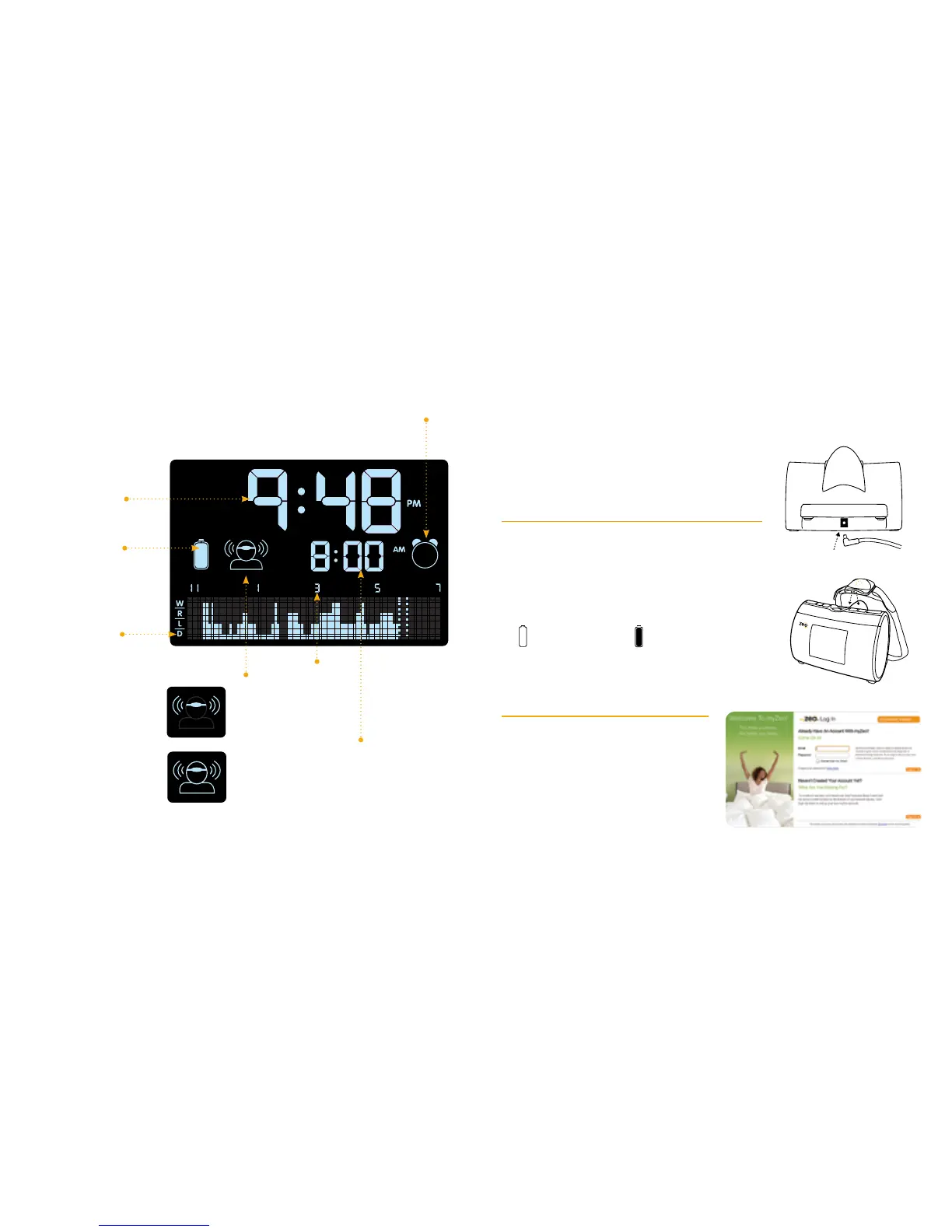
“JEB” Icon
Indicates that the head-
band is communicang
with the bedside display
and collecng data
BaeryIcon
Flashing baery - the
headband is charging
Solid baery - the
headband is charged
Time Display
Indicates the
current me
Alarm Time
Display
Indicates the
set alarm me
(at night) and
ZQ (in the
morning)
Headband Icon
Indicates that the headband
is communicang with the
bedside display
Sleep Phase
Indicates Wake,
REM, Light and
Deep sleep on the
sleep graph
Time of Night
In the sleep graph, indicates
the me of night
7
Seng Up your Sleep Manager™Bedside Display Screen Icons
Alarm Icon
Indicates the alarm
is acvated


 To Next Page