
 Need help?
Do you have a question about the ZEP METER MIST 3000 Plus and is the answer not in the manual?
Introduces the two main product variants: Meter Mist 3000 Plus and Meter Mist 3000 Select.
Lists common benefits, coverage area, and usage scenarios applicable to both dispenser models.
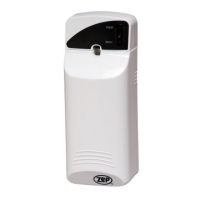
Displays the Meter Mist 3000 Plus unit image and its product number 788801.
Details spray intervals, spray modes (Day/Nite/24Hr), and indicator lights for the Plus model.
Explains the function of power, refill, interval dial, reset, and mode switches on the Plus unit.
Covers the refill test button, 3-way switch for audio/quiet modes, and the keyless lock.
Shows where the spray can nozzle and main can fit, and details the battery compartment.
Specifies the factory default spray intervals and operating mode for the Plus model.
Covers opening the unit, inserting batteries, setting intervals, and spray modes (Steps 1-4).
Instructions for inserting the product can, closing, audio settings, and a critical safety warning.
Displays the Meter Mist 3000 Select unit image and its product number F30001.
Details spray intervals (HI/ME/LO), spray hours, programmable days off, and LCD display functions.
Explains the on/off, tone, reset, mode, adjust, and enter buttons, and the LCD window.
Identifies the keyless lock and unit cover for accessing the dispenser.
Shows can placement, battery compartment, and details on the LCD interface.
Explains the battery life and days to refill indicators shown on the Select model's LCD.
Specifies factory default refill days, spray intervals, and operating hours for the Select model.
Covers opening the unit, inserting batteries, power on, tone settings, and a safety warning (Steps 1-4).
Instructions for inserting the product can into the dispenser and closing the unit cover (Steps 5-6).
Introduces the custom programming process, cycling through settings, and how to exit.
Details how to adjust spray frequency (HI/ME/LO) using MODE, ADJUST, and ENTER buttons.
Explains how to set the current time, including advancing by 10-minute intervals and AM/PM.
Guides on configuring 12 or 24-hour operation modes for the dispenser.
Instructions for setting days the unit is active or programmed to be turned off.
Recommends viewing an online video for detailed mounting instructions on the Zep Equipment website.
Highlights that the mounting holes are identical for both the 3000 Select and 3000 Plus models.
Provides crucial advice on unit placement height, direction, and using all mounting holes.

 To Next Page
 General