Need help?
Do you have a question about the ZEPCAM T2 Series and is the answer not in the manual?
Glossary of terms and acronyms used for Zepcam products and features.
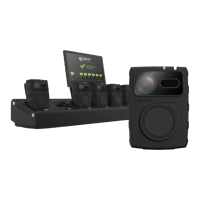
Explains how the Zepcam T2 series Docking Station facilitates recharging and data offload.
Lists essential requirements for setting up and operating the docking station.
Provides physical measurements for 4 and 8-docking station models.
Details the meaning of various LED indicators on the docking station and cameras.
Guidelines for positioning the docking station to ensure proper ventilation and operation.
Step-by-step guide on connecting and setting up the docking station.
How to provision and update the DS using a USB stick without a web browser.
Describes the information presented on the docking station's onboard overview page.
Explains how to access and download system logs for troubleshooting and analysis.
Details the configurable settings on the docking station's onboard website.
Covers functionalities for backing up, restoring configurations, and updating firmware.
Step-by-step instructions for pairing the docking station with the Zepcam server.
Explains how to share a monitor and keypad with multiple docking stations.
Describes the remote firmware upgrade process for T2(+) cameras via the docking station.
Guide to setting up dynamic officer ID using a monitor, keyboard, and Zepcam Manager.
Explains how to link cameras to officer IDs for automatic recording association.
 General
| Brand | ZEPCAM |
|---|---|
| Model | T2 Series |
| Category | Docking Station |
| Language | English |

 To Next Page