
 Need help?
Do you have a question about the Zetta Z82 and is the answer not in the manual?
Records only when motion is detected, offering up to 1 month standby.
Press and hold the power button until the green LED is on to start recording.
Press and hold the power button until the orange LED turns off to stop recording.
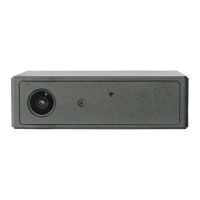
The Zetta Z82 is an intelligent security camera designed for surveillance, offering a range of features for flexible and reliable recording. It incorporates multiple triggering methods and various auto on/off modes to suit different surveillance needs. The camera is equipped with a built-in rechargeable battery, providing significant operational autonomy.
The primary function of the Zetta Z82 is to record video and audio for security and surveillance purposes. It supports Full HD 1080p resolution, ensuring clear and detailed footage. The camera's intelligent design allows it to adapt to various recording scenarios, from continuous monitoring to motion-triggered events.
A key feature is its circular recording capability, which means the camera will loop back and overwrite the oldest footage once the memory card is full. This ensures continuous recording without the need for manual deletion of old files. All recorded videos are automatically stamped with the time and date, providing crucial contextual information for any captured events.
The Zetta Z82 excels in motion-triggered recording, allowing it to enter a standby mode and only begin recording when motion is detected. This feature is particularly useful for extended surveillance, as it conserves battery life and memory space by only capturing relevant events. The camera is designed to work effectively through glass and windows, expanding its placement options.
To manage file sizes and simplify review, the camera includes an auto gapless split file function, which automatically splits recorded files into segments of 10, 15, or 20 minutes without any gaps between them. This makes it easier to navigate and manage footage.
The camera also supports orientation adjustment, which is useful when the camera is mounted upside-down, ensuring the video is always correctly oriented. Users can configure the video quality to high, medium, or low, balancing between detail and storage consumption according to their specific requirements.
For storage, the Zetta Z82 supports microSD (TF) cards up to 256GB. It is recommended to use cards larger than 8GB, class 4 or above, and to format them to FAT32 before use for optimal performance.
The Zetta Z82 is designed for ease of use, with a straightforward setup and intuitive operation.
Battery Life and Charging: The camera's internal rechargeable battery offers impressive endurance, providing up to 9 hours of continuous video and audio recording during typical use. In motion-triggered standby mode, it can last for up to 1 month (in max battery mode). For continuous operation, the camera can be powered by a 5V DC adapter (not included), achieving up to 156 hours of circular recording with a 256GB microSD card.
Charging the camera is flexible. It can be charged via the USB port of a computer, a portable power bank, a 5V DC adapter, or a car charger. When charging via a computer's USB port, the camera functions as a mass storage device, and recording is temporarily unavailable. However, when charging via a power bank, DC adapter, or car charger, the camera can continue to record, depending on the selected mode. For initial use or after a long period of inactivity, it is recommended to fully charge the battery for at least 8 hours and resync the time using the Camera Widget.
Recording Operation: To start recording, a FAT32-formatted microSD card must be inserted. The user presses and holds the Power button until the green LED illuminates (approximately 3 seconds), then releases it. A flashing green LED indicates that the camera is actively recording. To stop recording, the Power button is pressed and held until the orange LED turns off (approximately 3 seconds). A crucial safety note is to always turn off the camera before removing the microSD card to prevent data corruption.
Status Indicators: The camera uses LED indicators to communicate its status:
Customization: The Zetta Z82's settings can be customized using the "Camera Widget" PC configuration tool, which can be downloaded from the manufacturer's website. This tool allows users to adjust various parameters:
The "Always On" power option keeps the system on but does not record, with a 1-second delay in recording after triggering. The "Max Battery" option puts the system in standby, with a 4-second delay in recording after triggering. When motion triggering is enabled, the Z82 records for 10 seconds after powering up, then enters standby. If further triggers occur, it continues recording until no more triggers are detected, after which it records for one more minute before returning to standby.
Connecting to Computer: To connect the camera to a computer, users simply connect the larger end of the USB cable to an available computer USB port and the smaller end to the camera's USB port. The camera will then appear as a removable drive in "My Computer."
Firmware Upgrade: Zetta Systems Limited periodically releases new firmware to enhance features or add new functionalities. Users are encouraged to visit the manufacturer's website to check for updates.
Card Formatting: For microSD cards 64GB or larger, it is essential to format them to FAT32 before use. The formatting process involves:
Time Synchronization: If the camera's time displays an incorrect year (e.g., 2030 or later) due to loss of Real Time Clock, the Camera Widget should be used to resync the time. Files with incorrect timestamps will be moved to a "ZETTA_ERR" folder, which can be deleted if not needed.
Environmental Requirements: The camera is designed to operate within specific temperature ranges. The storage temperature should be between 32°F to 113°F (0°C to 45°C), and the operating temperature should also be between 32°F to 113°F (0°C to 45°C).
 General
| Recording Modes | Continuous, Motion Detection |
|---|---|
| Storage | MicroSD card (up to 128GB) |
| Weather Resistance | IP65 |
| Video Resolution | 1080P |
| Connectivity | Wi-Fi (2.4GHz) |
| Power Supply | Rechargeable Battery |
| Operating Temperature | -10°C to 50°C |

 To Next Page