Need help?
Do you have a question about the Zhiyun FIVERAY M40 and is the answer not in the manual?
Product safety warnings including water, chemicals, heat, fan obstruction, LED exposure, and temperature limits.
Precautions for handling the high-precision device, cleaning, child safety, dust protection, and repair.
Instructions for charging the device using a USB Type-C cable and recommended PD chargers.
Steps for mounting the ZHIYUN FIVERAY M40 onto a light stand or camera using the bracket.
Using the brightness/power wheel and color temperature wheel for adjustments and power control.
Step-by-step guide to upgrade the firmware using 'Zhiyun Gimbal Tools' software.
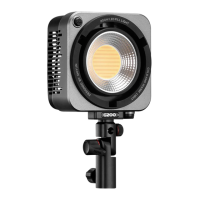
The ZHIYUN FIVERAY M40 is a high-power portable LED fill light designed for various lighting needs in video recording, live streaming, and still portrait shooting. This compact device offers adjustable brightness and color temperature, making it a versatile tool for creators.
The core function of the FIVERAY M40 is to provide adjustable illumination. It features LED chips that emit both cool and warm light, allowing users to precisely control the color temperature to match ambient lighting or achieve specific creative effects. The device also offers brightness adjustment, enabling fine-tuning of light intensity. A built-in bracket facilitates mounting on a light stand or camera, offering flexibility in positioning. The fill light's adjustable angles further enhance its utility, allowing users to direct light exactly where it's needed.
To begin using the FIVERAY M40, the built-in battery must first be activated by fully charging it. Charging is accomplished via a provided USB Type-C cable connected to a USB charger. For optimal charging, it's recommended to use USB chargers that support the PD protocol, with a maximum of 50W. The device supports a maximum of 15W for battery charging, even when powered off or in operation. If the charger's power exceeds 15W, the excess power will be used to supply the operating FIVERAY M40. Before charging, the bracket should be rotated to prevent it from obstructing the Type-C charging port. It is advised to fully charge the device before each use, as low battery levels can affect performance.
Installation of the FIVERAY M40 is straightforward. It can be mounted on a light stand or a camera. For light stand installation, the bracket should first be rotated to its vertical position. After expanding the light stand and placing it on a flat surface, the 1/4" screw at the top of the light stand is driven into the 1/4" screw hole at the bottom of the FIVERAY M40 bracket. The bracket is then rotated for a firm installation. Finally, the FIVERAY M40 can be adjusted forward or backward to the desired position to meet specific lighting needs.
Operating the FIVERAY M40 involves two main controls: the Brightness/Power Wheel and the Color Temperature Wheel. To power on the device, the Brightness/Power Wheel is scrolled up until a click sound is heard, and the brightness mark points between "OFF" and "0%". The battery level/charging indicator lights will then display the current battery level. Scrolling the Brightness/Power Wheel up increases brightness, while scrolling down decreases brightness and eventually powers off the device. The Color Temperature Wheel allows users to increase the color temperature level by scrolling up and decrease it by scrolling down. Users should adjust both brightness and color temperature to values appropriate for their specific use case.
The device includes battery level/charging indicator lights to keep users informed about the power status. One solid indicator light signifies 0%-25% battery level, two solid lights indicate 25%-50%, three solid lights mean 50%-75%, and four solid lights represent 75%-100%. During charging, the four indicator lights illuminate one by one, and once charging is complete, all four lights remain solid.
The FIVERAY M40 is a high-precision control device and requires careful handling. It is not waterproof, so contact with any liquid or cleaner should be avoided, and it should never be used in rain or humid environments. Exposure to corrosive chemicals, inflammable, or explosive materials is strictly prohibited. When in use, heat-generating components should not be touched to prevent burns. To ensure proper cooling performance, the fan should not be wrapped or blocked with foreign objects. Users should also avoid looking directly at the glowing LED chips to prevent eyesight damage. The product should not be placed or used in environments with temperatures exceeding 40°C.
In terms of physical maintenance, users should keep their hands dry when operating the device and use a soft, dry cloth for cleaning. It should be kept out of reach of children and protected from dust and sand during use. Disassembly of the product by unauthorized individuals is not recommended. In the event of malfunctions, the device should be repaired by ZHIYUN or authorized maintenance personnel.
Firmware upgrades are possible using "Zhiyun Gimbal Tools." The upgrade process involves connecting the FIVERAY M40's Type-C charging port to a computer with a USB Type-C cable. Users then visit the ZHIYUN official website to download the USB driver, Zhiyun Gimbal Tools, and the latest firmware (with a ".ptz" file extension). After installing the driver and software, and unzipping the firmware, users open "Zhiyun Gimbal Tools," select the corresponding port, click "Open," and then "Firmware Upgrade." They then browse to select the downloaded firmware file and click "Upgrade." The FIVERAY M40 will restart once the firmware upgrade is complete. The device can also be upgraded when powered off.
The warranty period for the FIVERAY M40 includes replacement or free repair service for quality deficits found within 15 days of receipt. Customers are entitled to free repair service for product defects in material or workmanship under normal consumer usage for 12 months from the date of sale. However, the warranty period may vary by component and country. Warranty exclusions include unauthorized repair, misuse, collision, neglect, mishandling, soaking, accidents, unauthorized alteration, improper use, torn or altered labels/security tags, expired warranty, or damage due to force majeure events like fire, flood, or lightning. For warranty claims, users should contact a local agent or ZHIYUN's customer service via email or website.
 General
| Light Source | LED |
|---|---|
| Max Power Output | 40W |
| Color Temperature | 2700K-6200K |
| Brightness Range | 0-100% |
| Battery Type | Lithium-ion |
| Operating Voltage | 5V |
| Weight | 320g |
| Control | On-board Controls |
| Luminous Flux | 14000 lux at 0.3m |
| Charging Time | 1 hour 50 minutes |
| Mounting Options | 1/4" screw |


 To Next Page