40
12.Troubleshooting and help with
updating device software
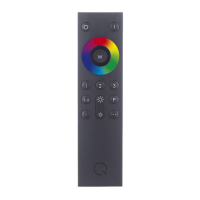
Q remote control unit (Q-RC) does not react
to key commands; status LED does not flash
Possible causes:
- The remote control‘s batteries are flat; please
replace (see point 9)
Lights/devices fail to react to the Q-RC even
though the remote control‘s status LED is
signalling that it is ready for use
Possible causes:
- Lights/devices have not been properly paired with
the Q-RC; please check (see point 5.)
- Lights/devices have been switched off via wall,
pull cord or device switches; please check that all
lights/devices are ready for use
- The Q remote control has an operating software
fault. Please take the batteries out and then put
them back in. If the lights/devices are switched on
and they still do not react to the Q-RC, please
reset the remote control (see point 10.).
NOTE: Resetting deletes all saved groups and
scenes. Lights/devices have to be paired again
(see point 5.)
- Lights/devices fail to react to the Q-RC even
though the possible causes for the fault stated
above have been checked. Please contact our
customer service team.
Lights/devices will not pair with Q remote
control (see point 11.).


 To Next Page
 Loading...