UM026803-0816 Start the S3F8S19 Ledblink Sample Program
S3F8S19 Development Kit
User Manual
9
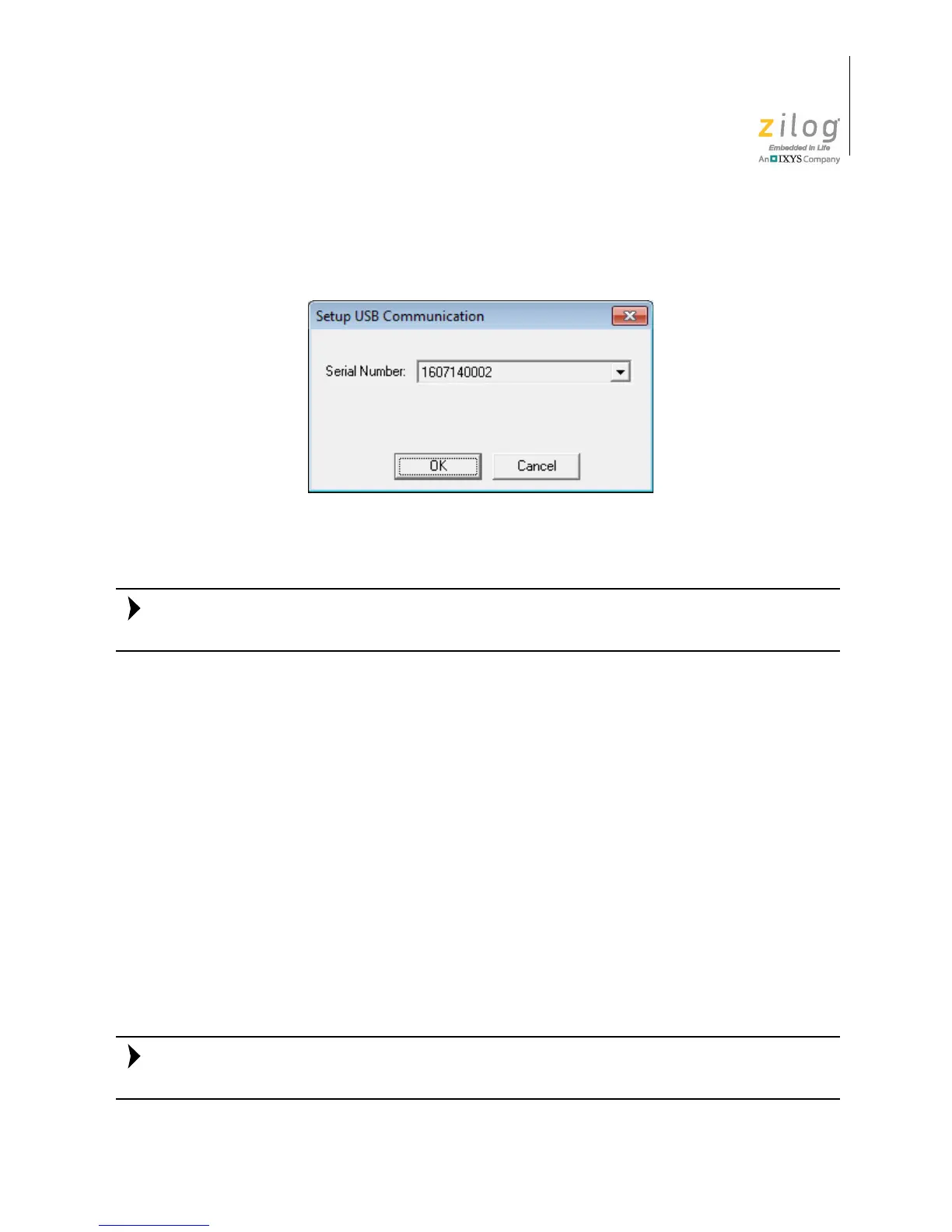
8. After selecting S3FlashIspII from the Debug Tool drop-down menu, click Setup to
select the serial number of the S3 Flash ISP II you are using, as indicated in Figure 10.
The serial number you see on your screen will be different from the serial number shown
in Figure 10.
9. Click
OK to close the Setup USB Communication dialog box.
10. Make sure that the Enhanced ISP Debug Library is selected.
11. Click
OK to close the Project Settings dialog box.
12. If you are prompted to rebuild any affected files, click
Yes. Otherwise, choose Build
from the menu bar, then click Rebuild All. The following message is displayed.
OUTPUT CHECKSUM
===============
ledblink.hex 9AC2
ledblink.lod 9AC2
0 warning(s)
0 error(s)
Build succeeded
This Output Checksum message is an example and may not match the actual checksum of
the project for a particular release of the ZDS installation software.
Figure 10. The Setup USB Communication Dialog


 To Next Page
 Loading...