BEFORE YOU START
Warning! Before assembling the scooter, please check whether the power is off, if not, please turn it off before
continuing with assembly.
5
ASSEMBLY: TO BE COMPLETED BY AN ADULT.
SCOOTER CONTROLS:
TO RIDE:
- Assembly can typically be completed in up to 5 minutes, not including the initial charge time.
- Time of charging is at least 4 hours for the first time.
BEFORE YOU FIRST EXPERIENCE YOUR ZINC FOLDING ELECTRIC SWIFT PLUS SCOOTER, PLEASE READ THE USER MANUAL
THOROUGHLY AND LEARN THE BASICS TO ENSURE YOUR SAFETY AND THE SAFETY OF OTHERS.
Failure to follow the basic instructions and safety precautions listed in the USER MANUAL, can lead to damage to your scooter, other property damage,
serious bodily injury and even death.
WARNING
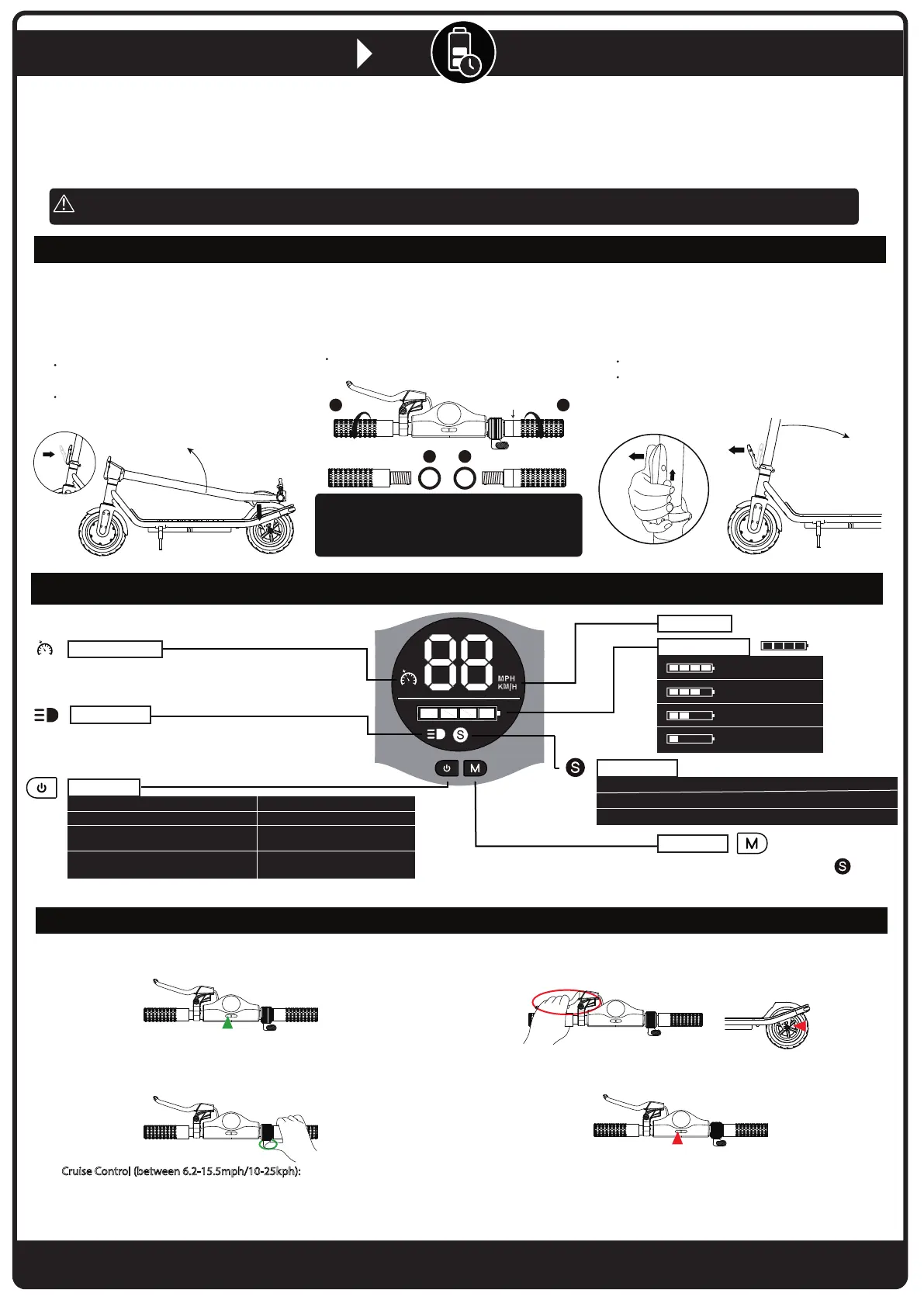
The Zinc folding electric swift plus scooter can
be assembled within 5 minutes:
Install the washer onto the handles, then tighten
the handles into the stem.
Before installing the handles, please make sure to
differentiate the left & right handles carefully.
Please see the difference of left & right handles
from above images.
2 Assembly
The Zinc folding electric swift plus scooter can be
folded in a few seconds at the press of a single lever.
3 Folding
You can unfold the Zinc folding electric swift
plus scooter without any inconvenience in seconds.
1 Unfolding
L R
RL
ALLOW AT LEAST 4 HOURS FOR INITIAL CHARGE.
BY NOT DOING SO YOU WILL INVALIDATE THE WARRANTY.
1. Turn on the scooter by pressing the Power key, hold for 3 seconds
and check the battery power.
4. Turn off the scooter when you have finished using the product using the
Power key.
3. To stop riding, release the throttle and use the electric brake to
gradually coast to a stop then step off the scooter one foot at
a time. Be extra cautions when dismounting for the first time.
2. Once the power is on it is safer to start riding. With one foot on the deck
keeping the other foot on the ground and push off. Once the speed is up to 1.9mph/3kph
then push accelerator and place the other foot on the deck.
Skillfully use the accelerate throttle valve to speed up or slow down when riding.
Cruise Control (between 6.2-15.5mph/10-25kph): You can set the speed as you want
during driving, and the scooter will start moving at the same speed afterwards.
Press the accelerator lever and keep the same speed for 6 seconds. The cruise
control will automatically start and you will hear a ‘beep’ sound. You can switch
the function o easily when you press the brake lever or press the accelerator again.
Brake Handle
To turn the scooter ON / OFF: Press the power key for 3 secs.
Change the speed unit (mph/kph): Press the power key 3 times.
Activate the cruise control function: Press the power key 4 times.
(it will make 1 'beep' sound).
Deactivate the cruise control function
*: Press the power key 4 times.
(it will make 2 'beep' sounds).
Power Key
Battery Power
Speed Unit
75%-100% power
50%-75% power
25%-50% power
0%-25% power
White light: Low speed mode, max speed is 6.2mph/10kph.
Yel l ow ligh t : Middl e speed m ode, m a x speed is 12.4 m ph/20k p h.
Red light: High speed mode, max speed is 15.5mph/25kph.
Speed Level
Cruise Control
When the light is on, it means you have entered
‘Cruise Control’ mode. This function can only be activated
in middle/high speed mode.
*The cruise control is disabled on start up and requires to be turned on.
When the scooter is turned off, the cruise control is disabled.
Press down on the rear fender until folding
hook gets out of the hook hole on rear fender.
Raise the stem up, then pull up the folding
latch towards the upright pole to secure in place.
Push buckle lock up and pull folding latch down.
Fold stem backwards and hook to rear fender.
Power Key
Accelerator
Power Key
Drum Brake
Mode Key
When the scooter is on, switch the
speed modes at low speed, middle speed
and high speed by pressing this button.
Light Status
When the icon is on, the front light is turned on,
When the icon is off, the front light is turned off.
NEED HELP?
Visit our website for replacement parts and product support WWW.ZINCSPORTS.COM Contact us at
CUSTOMERSERVICES@ZINCHQ.COM or call our customer service line on +44(0) 800 731 0006
Note: The scooter will turn off automatically if it has not been used for 5 minutes.
Right handle has
this round line


 To Next Page
 Loading...