4.
IMPORTANT: Please do not attempt to adjust the end of the brake cable that is located on the underside of the scooter.
This is a specialized operation that should only be done at your Service Centre.
HOW TO BRAKE
Pulling the brakes sharply at high speed can cause the rear wheel to lock which may result in a “at spot” on the rear wheel.
To avoid this, pull gently on the brake, this will decrease the chances of skidding and ultimately preventing at-spotting.
Flat-spotting on the rear wheel will not be covered under warranty.
The ZINGO X300 has a rear wheel brake-pad system.
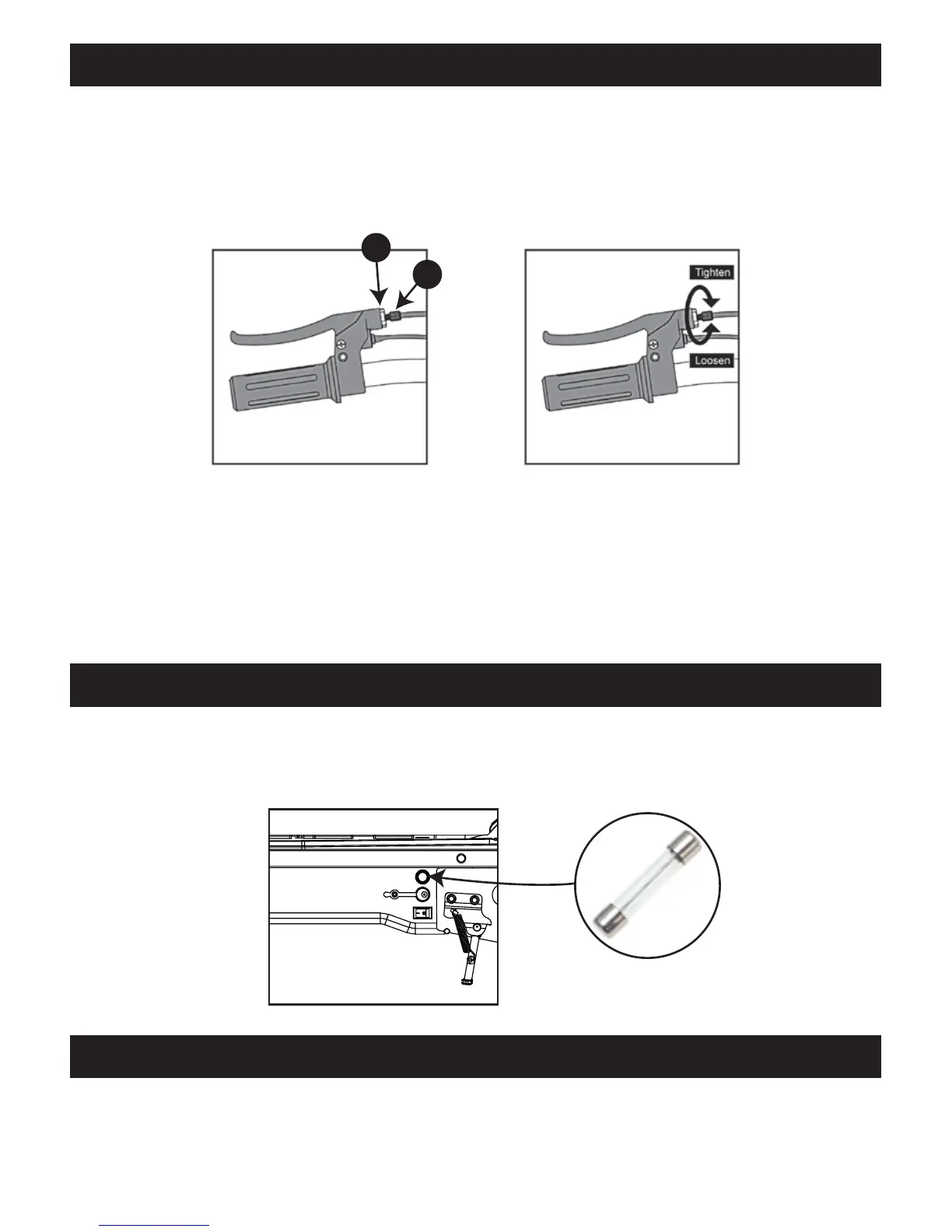
To tighten your brakes, loosen the lock nut (A) by turning it anti-clockwise until it spins freely. Now turn the tensioning bolt (B)
outwards until the brake is correctly adjusted. Finally, tighten the lock nut to lock the adjustment in place.
To loosen your brakes, loosen the lock nut (A). Turn the tensioning bolt (B) inward and the brake will loosen. Now tighten the
lock nut to lock the adjustment in place.
ADJUSTING YOUR BRAKES & BRAKING
If your ZINGO X300 happens to suddenly stop working, check the fuse located below the deck on the left-hand side of the
scooter above the charging port. The fuse may have shorted if the motor was overloaded. If so, replace the fuse and correct the
riding conditions that caused the overload. Avoid repeatedly tripping the breaker. Should you experience further issues please
contact your local Service Centre (see below for details).
FUSE/RESET
Our nationwide Service Centres carry spares and back-up parts for your ZINGO X300. For best long-term performance it is
highly recommended that you visit your nearest Service Centre to give your ZINGO X300 a service every 3 months. Please call
0861 77 88 88 or email info@tevo.co.za to get further information on your nearest Service Centre.
SERVICE CENTRES
B
A
Fuse


 To Next Page