

EasyManua.ls Logo

Zinwell PWQ-5101C - User Manual

Zinwell PWQ-5101C
15 pages
Print Icon
To Next Page IconTo Next Page
Loading...
Powerline Wireless N Extender
User’s Manual

Other manuals for Zinwell PWQ-5101C

Question and Answer IconNeed help?

Do you have a question about the Zinwell PWQ-5101C and is the answer not in the manual?

Summary

IMPORTANT INFORMATION

IMPORTANT SAFETY NOTES

Key safety precautions for operating the Powerline Wireless N Extender.

FEDERAL COMMUNICATIONS COMMISSION INTERFERENCE STATEMENT

FCC compliance information and interference mitigation measures.

INTRODUCTION

PACKAGE CONTENT

Lists the items included in the product package.

PRODUCT OVERVIEW

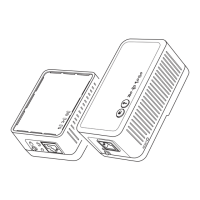
Visual overview of the Powerline Wireless N Extender and Bridge.

BUTTONS AND LEDS (Powerline Bridge)

Explains the function of buttons and LEDs on the Powerline Bridge.

BUTTONS AND LEDS (Wireless N Extender)

Explains the function of buttons and LEDs on the Wireless N Extender.

HARDWARE INSTALLATION

ESTABLISH POWERLINE NETWORK

Step-by-step guide to setting up the powerline network.

ENCRYPTED PLC NETWORK

CREATE AN ENCRYPTED PLC NETWORK GROUP

How to create a secure, encrypted PLC network group.

JOIN TO AN ENCRYPTED PLC NETWORK GROUP

Instructions for joining an existing encrypted PLC network.

REMOVE DEVICE FROM AN EXISTING NETWORK GROUP

Procedure to remove a device from a PLC network group.

CREATE ADDITIONAL ENCRYPTED NETWORK

Steps to create a new private network alongside an existing one.

ADVANCED WI-FI SETTINGS VIA WEB BROWSER

LOGIN TO SETTING PAGE

How to access the device's web interface for configuration.

DUPLICATE CURRENT SSID & PASSWORD WITH ONE BUTTON

Guide to cloning Wi-Fi settings using the Clone AP button.
SPECIFICATIONS

Summary

IMPORTANT INFORMATION

IMPORTANT SAFETY NOTES

Key safety precautions for operating the Powerline Wireless N Extender.

FEDERAL COMMUNICATIONS COMMISSION INTERFERENCE STATEMENT

FCC compliance information and interference mitigation measures.

INTRODUCTION

PACKAGE CONTENT

Lists the items included in the product package.

PRODUCT OVERVIEW

Visual overview of the Powerline Wireless N Extender and Bridge.

BUTTONS AND LEDS (Powerline Bridge)

Explains the function of buttons and LEDs on the Powerline Bridge.

BUTTONS AND LEDS (Wireless N Extender)

Explains the function of buttons and LEDs on the Wireless N Extender.

HARDWARE INSTALLATION

ESTABLISH POWERLINE NETWORK

Step-by-step guide to setting up the powerline network.

ENCRYPTED PLC NETWORK

CREATE AN ENCRYPTED PLC NETWORK GROUP

How to create a secure, encrypted PLC network group.

JOIN TO AN ENCRYPTED PLC NETWORK GROUP

Instructions for joining an existing encrypted PLC network.

REMOVE DEVICE FROM AN EXISTING NETWORK GROUP

Procedure to remove a device from a PLC network group.

CREATE ADDITIONAL ENCRYPTED NETWORK

Steps to create a new private network alongside an existing one.

ADVANCED WI-FI SETTINGS VIA WEB BROWSER

LOGIN TO SETTING PAGE

How to access the device's web interface for configuration.

DUPLICATE CURRENT SSID & PASSWORD WITH ONE BUTTON

Guide to cloning Wi-Fi settings using the Clone AP button.

SPECIFICATIONS

Zinwell PWQ-5101C Specifications

General IconGeneral
BrandZinwell
ModelPWQ-5101C
CategoryExtender
LanguageEnglish