12
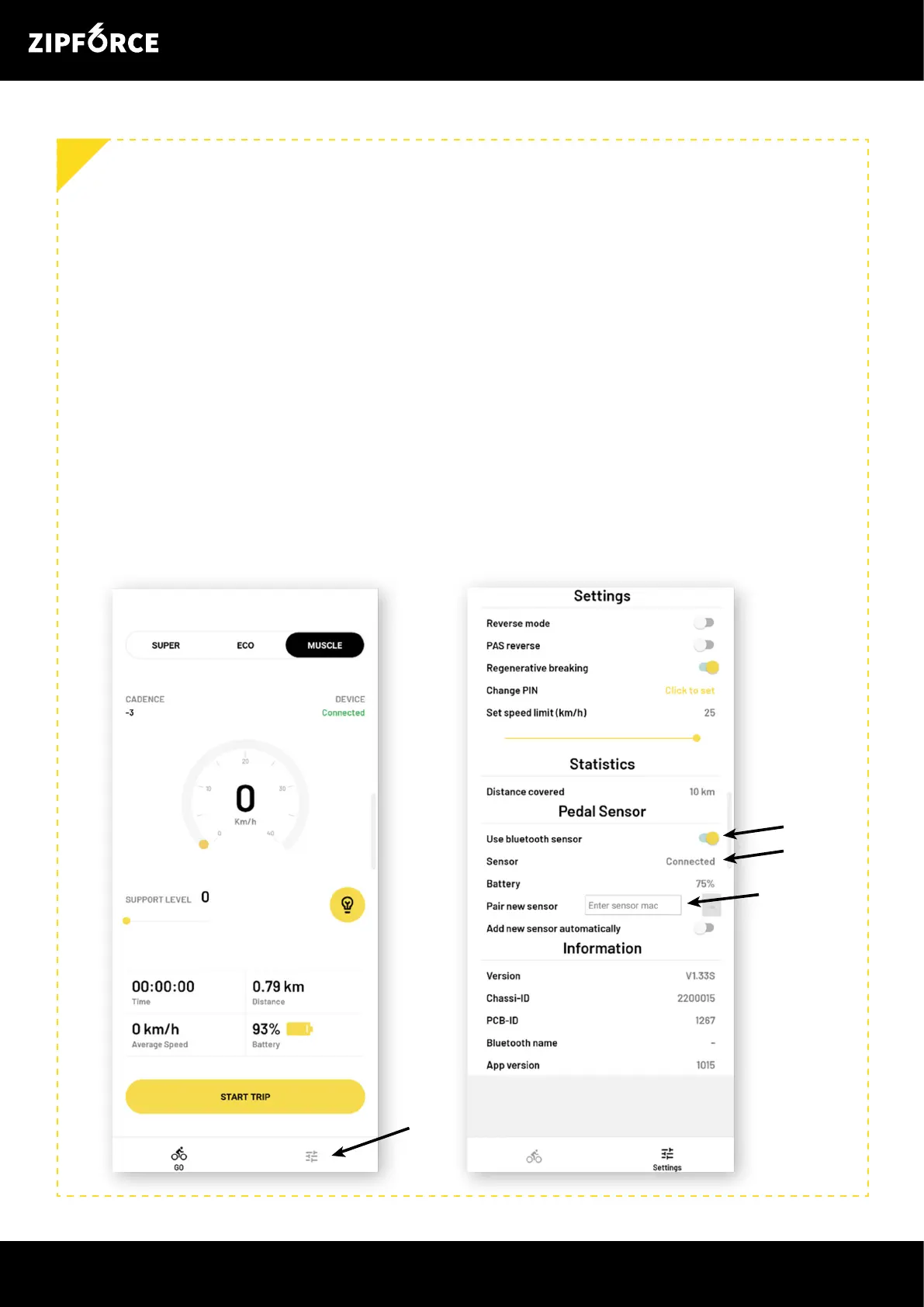
1. Go to settings by using the symbol in the bottom right corner.
2. First, activate wireless PAS with ”Use Bluetooth sensor”. This is necessary to be able
to connect a sensor. A Zipforce has room for ve wireless sensors. If you move the
Zipforce between bikes/sensors, the different MAC addresses for the wireless PAS
sensors need to be stored on the device.
3. To add (pair) a new wireless PAS:
Scan the QR code on the back of the sensor. Then paste the code under “Pair
new sensor”. You can also enter the 12 character long MAC address manually.
Click on the yellow button that appears when you have entered the MAC
address.
If you accidentally add the same adress several times, it is ok.
4. When the wireless PAS sensor is connected, it will be visible here. You do not have to
use ”Add new sensor automatically”.
TROUBLESHOOTING/RECONNECT WIRELESS PAS TO THE ZIPFORCE
11
1.
2.
4.
3.



 To Next Page