5
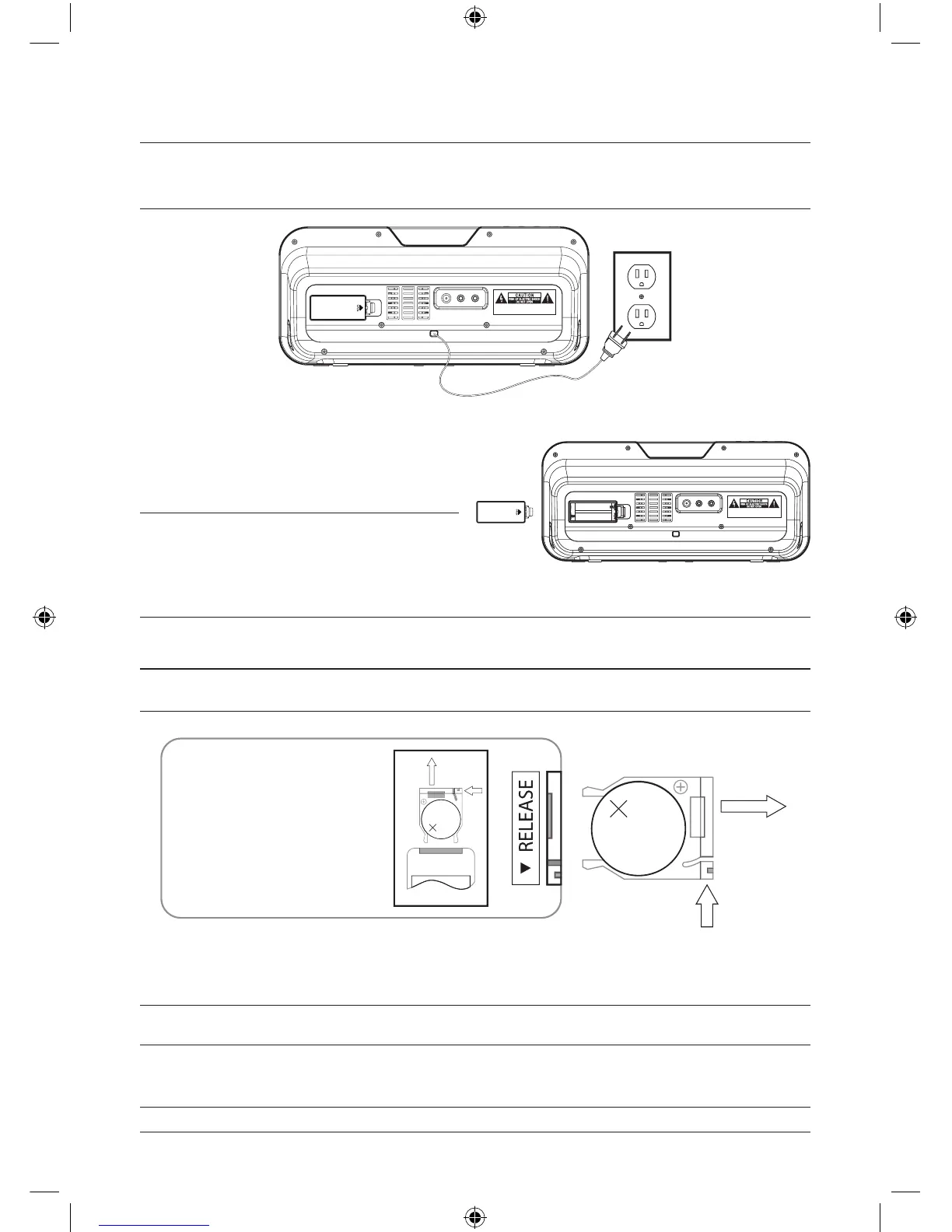
Use 2 AAA Batteries (not included) to
serve as a backup power source for the
unit in case of a power outage.
Please note, the backup battery power
is meant to save the clock time only, and
should not be relied on as a primary
power source.
Powering the Unit
Power the unit by plugging the attached AC cord into a standard (120V~60Hz) AC
outlet.
Changing the Remote Battery
The Remote Control has a button cell battery pre loaded into it.
Step 1: Push the Release Button and pull out the Battery Compartment to access
the battery.
Step 2: Replace the old battery with an equivalent new battery (CR2025).
Step 3: The positive side of the battery, as indicated by a plus symbol, must be
facing up with inserted into the remote.
AC ~
AUX OUT
VIDEO OUT
AUX IN
WA RN ING :S H OC K HA ZA RD -DO NO T O PE N .
AV IS :R IS QU E DE C HO C É LE C TR IQ UE -NE PAS O UV R IR .
AC ~
AUX OUT
VIDEO OUT
AUX IN
WA RN ING :S H OC K HA ZAR D -DO NOT O PE N.
AVI S: R IS QU E DE C HO C É LE C TR IQ UE -NE P AS O UV R IR .


 To Next Page