16
ENGLISH
¢PRIOR TO USING THE RADIO
¢Charging the battery
There are 3 different accessories for charging the Zodiac Proline+. The charger is not
included when buying the radio. You will nd more accessories on www.zodiac.no.
• Rapid desktop charger (Art. no. 47206)
The charger can charge the radio and a separate battery. The charging time is approx.
2 hrs.
• 6-position charger (Art. no. 47253)
A charger for charging 6 radios and 6 extra batteries simultaneously.
• Active holder for vehicle mount (Art. no. 47233)
Connected to 12/24 Volts and it can charge the battery while the radio is switched on.
Charging time approx. 2 hrs.
Applies to both standard rapid charger (art.no 47206) and 6 position charger
(art.no 47253).
- Red light indicates that the battery is charging.
- Red ligt that ashes indicates something wrong with the charging. The battery is not
charging.
- Yellow light indicates that the battery in the rst row will be fully charged before the next
row of charging occurs. Only one battery can charge at the time.
- Green light indicates that the battery is fully charged.
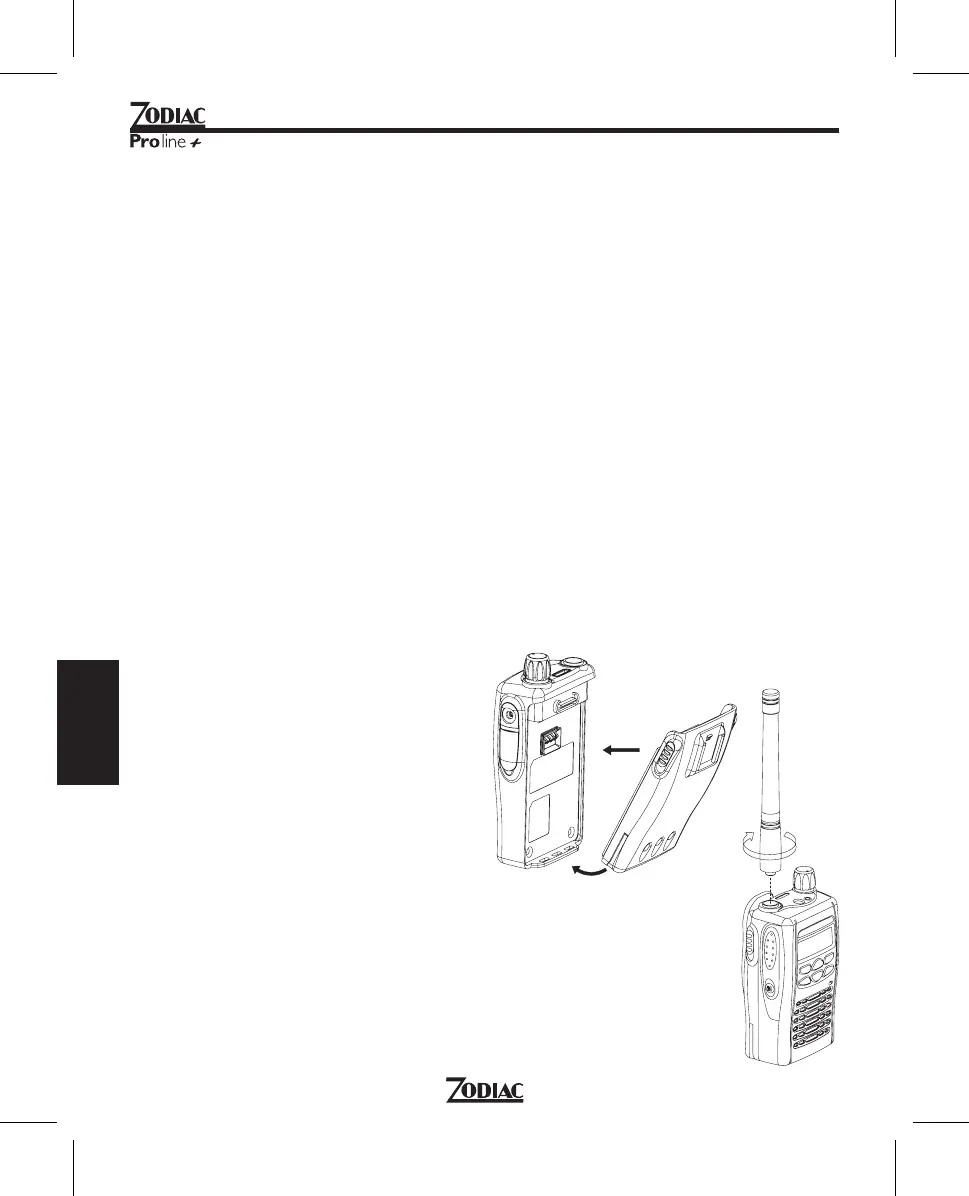
¢Mounting the battery
1. Put the battery in the xing track.
2. Press the upper part of the battery
until a click is heard.
¢Mounting the antenna
1. Put the antenna in the antenna socket.
2. Twist the antenna counterclockwise.



 To Next Page