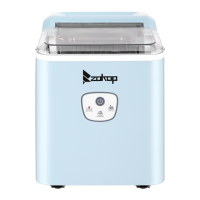
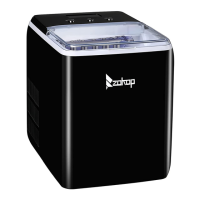
This document outlines the operation, maintenance, and safety guidelines for a commercial ice maker.
Function Description
This commercial ice maker is designed to produce ice cubes for various applications. It operates by continuously supplying water to an evaporator where ice forms, then harvests the ice into a storage bin. The unit features an automatic self-cleaning program to ensure hygienic operation and can be programmed for delayed start or timed shutdown. It is equipped with sensors to detect water levels, ice fullness, and environmental temperature, which contribute to its automated ice-making and harvesting cycles. The ice maker is designed for indoor use and requires a continuous water supply and drainage system for optimal performance.
Usage Features
The ice maker is straightforward to operate with a user-friendly control panel. To begin, simply plug in the unit and press the "ON/OFF" button. The machine will automatically fill its water tank and commence the ice-making process. The display window provides real-time information, including the ambient temperature and the remaining time for the current ice-making cycle.
A key feature is the ability to adjust ice thickness. Users can press the "+" or "-" buttons on the control panel to increase or decrease the ice-making duration, respectively, which directly influences the thickness of the ice cubes. The default setting for ice thickness is "0," and any adjustments made will apply to subsequent ice-making cycles.
The unit also incorporates a "TIMER CLEAN" button with dual functionality. A quick press allows users to set a timer for delayed start-up or shutdown, ranging from 1 to 24 hours. This is particularly useful for scheduling ice production to meet specific demands or to conserve energy during off-peak hours. When the unit is running, a timer can be set for shutdown, and when in standby, a timer can be set for start-up. The display will show "H" next to the number to indicate that a timer is active, and the number will count down until the scheduled event. Pressing the "ON/OFF" button during a timed setting will cancel the timer.
Pressing the "TIMER CLEAN" button for more than 5 seconds initiates a self-cleaning program, which is crucial for maintaining hygiene and performance. During this 20-minute cycle, the water pump runs intermittently to circulate water and clean the internal components. The display will show "20M" and a rotating symbol to indicate the cleaning process is active. This program can also be manually canceled by pressing the "ON/OFF" button.
The ice maker is equipped with an ice-full alarm, which stops the ice-making process when the storage bin is full. Production resumes automatically once ice is removed. Similarly, a water shortage alarm will illuminate a symbol on the display, indicating that the unit needs to be refilled or restarted. If the unit experiences water shortage, it will automatically restart after 15 minutes once water supply is restored.
For convenience, the temperature display can be switched between Fahrenheit (°F) and Celsius (°C) by pressing the "+" or "-" button for more than 5 seconds.
Maintenance Features
Regular maintenance is essential for the longevity and efficient operation of the ice maker. The manual provides detailed instructions for both daily and periodic cleaning.
Daily Cleaning: The ice shovel, door, and water dividing pipe should be cleaned daily. Rinsing the ice shovel and wiping both sides of the door with a clean cloth at the end of each day is recommended.
Semi-Monthly Cleaning: Every two weeks, the ice shovel, ice bin, water tank, ice-full detecting plate, and the surface of the evaporator should be cleaned. This involves using a diluted detergent, warm water, and a soft cloth to thoroughly clean all water-contacting internal parts. The water drain pipe of the water tank can be pulled out to facilitate draining the cleaned water. After cleaning, it's important to reinstall the drain pipe and the cap of the unit's main drain port to ensure normal operation. The first batch of ice made after cleaning should be discarded.
Semi-Annual Cleaning: Every six months, all components and surfaces exposed to water or ice, including the ice storage bin, water tank, door, evaporator, water pump, silicone tube, and water dividing pipe, should be cleaned using a Nu-Calgon Nickel Safe Ice Machine Cleaner. This more thorough cleaning should ideally be performed by a certified serviceman. The process involves mixing the cleaning solution with warm water, pouring it into the water tank, and running the self-cleaning program. After the program, the cleaning solution is drained, and the process is repeated with fresh water to rinse the system. It is crucial to wear rubber gloves and safety goggles when handling the cleaning solution, as it contains acids. The manual explicitly states not to use or mix the cleaner with any other solvent-based products.
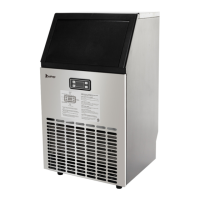
Exterior Cleaning: The exterior of the unit, including the door and cabinet, should be cleaned regularly with a mild detergent solution and warm water. A soft sponge should be used, followed by rinsing with clean water and drying with a soft cloth to prevent water spotting. For stainless steel models, discoloration from chlorine gas or moisture is normal and can be cleaned with a mild detergent and a damp cloth, avoiding abrasive cleaning agents.
Water System Maintenance: The water dividing pipe, located on the evaporator, should be periodically checked and cleaned. If water flow is obstructed, the pipe can be disassembled, and its small holes cleaned to ensure proper water distribution during ice making. The water tank and ice-full detecting plate also require regular cleaning to maintain hygiene.
Long-Term Storage: If the ice maker will not be used for an extended period or needs to be moved, it is crucial to drain all water from the system. This involves ejecting all ice cubes, turning off and unplugging the unit, shutting off the main water supply, disconnecting the water supply hose, and draining water from both the water tank and the main drain port. The door should be left open to allow for air circulation and prevent mold and mildew. The interior should be dried, and the unit covered with a plastic bag to protect it from dust and dirt.


 To Next Page
 General