50036-1 | Zona Plus
TM
Series 2 - User’s Guide | Page 4 | ©2012-2013
PREPARING THE ZONA PLUS FOR USE
(NOTE: For your convenience, the battery is factory
installed and your Zona Plus is ready for use.)
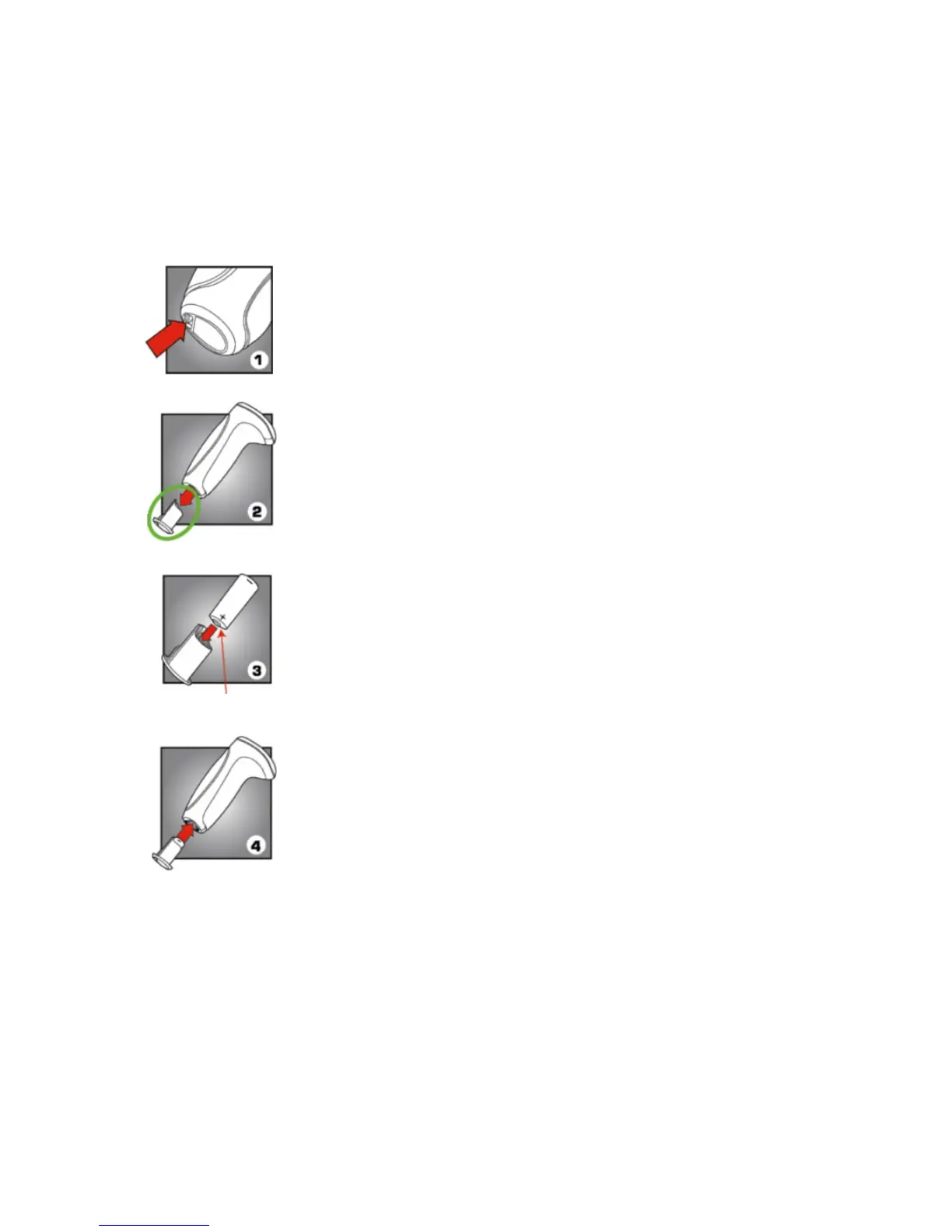
Step 1: Locate the battery housing on the
bottom of the Zona Plus and remove
the battery housing by pushing the
locking tab toward the sticker.
Step 2: Slide the battery housing down
and out of the Zona Plus, as shown.
Step 3: Insert the battery into the battery
housing, positive end first, as shown.
Tip: The positive end (+) has the little
knob.
Step 4: Insert the battery housing back
into the Zona Plus and make sure you
hear a “CLICK,” to ensure the battery
housing in securely placed in the Zona
Plus.
Tip: The best way to get the battery housing to click
into place, after inserting it back into the device, is
to set the bottom of the battery housing against a
hard flat surface and press down firmly while gently
rocking the device forward and back (you may hear
a click).



 To Next Page