QUICK START AND COMMISSIONING
GEN II
QUICK START AND COMMISSIONING
Follow these Quick steps for a successful job
If you need additional information, please read the GEN II Manual
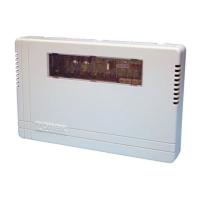
1. Install GEN II controller inside the conditioned space, in an easily accessible location for your customer.
2. Install an independent 24 volt 100 VA transformer, and connect to the TR1 and TR2 terminals on the GEN II
controller. Do not ground out the transformer.
3. Install the LAT sensor in the supply air, ahead of any bypass takeoffs. Wire sensor to the S S terminals on the
GEN II controller.
4. Install Dampers and Bypass Dampers.
5. Install all thermostat sub-bases.
6. Wire TR1 and TR2 terminals from the GEN II controller to the first thermostat sub-base TR1 and TR2 - only
(18 ga thermostat wire).
7. Wire A & B terminals from GEN II controller using Zonex TWPR or STPR Plenum rated twisted pair wire to the
first thermostat sub-base A & B - only.
8. Damper wiring - connect RO, RC, MC wires from each thermostat to its damper actuator using 18 ga thermostat
wire.
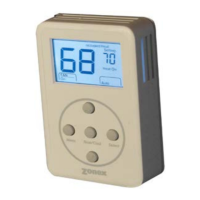
9. Attach the first EzTouch thermostat to it’s sub-base.
10. Address the thermostat as #1 and select damper type operation - see page 11-12 for EzTouch installation,
addressing and operation.
11. Turn on GEN II controller switch “E”. Power light should light up and look at the display “G” on the GEN II
controller, and the #01 should appear on the display. This indicates you are communicating with the first
thermostat.
12. If you don’t see the #01 and 00 is displayed, check the address. If the address on the stat is #01, then check
wires for TR1 & TR2 polarity and A & B for correct connections.
13. If #01 is displayed on the GEN II controller, then daisy chain wires from thermostat #1 to the next thermostat
and address it #2; then repeat the ON-OFF switch operation and confirm the #02 shows up on the display
indicating the system is now communicating with 2 thermostats.
14. Continue adding EzTouch thermostats; and confirm communication by repeating the ON-OFF switch operation
until all thermostats are wired and the total number of thermostats on the job show up on the display on the
GEN II controller.
15. Go to any EzTouch and make a Cool Call. Look at the GEN II controller and confirm Y1 (yellow LED) and G
(green LED) lights are on.
16. Turn OFF the Cool Call to be sure Y1 and G turn OFF at the GEN II controller.
17. Repeat with a Heat Call for W1 (red LED).
18. Wire GEN II controller to the A/C unit.
19. Set thermostat to call for cooling, and check register to be sure each damper opens and closes as you make
and satisfy the call.
For Advanced Feature Configuration or additional operating information, review the attached GEN II manual.


 To Next Page