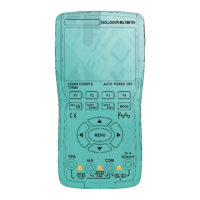
This document describes a battery-powered, true RMS, auto-range multi-function digital multimeter with a 6000-count LCD display and adjustable backlight brightness.
Function Description
The multimeter is designed for various electrical measurements and includes several features to enhance usability and safety.
Measurement Capabilities:
- AC/DC Voltage: Measures both AC and DC voltages. When testing AC voltage, the vice display shows frequency; when testing DC voltage, it shows regular temperature.
- Resistance: Measures electrical resistance.
- Continuity: Tests for continuity, indicated by a beeper when resistance is below 50Ω.
- Diodes: Tests diodes, showing "OL" if the polarity is reversed or the diode is broken.
- Capacitance: Measures capacitance, with readings stabilizing on the display.
- Frequency/Duty Cycle: Measures frequency (low voltage and high frequency) and duty cycle, with the vice display showing the duty cycle.
- NCV (Non-Contact Voltage) Test: Detects AC voltage nearby using an inner sensor, with the beeper frequency increasing with stronger voltage. The vice display shows regular temperature during NCV mode.
- Temperature Test: Measures temperature in Fahrenheit or Celsius.
Display Indicators:
- AUTO: Auto range mode.
- Voice recognition icon: Indicates voice recognition is active.
- DC/AC: Indicates DC or AC voltage measurement.
- Negative display icon: Indicates a negative reading.
- Low battery icon: Indicates low battery, prompting replacement.
- °C/°F: Indicates temperature units (Celsius or Fahrenheit).
- T-RMS: True RMS measurement.
- %: Duty cycle.
- Hz: Frequency test (Hertz).
- F: Capacitance test (Farad).
- V: Voltage test (volt).
- Ω: Resistance test (ohm).
- A: Current test (Ampere).
- HOLD: Display freezes the present reading.
- MAX: Display shows the maximum reading.
- MIN: Display shows the minimum reading.
- Continuity icon: Continuity test.
- Diode icon: Diode test.
- REL: Measures both sinusoidal and non-sinusoidal AC waveforms accurately.
- MANU: Manual range.
- nkMpm: Test unit.
Function Buttons:
- Power Button: Long press to turn on/off the product.
- Hz% / >2s REL Button:
- Short press: Main display shows current frequency, vice display shows duty cycle. Press again to quit.
- Long press (on capacitance): Clears readings.
- HOLD / >2s ☀ Button:
- Short press: Holds the current reading; press again to continue normal operation.
- Long press (>2s): Turns on backlight; long press again to turn it off.
- mV / >2s TEMP Button:
- Short press: Enters DC voltage function; press again to switch between DC and AC voltage.
- Long press: Switches temperature units between Celsius and Fahrenheit.
- Ω / >2s NCV Button:
- Short press: Toggles between Resistance, Diode/Continuity, and Capacitance testing modes. Vice display shows regular temperature.
- Long press: Enters NCV test mode; long press again to turn it off.
- Voice Recognition Button:
- Short press: Enters voice recognition function; short press again to turn it off.
- Automatically turns off if no operation in 2 minutes.
Important Technical Specifications
General Specifications:
- Display: LCD, 6000 counts
- Ranging: Auto
- Material: ABS+TPE
- Update Rate: 3 times/second
- True RMS: Yes
- Data Hold: Yes
- Backlight: Yes
- Low Battery Indication: Yes
- Auto Power Off: Yes
Mechanical Specifications:
- Dimension: 125 x 81 x 23 mm
- Weight: 170g (without battery)
- Battery Type: 2 x 1.5V AAA batteries
- Warranty: One year
Environmental Specifications:
- Operating Temperature: 0~40°C
- Operating Humidity: <75%
- Storage Temperature: -20~60°C
- Storage Humidity: <80%
Electrical Specifications (Accuracy ±(X%+Y)):
- DC Voltage (V):
- 6.000V: 0.001V resolution, ±(0.5%+3) accuracy
- 60.00V: 0.01V resolution, ±(0.5%+3) accuracy
- 600.0V: 0.1V resolution, ±(0.5%+3) accuracy
- DC Voltage (mV):
- 60.00mV: 0.01mV resolution, ±(0.5%+3) accuracy
- 600.0mV: 0.1mV resolution, ±(0.5%+3) accuracy
- AC Voltage (V):
- 6.000V: 0.001V resolution, ±(1.0%+3) accuracy
- 60.00V: 0.01V resolution, ±(1.0%+3) accuracy
- 600.0V: 0.1V resolution, ±(1.0%+3) accuracy
- 750.0V: 0.1V resolution, ±(1.0%+3) accuracy
- AC Voltage (mV):
- 60.00mV: 0.01mV resolution, ±(1.0%+3) accuracy
- 600.0mV: 0.1mV resolution, ±(1.0%+3) accuracy
- Resistance (Ω):
- 600.0Ω: 0.1Ω resolution, ±(0.5%+3) accuracy
- Resistance (KΩ):
- 6.000KΩ: 0.001KΩ resolution, ±(0.5%+3) accuracy
- 60.00KΩ: 0.01KΩ resolution, ±(0.5%+3) accuracy
- 600.0KΩ: 0.1KΩ resolution, ±(0.5%+3) accuracy
- Resistance (MΩ):
- 6.000MΩ: 0.001MΩ resolution, ±(1.5%+3) accuracy
- 60.00MΩ: 0.01MΩ resolution, ±(1.5%+3) accuracy
- Capacitance (nF):
- 6.000nF: 0.001nF resolution, ±(5.0%+20) accuracy
- 60.00nF: 0.01nF resolution, ±(3.5%+4) accuracy
- 600.0nF: 0.1nF resolution, ±(3.5%+4) accuracy
- Capacitance (μF):
- 6.000μF: 0.001μF resolution, ±(3.5%+4) accuracy
- 60.00μF: 0.01μF resolution, ±(3.5%+4) accuracy
- 600.0μF: 0.1μF resolution, ±(3.5%+4) accuracy
- Capacitance (mF):
- 6.000mF: 0.001mF resolution, ±(5.0%+5) accuracy
- 60.00mF: 0.01mF resolution, ±(5.0%+5) accuracy
- Frequency (Hz):
- 6.000Hz: 0.001Hz resolution, ±(0.1%+5) accuracy
- 60.00Hz: 0.01Hz resolution, ±(0.1%+5) accuracy
- 600.0Hz: 0.1Hz resolution, ±(0.1%+5) accuracy
- Frequency (kHz):
- 60.00kHz: 0.01kHz resolution, ±(0.1%+5) accuracy
- 600.0kHz: 0.1kHz resolution, ±(0.1%+5) accuracy
- Frequency (MHz):
- 6.000MHz: 0.001MHz resolution, ±(0.1%+5) accuracy
- 10.00MHz: 0.01MHz resolution, ±(0.1%+5) accuracy
- Duty Cycle: 1%~99% range, 0.1% resolution, ±(0.1%+2) accuracy
- Temperature: Regular temperature
- Diode: Yes
- Continuity: Yes
Usage Features
Safety Information:
- Always read safety information before use.
- Use the product only as specified to ensure protection.
- Examine the case for cracks or missing plastic and check insulation around terminals before use.
- Ensure measurements are made with correct input terminals, functions, and within the allowable measuring range.
- Do not use in explosive gas, vapor, or damp/wet environments.
- Keep fingers behind finger guards on probes.
- Do not touch input terminals not in service when connected to a live circuit.
- Disconnect test leads before changing modes.
- Exercise caution when measuring voltages exceeding 36V DC or 25V AC to avoid electric shock.
- "OL" indicates an out-of-range input.
- Replace batteries when low to ensure accurate readings.
- Do not make measurements if the battery door is not properly placed.
- Do not measure voltage that exceeds the extremes indicated in the specifications.
- Do not touch high voltage circuits during measurements.
- For resistance, continuity, and capacitance tests, disconnect circuit power and discharge all capacitors. Do not input voltage at these settings.
Voice Recognition:
The device features voice recognition for hands-free operation.
- Press the voice recognition button to enter the mode; the display will show a flickering voice icon and beep once.
- Say "Hey, multimeter" to activate voice recognition; the display will show the voice icon long-term and beep twice.
- Say commands like "resistance mode" to enter specific test modes.
- Voice recognition will automatically turn off after 2 minutes of inactivity.
Voice Commands:
- "RESISTANCE-MODE"
- "CAPACITANCE-MODE"
- "AUTO-MODE"
- "DIRECT-VOLTAGE-MODE"
- "ALTERNATING-VOLTAGE-MODE"
- "TURN-ON-LIGHT"
- "TURN-OFF-LIGHT"
- "RELATIVE-VALUE"
- "RELATIVE-VALUE-CANCEL"
- "DATA-HOLD"
- "HOLD-CANCEL"
Auto Power Off:
- The product automatically powers off after 15 minutes of inactivity.
- A built-in beeper sounds 5 times one minute before auto power off.
- To restart, press the SELECT button or turn the rotary switch to OFF and then to a desired position.
- To disable auto power off, hold down the SELECT button while turning on the product; five beeps will confirm it's disabled.
Maintenance Features
General Maintenance:
- Do not attempt to repair or service the product beyond replacing batteries and fuses unless qualified and possessing relevant calibration, performance test, and service instructions.
Cleaning:
- Wipe the product with a damp cloth and mild detergent.
- Do not use abrasives or solvents.
- Dirt or moisture in the terminals can affect readings.
- Remove input signals before cleaning.
Battery Replacement:
- When the low battery icon is shown on the display, replace the batteries.
- Remove the test leads and turn off the product.
- Loosen the screw on the battery door and remove it.
- Replace used batteries with new ones of the same type (2 x 1.5V AAA batteries).
- Place the battery door back and fasten the screw.

 Need help?
 General

 To Next Page