4
English
1
2
4
6
3
5
7
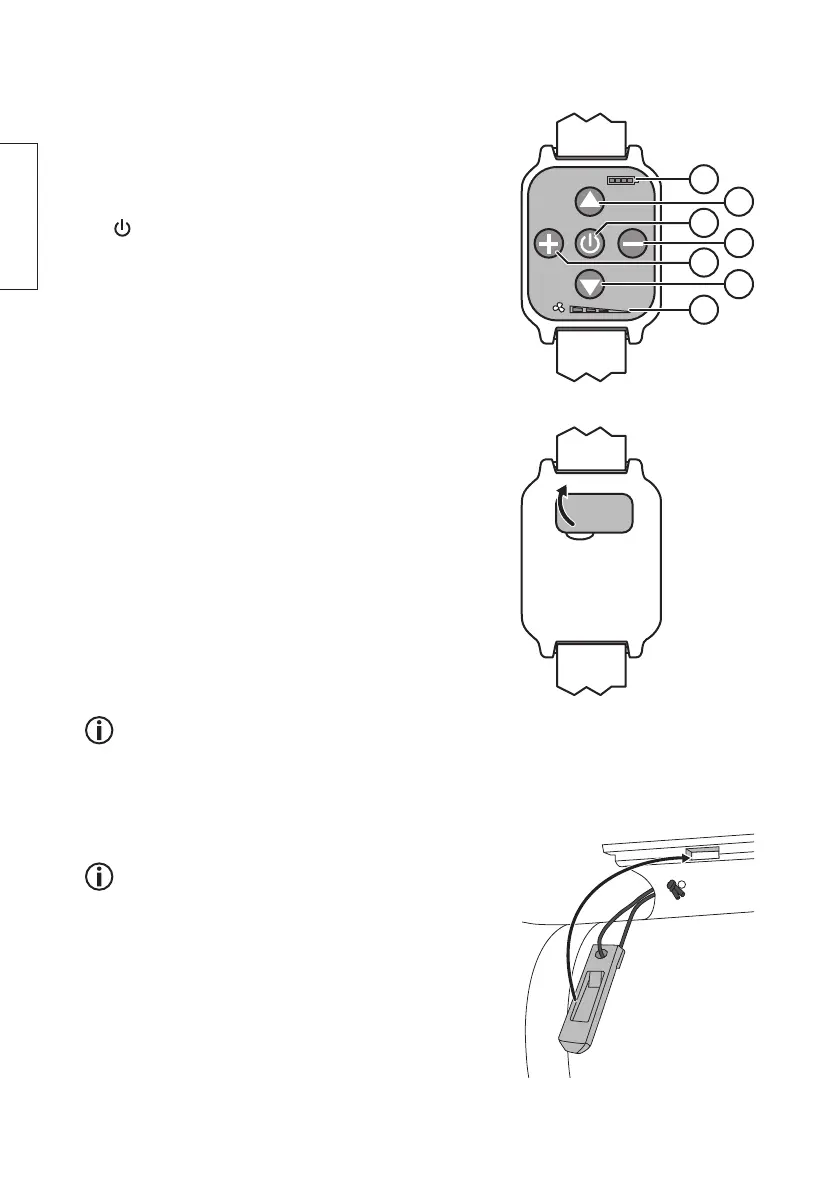
The remote control
1. Battery charge indicator
2. [ ▲ ] Forwards (themotor stops when thebutton is
pressed, press it once again to start propulsion in
anew direction).
3. [
] On/off. The motor will start and begin to slowly
propel forwards.
4. [ − ] Press repeatedly to decrease speed.
5. [ + ] Press repeatedly to increase speed.
6. [ ▼ ] Reverse (themotor stops when thebutton is
pressed, press it once again to start propulsion in
anew direction).
7. Speed indicator
Charging theremote control
1. Remove thecharging port cover on theback of
theremote control.
2. Connect theincluded Micro-USB charging cable
to theremote control and to aUSB charger or
computer. The battery charge indicator will show
thestatus as follows:
- red light if thebattery capacity is around 25 %
- yellow light if thebattery capacity is around 50 %
- green light if thebattery capacity is around 75 %
- blue light when thebattery is fully charged
The battery charge indicator on theremote
control also shows thecharge status when themotor
is used on theboard. If theindicator is not lit,
thebattery is fully discharged.
Instructions for use
• Make sure that thebattery of theremote control
and themotor are fully charged before initial use.
• The motor must not be used in any liquids other than
water. The water temperature must not exceed 35 °C.
1. Mount themotor onto theSUP board and lock it in
place using thelocking pin.
2. Switch themotor on using theremote control and
control it as per theinstructions in theThe remote
control section.


 To Next Page