Need help?
Do you have a question about the Zte 2050 and is the answer not in the manual?
Guide for inserting SIM and microSDXC cards into the phone.
Steps to connect the charger and power outlet for charging.
Instructions for turning the phone on, off, and restarting it.
How to scan for channels and listen to FM radio.
Important safety warnings for phone usage, handling, and environment.
Details on radio frequency exposure limits and testing procedures.
Information on SAR compliance, body-worn operation, and separation distances.
Explanation of FCC labeling rules for the device.
Guidance for users regarding device operation and interference.
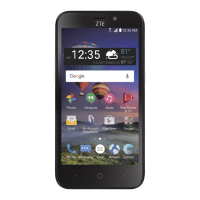
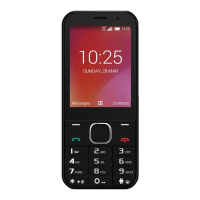
The ZTE 2050 is a smartphone designed for everyday communication and multimedia consumption, offering a range of features for connectivity, entertainment, and personal organization. Its intuitive design and user-friendly interface aim to provide a seamless experience for users.
The ZTE 2050 serves as a versatile mobile communication device, enabling users to make and receive calls, send and receive text messages, and access the internet. It supports various applications for productivity, social networking, and entertainment. The device is equipped with front and back cameras, allowing users to capture photos and videos, and a fingerprint sensor for enhanced security. It also includes an FM radio for listening to broadcasts.
The phone's physical layout includes an earpiece, front camera, proximity and light sensor, and an indicator light on the front. On the side, it features volume keys and a power key, which also serves to turn the screen on or off. The touch screen is the primary interface for interaction, allowing users to navigate menus, open applications, and input information.
For connectivity, the ZTE 2050 utilizes a nano-SIM card for cellular network access and supports a microSDXC card for expandable storage, allowing users to store more photos, videos, and applications. The card tray is easily accessible using a tray eject tool. The device features a headset jack for private audio listening and a Charging/USB Type-C jack for charging and data transfer.
The back of the phone houses the back cameras and flash, enabling users to capture high-quality images in various lighting conditions. A fingerprint sensor is also located on the back, providing a quick and secure method for unlocking the device and authenticating actions. The speaker is positioned at the bottom of the phone, providing audio output for calls, music, and videos.
Powering the device on and off is straightforward: a long press of the power key initiates the power-on sequence or brings up the power options menu for shutting down. In cases where the screen becomes unresponsive, a prolonged press of the power key can force a restart.
The FM radio feature allows users to listen to local radio stations. To use the FM radio, a wired headset must be connected, as it acts as the antenna. The phone can scan for available channels and save them for easy access. Users can switch between channels, add favorite stations, and choose to listen through the phone's speaker if desired. This feature does not require an internet connection, making it a convenient option for entertainment on the go.
Proper maintenance of the ZTE 2050 is crucial for its longevity and optimal performance. Users are advised to use only ZTE-approved chargers and USB Type-C cables to prevent damage to the phone or battery. The battery is non-removable, and any attempt to remove it could lead to fire or explosion. Therefore, users should not attempt to open the back cover.
To ensure the phone's safety and prevent damage, it is important to keep the device at least 10 mm away from the body during calls and to avoid contact with liquids. The phone should be kept dry, and extreme temperatures should be avoided. Small parts, such as the SIM card tray, should be handled carefully to prevent choking hazards, especially around children.
Users should exercise caution when using the loudspeaker, as the phone can produce loud sounds. To prevent possible hearing damage, it is recommended not to listen at high volume levels for long periods.
The device should be turned off in specific environments, such as hospitals, medical facilities, aircraft, airports, and near explosive materials or liquids, including gas stations, to comply with safety regulations. It is also important to avoid contact with magnetic objects, as they can interfere with the phone's internal components.
For security, the fingerprint sensor should be kept clean to ensure accurate and reliable authentication. The screen should also be cleaned regularly with a soft, dry cloth to maintain clarity and responsiveness.
In case of any issues, users are encouraged to visit the ZTE official website for self-service information and support. If the phone experiences persistent problems, such as not powering on after prolonged charging, contacting customer service is recommended. The device is designed to be robust, but unauthorized modifications to the software are not recommended, as they can cause faults and damages for which ZTE Corporation disclaims liability.
 General
| Loudspeaker | Yes |
|---|---|
| Radio | FM radio |
| Games | Yes |
| Network Technology | GSM |
| SIM | Mini-SIM |
| Video | No |
| Alert types | Vibration |
| WLAN | No |
| Bluetooth | No |
| GPS | No |
| Messaging | SMS, MMS |
| Browser | HTML |
| Java | No |
| Stand-by | Up to 200 h |
| Colors | Black |

 To Next Page