This document serves as a Quick Start Guide for the ZTE 9047, also known as the ZTE Axon 40 SE. It provides essential information for setting up and using the device, along with important safety and regulatory details.
Function Description
The ZTE Axon 40 SE is a smartphone designed for general mobile communication, internet access, and multimedia functions. It supports cellular network connectivity for making and receiving calls, sending messages, and accessing mobile data. The device also features Wi-Fi connectivity for wireless internet access, supporting both 2.4 GHz and 5 GHz bands. It includes a front camera for selfies and video calls, and a rear camera system for photography and videography. The phone incorporates a fingerprint sensor for secure unlocking and authentication. It is designed to be powered by a non-removable internal battery, which is charged via a USB Type-C port. The device also supports external storage expansion using a microSDXC card, in addition to its internal storage.
Important Technical Specifications
- Model Name: ZTE 9047 (ZTE Axon 40 SE)
- FCC ID: SRQ-ZTE9047
- SIM Card Type: nano-SIM
- External Storage: microSDXC (optional)
- Charging Port: USB Type-C
- Headset Jack: Integrated with USB Type-C port
- Wireless Connectivity: Wi-Fi (2.4 GHz and 5 GHz), Bluetooth®
- Battery: Non-removable
- SAR Information:
- Highest reported SAR value for usage against the head: 1.26 W/kg
- Highest reported SAR value for usage near the body: 1.09 W/kg
- SAR compliance for body-worn operation is based on a separation distance of 10 mm between the unit and the human body.
- FCC Compliance: Part 15 of the FCC Rules for Class B digital devices.
Usage Features
- Power On/Off: The device is powered on by pressing and holding the Power key. To power off, press and hold the Power key to open the options menu, then select the power off option.
- Screen Responsiveness: If the screen freezes or becomes unresponsive, the device can be restarted by pressing and holding the Power key for over 10 seconds.
- SIM and microSDXC Card Installation: The device uses a card tray that accommodates one nano-SIM card and one optional microSDXC card. The card tray is accessed by inserting a tray eject tool into a designated hole. The nano-SIM card is placed on the upper slot, and the microSDXC card on the lower slot. Cards can be installed or removed while the phone is turned on.
- Charging: The phone is charged by connecting a ZTE-approved adapter to the USB Type-C charging jack and then to a standard AC power outlet. It is recommended to fully charge the battery for optimal performance.
- Fingerprint Sensor: The device includes a fingerprint sensor, likely integrated with the Power key, for biometric authentication.
- Volume Control: A dedicated Volume key is available for adjusting audio levels.
- Front Camera: A front-facing camera is present for self-portraits and video communication.
- Wi-Fi Support: The device supports both 2.4 GHz and 5 GHz Wi-Fi bands, offering flexibility for wireless network connections.
Maintenance Features
- Approved Accessories: Only ZTE-approved chargers and USB Type-C cables should be used for charging to prevent damage to the phone or battery.
- Battery Care: The battery is non-removable. Attempting to remove it may cause fire or explosion. Users are advised not to remove the back cover.
- Card Tray Tool: The included tray eject tool should be used for accessing the SIM/microSDXC card tray. Using sharp objects or inserting the tool incorrectly can damage the phone.
- Software Updates: ZTE Corporation reserves the right to make modifications to specifications and provide software updates, which may alter the device's content or functionality. Users can find information on user manuals, self-service, and supported product models on the ZTE official website (www.ztedevices.mx).
- Troubleshooting Charging: If the battery is extremely low and the phone does not power on while charging, it is advised to charge for at least 20 minutes before attempting to power on again. If issues persist, contact customer service.
- Environmental Considerations: The device should be kept dry and away from liquids. It should also be protected from extreme temperatures. Users are advised not to disassemble the phone.
- Safety Guidelines: Adherence to product safety information, including avoiding phone use while driving, maintaining a minimum distance from the body during calls (10 mm), and turning off the device in specific environments (hospitals, aircraft, near explosive materials), contributes to device longevity and user safety.

 Need help?
 General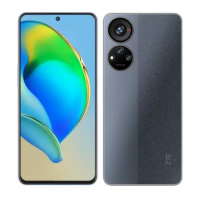

 To Next Page