EasyManua.ls Logo

Zte Blade L210 - User Manual

Zte Blade L210
10 pages
Print Icon
To Next Page IconTo Next Page
Loading...
1
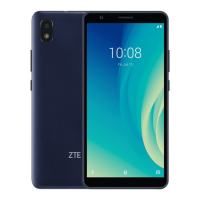
ZTE Blade L210
Quick Start Guide
Question and Answer IconNeed help?

Do you have a question about the Zte Blade L210 and is the answer not in the manual?

Summary

Getting to Know Your Phone

Setting Up Your Phone

Remove Back Cover

Instructions on how to remove the back cover of the phone to access internal components.

Install SIM and microSD Cards

Guide for inserting the nano-SIM card and the optional microSDXC card into the phone.

Insert Battery

Steps to correctly insert the battery, ensuring connectors align and it clicks into place.

Charging the Phone

Charge the Phone Battery

Instructions on connecting the charger and charging the phone's battery, including notes on low battery status.

Powering On;Off Your Phone

Power On and Off Procedures

Steps for turning the phone on and off using the power key, with troubleshooting tips for screen freezes.

FM Radio

Scan for FM Radio Channels

How to scan for available FM radio channels using a wired headset and save them to a list.

Listen to FM Radio

Instructions for selecting and listening to FM radio stations, including adjusting frequency and saving favorites.

Product Safety Information

Driving and Personal Safety

Safety guidelines for driving, phone usage distance, and handling small parts to prevent choking or hearing damage.

Operational Environment Safety

Precautions for using the phone in specific environments like hospitals, airports, or near explosive materials.

Device Care and Integrity

Recommendations for device handling, avoiding magnetic fields, liquids, extreme temperatures, and unauthorized disassembly.

FCC RF Exposure Information (SAR)

Understanding SAR Compliance

Details on the phone's compliance with FCC RF exposure limits (SAR) for head and body usage.

Body-Worn SAR Guidelines

Recommendations for maintaining a 10 mm separation distance for body-worn operations and accessory use.

FCC ID and SAR Values

FCC Labeling Requirements

Details on the FCC labeling requirements for the device, including compliance conditions.

User Information for FCC Compliance

Information for the user regarding FCC compliance, including modifications and user authority.

FCC Interference Information

Electrical Operating Data

Technical specifications for the phone and its power adapter, including voltage and current ratings.

Summary

Getting to Know Your Phone

Setting Up Your Phone

Remove Back Cover

Instructions on how to remove the back cover of the phone to access internal components.

Install SIM and microSD Cards

Guide for inserting the nano-SIM card and the optional microSDXC card into the phone.

Insert Battery

Steps to correctly insert the battery, ensuring connectors align and it clicks into place.

Charging the Phone

Charge the Phone Battery

Instructions on connecting the charger and charging the phone's battery, including notes on low battery status.

Powering On;Off Your Phone

Power On and Off Procedures

Steps for turning the phone on and off using the power key, with troubleshooting tips for screen freezes.

FM Radio

Scan for FM Radio Channels

How to scan for available FM radio channels using a wired headset and save them to a list.

Listen to FM Radio

Instructions for selecting and listening to FM radio stations, including adjusting frequency and saving favorites.

Product Safety Information

Driving and Personal Safety

Safety guidelines for driving, phone usage distance, and handling small parts to prevent choking or hearing damage.

Operational Environment Safety

Precautions for using the phone in specific environments like hospitals, airports, or near explosive materials.

Device Care and Integrity

Recommendations for device handling, avoiding magnetic fields, liquids, extreme temperatures, and unauthorized disassembly.

FCC RF Exposure Information (SAR)

Understanding SAR Compliance

Details on the phone's compliance with FCC RF exposure limits (SAR) for head and body usage.

Body-Worn SAR Guidelines

Recommendations for maintaining a 10 mm separation distance for body-worn operations and accessory use.

FCC ID and SAR Values

FCC Labeling Requirements

Details on the FCC labeling requirements for the device, including compliance conditions.

User Information for FCC Compliance

Information for the user regarding FCC compliance, including modifications and user authority.

FCC Interference Information

Electrical Operating Data

Technical specifications for the phone and its power adapter, including voltage and current ratings.

Overview

This document describes the ZTE Blade L210, a smartphone designed for general use, offering a range of features for communication, entertainment, and basic productivity. The device emphasizes user-friendliness with clear instructions for setup and operation, including safety guidelines to ensure proper handling and longevity.

Function Description:

The ZTE Blade L210 serves as a mobile communication device, enabling users to make and receive phone calls, send and receive text messages, and access various applications. It integrates a front and back camera for capturing photos and videos, a touch screen for interactive navigation, and a headset jack for private audio listening. The device also includes an FM radio function, allowing users to listen to broadcast radio stations. For security and convenience, it features a fingerprint sensor. The phone is powered by a rechargeable battery, supporting continuous operation and can be charged via a micro-USB jack.

Usage Features:

  • Powering On/Off: To power on the device, users press and hold the Power key. To power off, the Power key is pressed and held to access an options menu, from which the power off option can be selected. This simple mechanism ensures easy control over the device's operational state.
  • SIM and microSDXC Card Installation: The phone supports a nano-SIM card for cellular connectivity and an optional microSDXC card for expandable storage. Installation involves gently removing the back cover, inserting the cards into their designated slots, and then inserting the battery, ensuring connectors align. This modular design allows users to manage their network access and storage capacity.
  • Battery Charging: The device's battery can be charged using a ZTE-approved charger and USB cable. Users connect the adapter to the charging jack and then to a standard AC power outlet. The phone is designed to be charged fully for optimal performance, and the charger should be disconnected once the battery is full. A warning is provided against using unapproved accessories to prevent damage or battery issues.
  • FM Radio: The ZTE Blade L210 includes an FM radio feature, which requires a wired headset to be plugged in to function as an antenna. Users can scan for available channels, save them, and then listen to their preferred stations. The interface allows for switching channels and adjusting frequency, and channels can be added to a favorites list. The radio can also be played through the phone's speaker, and importantly, it does not require an Internet connection, making it a reliable entertainment option in various situations.
  • Touch Screen Interaction: The device features a touch screen, which is the primary interface for navigating menus, opening applications, and interacting with content. This intuitive input method is standard for modern smartphones, providing a fluid user experience.
  • Physical Keys: In addition to the touch screen, the phone has physical keys for essential functions: a Volume key for adjusting audio levels and a Power key for controlling power and screen lock.
  • Indicator Light: An indicator light provides visual cues for various notifications or device states, enhancing user awareness without needing to constantly check the screen.
  • Fingerprint Sensor: For enhanced security and quick access, the device incorporates a fingerprint sensor, allowing users to unlock the phone or authenticate actions with their unique fingerprint.

Maintenance Features:

  • Battery Management: The manual advises users to fully charge the battery as soon as possible after initial setup and to disconnect the charger once the battery is full to maintain battery health. It also notes that if the battery is extremely low, the phone might not power on immediately even when charging, suggesting a minimum charging period before attempting to power on.
  • Accessory Use: A critical maintenance instruction is to use only ZTE-approved chargers and USB cables. This is emphasized to prevent damage to the phone and to avoid the risk of battery explosion, highlighting the importance of compatible accessories for safe operation.
  • Troubleshooting (Screen Freeze): In case of a screen freeze or unresponsiveness, the manual suggests reinstalling the battery and powering on the device again. This provides a simple, user-level troubleshooting step for common software glitches.
  • Physical Care: General safety information includes advice to avoid contact with liquids, keep the phone dry, and not attempt to disassemble the phone. These guidelines are crucial for preventing physical damage and ensuring the device's longevity.
  • Environmental Considerations: The manual provides warnings against exposing the phone to extreme temperatures or disposing of it in fire, which are important for both device safety and environmental protection.
  • Electromagnetic Compatibility (EMC): The device is designed to comply with FCC rules regarding harmful interference. Users are advised on measures to correct interference, such as reorienting the receiving antenna or increasing separation from other equipment.
  • RF Exposure Guidelines: The manual includes detailed information on RF exposure and SAR compliance, advising users to keep the phone at least 10 mm away from their body during calls and to use non-metallic body-worn accessories to maintain compliance with safety limits. This information guides users on safe handling practices related to electromagnetic radiation.

Zte Blade L210 Specifications

General IconGeneral
ProcessorQuad-core 1.3 GHz
RAM1 GB
Internal Storage32 GB
Main Camera5 MP
Front Camera2 MP
Battery Capacity2600 mAh
Operating SystemAndroid 10 (Go edition)
SIMDual SIM (Nano-SIM, dual stand-by)
Expandable StoragemicroSDXC

Related product manuals