Need help?
Do you have a question about the Zte Blade L5 and is the answer not in the manual?
Your phone automatically goes into sleep mode. The display is turned off to save power and the keys are locked to prevent accidental operations.
This device complies with Part 15 of the FCC Rules. Operation is subject to the following two conditions.
Any Changes or modifications not expressly approved by the party responsible for compliance could void the user's authority.
This equipment has been tested and found to comply with the limits for a Class B digital device.
This document provides a quick start guide for the ZTE Blade L5, a smart terminal device designed for everyday communication and mobile computing. The guide covers essential information about the phone's physical features, basic operations, and important safety guidelines, ensuring users can quickly get acquainted with their new device.
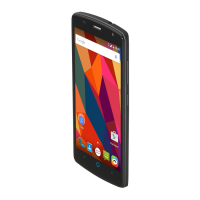
The ZTE Blade L5 is a mobile phone equipped with a touch screen interface, allowing for intuitive interaction through various gestures. Its primary functions include making and receiving phone calls, sending and receiving text messages, and accessing a wide range of applications. The device supports internet browsing, multimedia playback, and various other smart terminal functionalities. It features a front camera for selfies and video calls, and a back camera with a flash for capturing photos and videos. The phone is designed to be a versatile communication and entertainment tool, suitable for a broad user base.
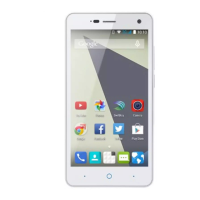
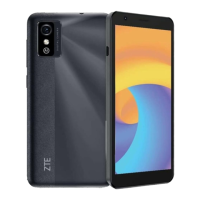
The ZTE Blade L5 offers a straightforward user experience, starting with its physical layout. On the front, you'll find the headset jack, proximity and light sensor, front camera, earpiece, and the touch screen. Below the screen are the Recent Apps Key, Back Key, and Home Key, which are essential for navigation. The back of the phone houses the back camera, flash, volume key, power key, and speaker. The charging/micro-USB jack is located at the bottom.
The keys on the ZTE Blade L5 have specific functions:
Installing the micro-SIM card and battery is a simple process. First, power off the phone and remove the battery. Then, gently lift the back cover using the slot at the bottom right. Hold the micro-SIM card with the cut corner oriented as shown and slide it into the card slot. Next, insert the battery by aligning its metal contacts with those in the battery compartment and gently pushing it until it clicks into place. Finally, align the back cover and press it back into position, ensuring all tabs are secure.
For expanded storage, the ZTE Blade L5 supports a microSDHC™ card (not included). To install it, remove the back cover, hold the microSDHC card with the metal contacts facing down, and slide it in. It's recommended to keep a microSDHC card installed as some applications may require it for normal operation or data storage. Always replace the back cover after installation.
Charging the battery is crucial for continuous use. The phone's battery should have enough power to turn on and make calls initially, but it's recommended to fully charge it as soon as possible. To charge, connect the adapter to the charging jack, ensuring it's inserted correctly, then connect the charger to a standard AC power outlet. Disconnect the charger once the battery is fully charged. If the battery is extremely low, the phone might not power on immediately even when charging; in such cases, charge for at least 20 minutes before attempting to power it on again.
Powering on and off the phone is straightforward. To turn it on, press and hold the Power Key. To turn it off, press and hold the Power Key to open the options menu, then touch "Power off" and confirm with "OK."
The phone automatically enters sleep mode after a period of inactivity to save power and prevent accidental operations. To wake it up, press the Power Key to turn on the screen, then touch and swipe the screen upwards. Alternatively, you can touch and hold an application shortcut at the bottom of the screen to unlock and open that application quickly. If a voice lock, unlock pattern, PIN, or password is set, you'll need to provide the correct input to unlock the phone.
The touch screen supports various gestures for interaction:
Maintaining the ZTE Blade L5 involves adhering to several safety and operational guidelines to ensure its longevity and safe use.
These guidelines are designed to help users get the most out of their ZTE Blade L5 while ensuring its safe and reliable operation.
 General
| Screen shape | Flat |
|---|---|
| Display diagonal | 5 \ |
| Touch technology | Multi-touch |
| Touchscreen type | Capacitive |
| Display resolution | - pixels |
| Orientation sensor | - |
| Processor cores | 2 |
| Processor model | MT6572 |
| Processor family | MediaTek |
| Processor frequency | 1.3 GHz |
| Processor architecture | ARM Cortex-A7 |
| Multimedia Messaging Service (MMS) | Multimedia Messaging Service (MMS) is a standard way to send messages that include multimedia content to and from a mobile phone over a cellular network |
| RAM capacity | 1 GB |
| Compatible memory cards | MicroSD (TransFlash) |
| Maximum memory card size | 32 GB |
| Internal storage capacity | 8 GB |
| Flash type | LED |
| Front camera type | Single camera |
| Rear camera resolution (numeric) | 8 MP |
| Front camera resolution (numeric) | 2 MP |
| Talk time (3G) | - h |
| Battery capacity | 2150 mAh |
| 2G standards | GSM |
| 3G standards | UMTS, WCDMA |
| Wi-Fi standards | 802.11b, 802.11g, Wi-Fi 4 (802.11n) |
| Bluetooth version | 4.0 |
| 3G bands supported | 900, 2100 MHz |
| 2G bands (primary SIM) | 850, 1800, 1900 MHz |
| Mobile network generation | 3G |
| USB connector type | Micro-USB |
| HDMI ports quantity | 0 |
| Headphone connectivity | 3.5 mm |
| Form factor | Bar |
| Product color | Black |
| Platform | Android |
| App distribution platform | Google Play |
| Operating system installed | Android 5.1 |
 Weight and Dimensions
| Depth | 8.6 mm |
|---|---|
| Width | 72 mm |
| Height | 143 mm |
| Weight | 142 g |

 To Next Page