Need help?
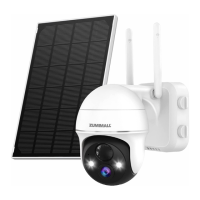
Do you have a question about the Zumimall GX2S and is the answer not in the manual?
Details about inserting an SD card, Wi-Fi requirements, and proximity to the router.
Adjusting motion detection sensitivity and understanding its impact on battery life.
Setting a time interval to avoid repeated alarms for the same motion event.
Choosing the length of video recordings triggered by motion detection.
Instructions on how to add and view multiple cameras simultaneously in the app.
Guide on how to share camera access with other users through the ZUMIMALL app.
Troubleshooting steps for network connectivity issues with the camera.
Steps to remove a camera and reconnect it to a different network.
Instructions on how to perform a factory reset on the camera.
Guidance on charging the camera, including charging time and indicator lights.
Tips for reducing false alarms, checking detection range, and using humanoid algorithms.
Ensuring good network, increasing sensitivity, and checking detection range for proper alerts.
Troubleshooting steps to ensure video recording is triggered and saved correctly.
Steps to enable and troubleshoot receiving alarm notifications from the app.
Steps to resolve issues with playing back recorded videos from the Micro SD card.
Ensuring cloud service is enabled and cloud storage is accessible for playback.
Troubleshooting steps for when the camera becomes offline or disconnected.
Tips for extending battery life, including reducing sensitivity and setting alarm intervals.
Troubleshooting steps for dealing with the ZUMIMALL app crashing or freezing.
Ensuring correct network access and account format for successful registration.
Troubleshooting device sharing issues, focusing on country compatibility.
Steps to troubleshoot audio issues when the device is speaking or being spoken to.
Explains whistling noise during intercom and recommends optimal distance.
Troubleshooting steps for blurry live video, including cleaning the lens and resolution settings.
Explains white spots at night due to light sources and advises on lens positioning.
 General
| Brand | Zumimall |
|---|---|
| Model | GX2S |
| Category | Security Camera |
| Language | English |

 To Next Page