Need help?
Do you have a question about the ZWO ASI585 and is the answer not in the manual?
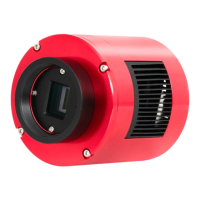
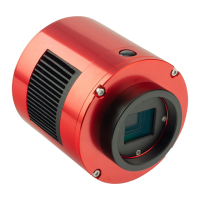
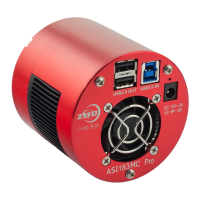
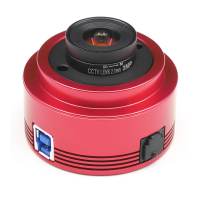
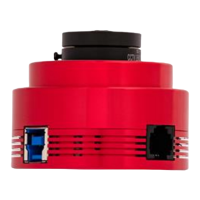
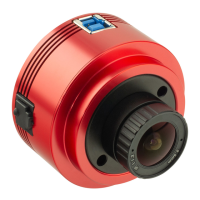
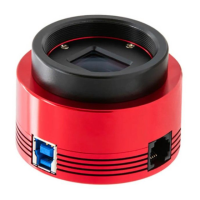
Illustrates and labels the external components and ports of the ASI585 camera.
The ASI585 is a color planetary camera, a sophisticated device designed for capturing high-quality astronomical images. It is one of the latest offerings from ZWO, released in 2022, and is notable for its advanced imaging capabilities and user-friendly design. The camera is built around a Sony IMX585 sensor, which contributes to its impressive performance in capturing detailed celestial objects.
The primary function of the ASI585 camera is to capture images of celestial bodies, particularly planets, with high resolution and sensitivity. It utilizes a Sony IMX585 CMOS sensor, which is a key component in achieving its imaging prowess. The camera is capable of recording images in both 12-bit and 10-bit Analog to Digital Converter (ADC) modes, offering flexibility to users. The 10-bit ADC mode allows for faster frame rates, which can be particularly beneficial for capturing rapidly changing planetary details. Additionally, the camera supports setting a Region of Interest (ROI) to further boost frame rates when only a specific area of the sensor is needed.
A standout feature of the ASI585 is its "zero amp glow" characteristic. This means that regardless of exposure length or gain settings, the camera does not exhibit amplifier glow, a common issue in many astronomical cameras that can introduce unwanted light artifacts into images. This feature is implemented at the hardware level, ensuring consistent performance without the need for software corrections. This significantly simplifies post-processing and enhances the quality of the captured data.
The camera also incorporates a High Conversion Gain (HCG) mode, which automatically activates at higher gain settings (specifically at a gain of 252). This mode is designed to further reduce readout noise while maintaining a wide dynamic range, similar to that achieved at lower gain settings. This allows users to capture faint details with less noise, even in challenging conditions.
The ASI585 is designed for ease of use and integration into existing astronomical setups. It connects to a computer via a USB 3.0 interface, ensuring fast data transfer rates, which are crucial for high-resolution, high-frame-rate imaging. The camera also supports USB 2.0, providing compatibility with a wider range of devices, albeit with potentially lower maximum frame rates.
For guiding purposes, the camera includes an ST4 guide port, allowing it to be connected to a mount for precise tracking during long exposures. This is essential for astrophotography, where even slight movements can blur images. The camera body itself features a 1/4" screw, enabling it to be mounted on a tripod for standalone use or for specific imaging configurations.
The camera comes with a variety of accessories to facilitate its use, including a 1.25" cover, a 2" cover, an ST4 cable, a USB 3.0 cable (2m), and a 1.25" nosepiece. These accessories allow for direct connection to telescopes and other optical systems. The camera's design includes an AR protective window with a diameter of 32mm and a thickness of 2mm, which shields the sensor from external elements.
The ASI585 supports software binning modes (bin2, bin3, bin4) as well as hardware binning modes (bin2, bin3, bin4). Binning combines pixels to increase sensitivity and frame rate, which can be beneficial for certain types of imaging, especially when speed is a priority. For users who do not prioritize speed, software binning is recommended.
The camera is compatible with multiple operating systems, including Windows, Linux, and Mac OSX, providing broad accessibility for users regardless of their preferred computing environment. ZWO also provides software installation instructions and other technical information on its official website, ensuring users have access to the latest resources.
Maintaining the ASI585 camera involves simple yet crucial steps to ensure its longevity and optimal performance. The camera is sealed and equipped with an AR protect window, which serves to shield the sensor from dust and humidity. This protective measure is vital for preserving the delicate sensor and preventing image degradation due to environmental factors.
To check for dust on the sensor or the protective window, users can set up their telescope, point it towards a bright area, and attach the camera. Using a Barlow lens is recommended to clearly visualize any dust particles. Adjusting the exposure to avoid overexposure will reveal dust as dim spots on the image. Large, dim spots typically indicate dust on the protective window, while smaller, darker spots suggest dust on the sensor itself.
For cleaning dust from the sensor surface, ZWO recommends using an air pump to blow off the particles. If this method is insufficient, cotton swabs moistened with 99% anhydrous ethanol can be used to gently wipe the sensor. Detailed instructions for cleaning the camera and redrying the desiccant are available on ZWO's official website, providing users with comprehensive guidance.
It is important to adhere to the specified working and storage temperature and humidity ranges to prevent damage to the camera. The working temperature range is -5°C to 50°C, with a working humidity of 20% to 80%. For storage, the temperature range is -20°C to 60°C, and the humidity range is 20% to 95%. Operating the camera outside these parameters can lead to damage.
Users are advised against using corrosive solutions to clean the camera, as this can corrode the surface oxide layer and harm the device. Additionally, prolonged exposure of the camera to direct sunlight should be avoided to prevent discoloration of the oxide layer.
ZWO offers a 2-year free warranty service for its products, starting from the day of receipt. This warranty covers product quality problems and transportation issues, provided the user contacts ZWO within the specified timeframes and provides relevant evidence. For repairs and consultations, ZWO directs users to its support site, and for software upgrades, the official website provides the latest versions. In cases where products need to be returned for after-sales service, ZWO provides an RMA code for reference, and products returned without written confirmation or an RMA code will not be accepted.
 General
| Sensor | Sony IMX585 |
|---|---|
| Pixel Size | 2.9μm |
| Max Frame Rate | 60 fps |
| Interface | USB 3.0 |
| Cooling | No |
| Read Noise | 1.2 e- |
| QE Peak | 80% |
| ADC | 12 bit |
| Protect Window | AR coated |
| Back Focus | 6.5mm |
| Resolution | 3840 x 2160 |
| Bit Depth | 12 bit |
| Shutter | Rolling |

 To Next Page