The ZZair-CP is a device designed to convert a factory-wired Apple CarPlay system into a wireless CarPlay system. This allows users to connect their iPhones to their car's infotainment system wirelessly, eliminating the need for a USB cable.
Function Description:
The primary function of the ZZair-CP is to enable wireless Apple CarPlay connectivity. It acts as an intermediary device that plugs into the car's factory USB input, which is typically used for wired CarPlay. Once connected, the ZZair-CP creates a wireless bridge, allowing an iPhone to connect via Bluetooth and Wi-Fi to access CarPlay features on the car's display. This means users can enjoy navigation, music, calls, and other CarPlay applications without physically plugging in their phone.
Important Technical Specifications:
While specific technical specifications like processor speed, RAM, or Wi-Fi standards are not explicitly detailed in the provided manual, the core functionality implies certain underlying technologies:
- Connectivity: The device utilizes a USB input for power and data connection to the car's infotainment system. It then establishes a wireless connection with an iPhone, which typically involves both Bluetooth for initial pairing and Wi-Fi for high-bandwidth data transfer required by CarPlay.
- LED Indicators: The ZZair-CP features two LED indicators:
- Red LED: Indicates that no phone is currently connected to the ZZair-CP.
- Blue LED: Indicates that a phone is successfully connected to the ZZair-CP.
- USB Input: The device itself has a USB input, which is used to charge the phone. This suggests that while the CarPlay connection is wireless, the device can still provide charging capabilities for the connected iPhone.
- Compatibility: The device is designed to work with factory-wired CarPlay systems. The manual shows examples with "HONDA-C332" and "VW Radio," suggesting broad compatibility with various car brands that offer wired CarPlay. It is specifically designed for iPhones, as it enables Apple CarPlay.
Usage Features:
The ZZair-CP offers several user-friendly features for seamless wireless CarPlay experience:
- Easy Installation: The device plugs directly into the factory CarPlay USB input. There's no complex wiring or modification required for the car's system.
- Simple Pairing Process:
- Initial Connection: Plug the ZZair-CP unit into the factory CarPlay USB input.
- Device Recognition: The factory radio will recognize the ZZair-CP as an iPhone, and the CarPlay icon will appear on the screen.
- Access ZZair-CP Menu: Select the CarPlay option to display the ZZair-CP main menu.
- Enable Bluetooth and Wi-Fi: Ensure Bluetooth and Wi-Fi are turned ON on the iPhone.
- Search for Devices: On the car's display, select "Search" in the ZZair-CP menu to find new devices.
- Pairing: On the iPhone, go to Bluetooth settings and search for the ZZair-CP device. The device name will typically start with "HONDA-C332" (or similar, depending on the car brand) followed by "Other Devices" and a 4-digit code (e.g., "HONDA-C332 400922").
- Confirm Pairing: Select the ZZair-CP device on the iPhone. A "Bluetooth Pairing Request" pop-up will appear on the iPhone; tap "Pair." A "CarPlay" pop-up will also appear; tap "Allow."
- Wireless CarPlay Activation: Once paired, the iPhone will connect wirelessly, and CarPlay will be displayed on the car's screen.
- Automatic Reconnection: After the initial pairing, the device is designed to automatically connect to the paired iPhone when the car starts, providing a hassle-free experience.
- Phone Charging: The integrated USB input on the ZZair-CP allows users to charge their phone while using wireless CarPlay, addressing the potential battery drain from continuous wireless usage.
- Multi-Device Support: The ZZair-CP can store multiple paired devices. This is useful for households with multiple iPhone users who drive the same car.
- Device Management:
- Deleting a Phone: Users can easily delete a previously paired phone from the ZZair-CP's memory. This involves turning off the iPhone's Bluetooth, accessing the ZZair-CP menu on the car's screen, selecting the connected device, and holding down on the device name for 3 seconds. An option to "Delete" the device will then appear. This is useful for managing privacy or freeing up memory if a device is no longer used with the system.
Maintenance Features:
The ZZair-CP also includes features for maintaining and updating the device:
- Firmware Updates: The device supports firmware updates to improve compatibility, usage, and functionality. This ensures the ZZair-CP remains current with new iPhone software updates and car infotainment system changes.
- Update Process:
- Ensure the ZZair-CP is connected to the car and a phone is paired.
- On the iPhone, open Safari and enter the IP address
192.168.50.2.
- The phone will communicate with the ZZair-CP via Bluetooth, and a message will appear on the phone stating if new software is available.
- Tap the button to initiate the update.
- The update process can take up to 5 minutes, during which a loading bar will indicate progress.
- Once the update is complete, the ZZair-CP will reboot and reconnect with the device automatically.
- Continuous Improvement: The manufacturer emphasizes a commitment to continuously making improvements to the ZZair-CP, including expanding compatibility, improving usage, and enhancing functionality through regular updates. This suggests ongoing support and development for the product.
In summary, the ZZair-CP is a practical and user-friendly device that upgrades wired Apple CarPlay to a wireless experience, offering convenience, easy setup, and ongoing support through firmware updates.

 Need help?
 General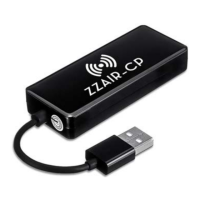

 To Next Page