5
PANNELLO PRINCIPALE
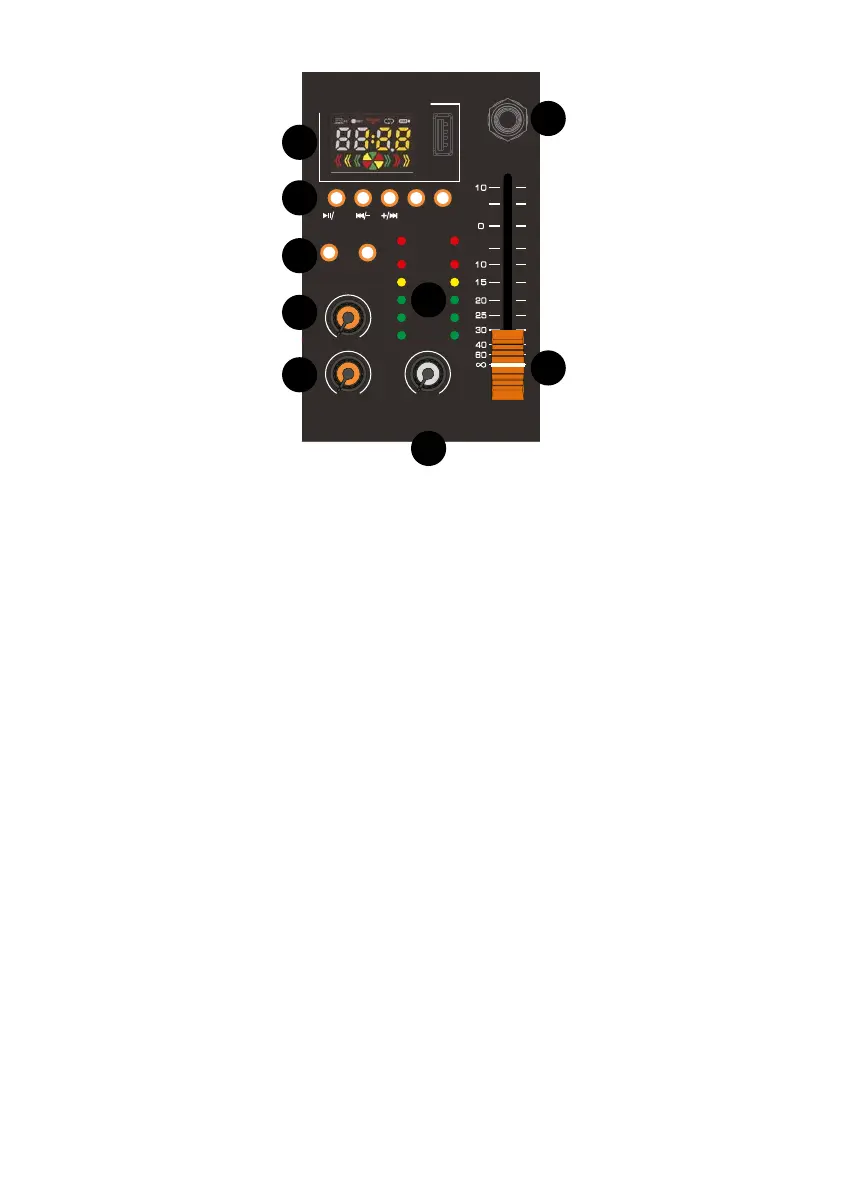
1) DISPLAY DI CONTROLLO
permette di gestire il lettore mp3 e
visualizza l’effetto DSP selezionato.
2) PULSANTI LETTORE MP3
Per la gestione e il controllo del letto-
re mp3/Bluetooth.
3) PULSANTI SELEZIONE EFFETTI
Permettono di selezionare uno dei 16
effetti DSP integrati nel mixer.
4) PARAMETER
Regola la profondità o la velocità
dell’effetto selezionato.
5) FX
Regola il volume dell’effetto.
6) PHONES
Regola il volume dell’uscita cuffie.
7) MAIN
Controlla il livello dell’uscita principale.
8) AUX
Controlla il livello dell’uscita ausiliaria.
9) VU METER
Indica il livello dell’uscita principale.
MAIN PANEL
1) CONTROL DISPLAY
Manage the mp3 player and view the
selected DSP effect.
2) MP3 PLAYER BUTTONS
For setting and control of the mp3 /
Bluetooth player.
3) EFFECTS SELECTION BUTTONS
Select one of the 16 DSP effects built
into the mixer.
4) PARAMETER
Adjust the depth or speed of the se-
lected effect.
5) FX
Adjust the volume of the effect.
6) PHONES
Adjust the volume of the headphone
output.
7) MAIN
Adjust the level of the main output.
8) AUX
Adjust the level of the auxiliary output.
9) VU METER
Indicates the level of the main output.
PARAMETER
DSP SELECT
MODE
DIGITAL MP3 PLAYER
EQ
POWER
GAIN
PHANTOM PHONES
POWER
CH3/4
USB
+48V
HI
LOW
AUX
FX
LEVEL
GAIN
HI
LOW
AUX
FX
PEAK PEAK PEAK
MIN MAX
MIN MAX
MIN MAXMIN MAX
-15 +15-15 +15-15 +15
-15 +15-15 +15-15 +15
0 10 0 10 0 10
0 10 0 10 0 10
0 10 0 10
+6
+3
0
-3
-10
FX PHONES MAIN
AUX
REC
L /
MONO
MIC / LINEMIC / LINE
01 HALL1
02 HALL2
03 ROOM1
04 ROOM2
05 REVERB + DELAY
06 125 mS DELAY
07 175 mS DELAY
08 225 mS DELAY
09 285 mS DELAY
10 560 mS DELAY
11 860 mS DELAY
12 1000 mS DELAY
13 1400 mS DELAY
14 800 mS PINGPONG DELAY
15 1000 mS PINGPONG DELAY
16 1400 mS PINGPONG DELAY
FX
ZZMXBTR4
1
2
3
4
5
6
7
8
9


 To Next Page
 Loading...