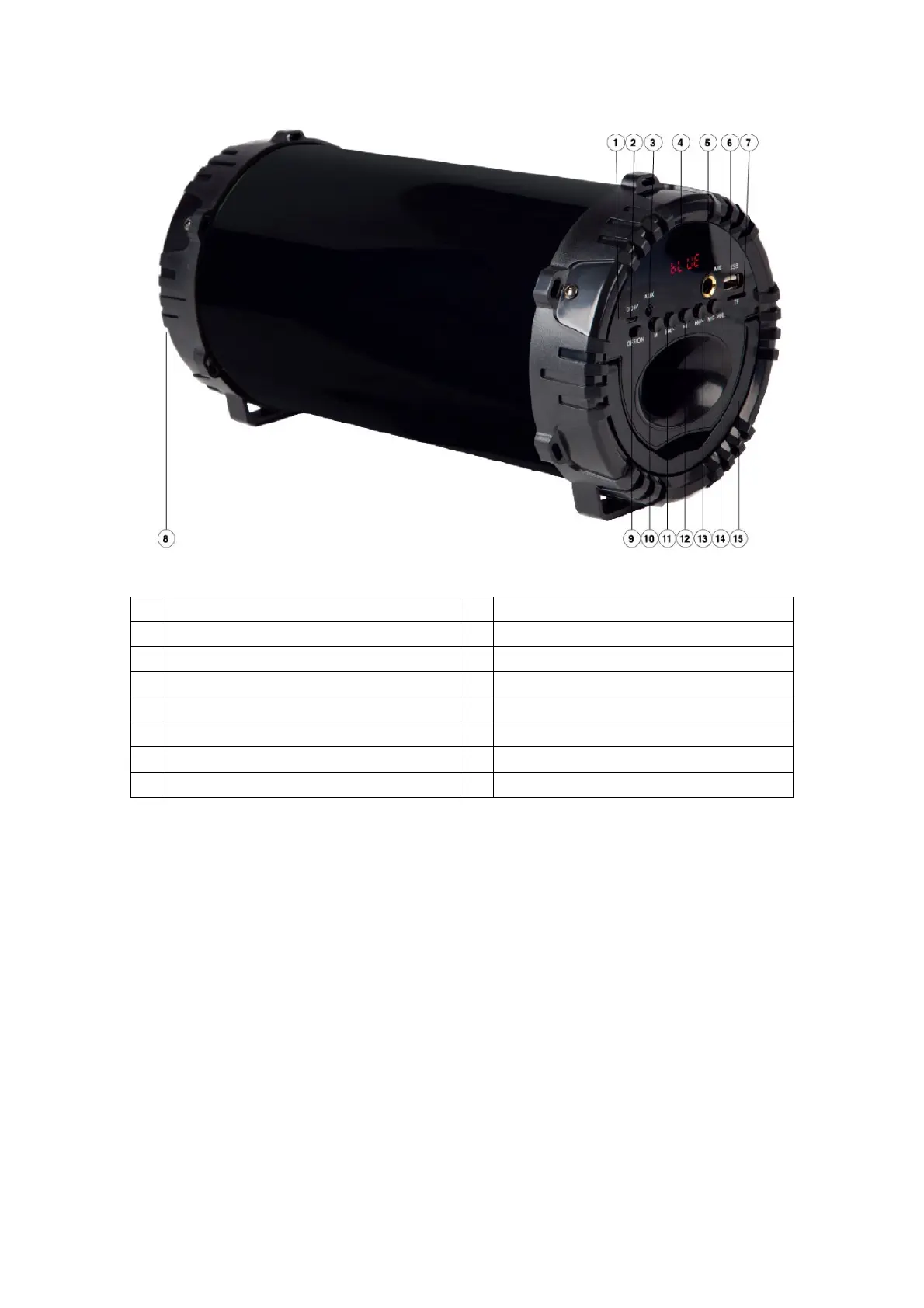
1 Charging LED indicator 9 ON/OFF switch
2 Charging port 10 Mode button
3 Auxiliary port 11 Skip backward/Decrease volume
4 LED display 12 Play/Pause button
5 Microphone input 13 Skip forward/Increase volume
6 USB slot 14 Mic volume button
INSTRUCTIONS FOR USE
Charging Instructions
For best results, fully charge the speaker before use.
Connect the USB cord(included) to the charging port of the speaker and insert the other
end into a port on your computer or similar power source.
The RED LED turns on indicating that the battery is being charged. Once it is fully charged,
the Red LED will turn off. It takes 5 to 7 hours to fully charge the speaker.
Note: In order to have better battery life, please do not charge for over 6 hours.
Overcharging the speaker can adversely impact the battery life.
Turn off the speaker when it’s not in use to save battery power.


 To Next Page