29
8
Unit-Mixer
SAVE saves the unit settings including the mixer volumes (please
make sure save is enabled on the UNIT-PREF page). A question
mark next to SAVE indicates that settings have been changed. If one
wants to reload the original settings, hold the MORE button and
press UNDO. To resume editing, hold the MORE button and press
REDO.
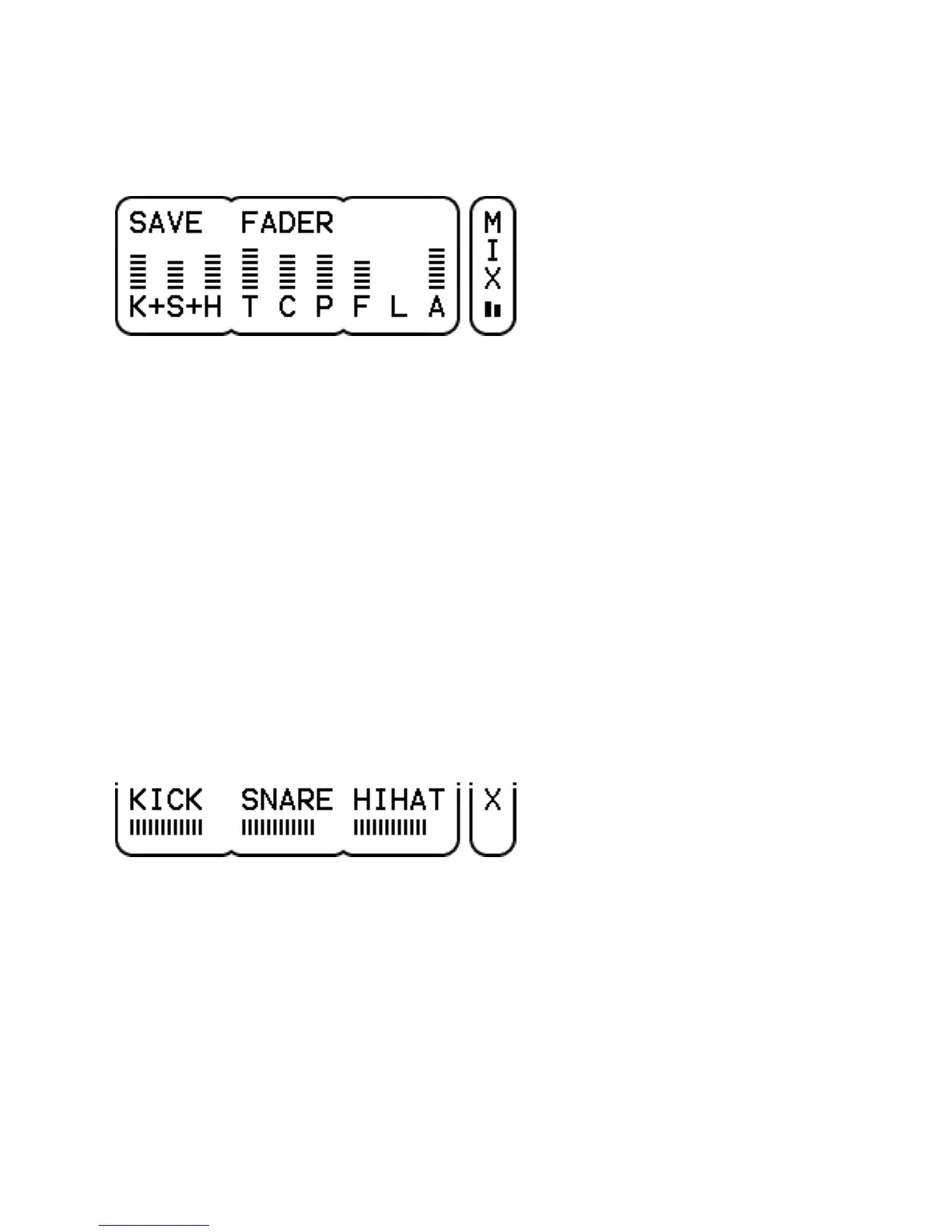
FADER selects the 3 volume faders to be controlled by the 3
parameter dials. Depending on the UNIT-PREF-MIXER setting, 9
vertical faders are shown with just the initials (the full names are
shown when selecting or adjusting the faders) or 3 horizontal faders
at the time with full names. Click the parameter dials to directly
select the 3 faders indicated above each dial.
VU meter shows the left and right signal level of the mix. It's either
located below the page name or at the top right.
KICK, SNARE, HIHAT or TOMS, CYMBS, PERC each control the
drum volume of one or more drum channels. This volume is in
addition to the volume as set on the KIT-DRUM page. The
assignment of each drum channel to a particular fader is done on
the UNIT-INTF page. The fader names can be changed on the UNIT-
PREF page to reflect the volumes they control.
FX, LINE, ACMP control the volume of the effect, line input and
accompaniment. This volume is in addition to the volume as set on
the KIT-FX and KIT-ACMP page (the line input volume is only on the
mix page).



 To Next Page