EasyManua.ls Logo

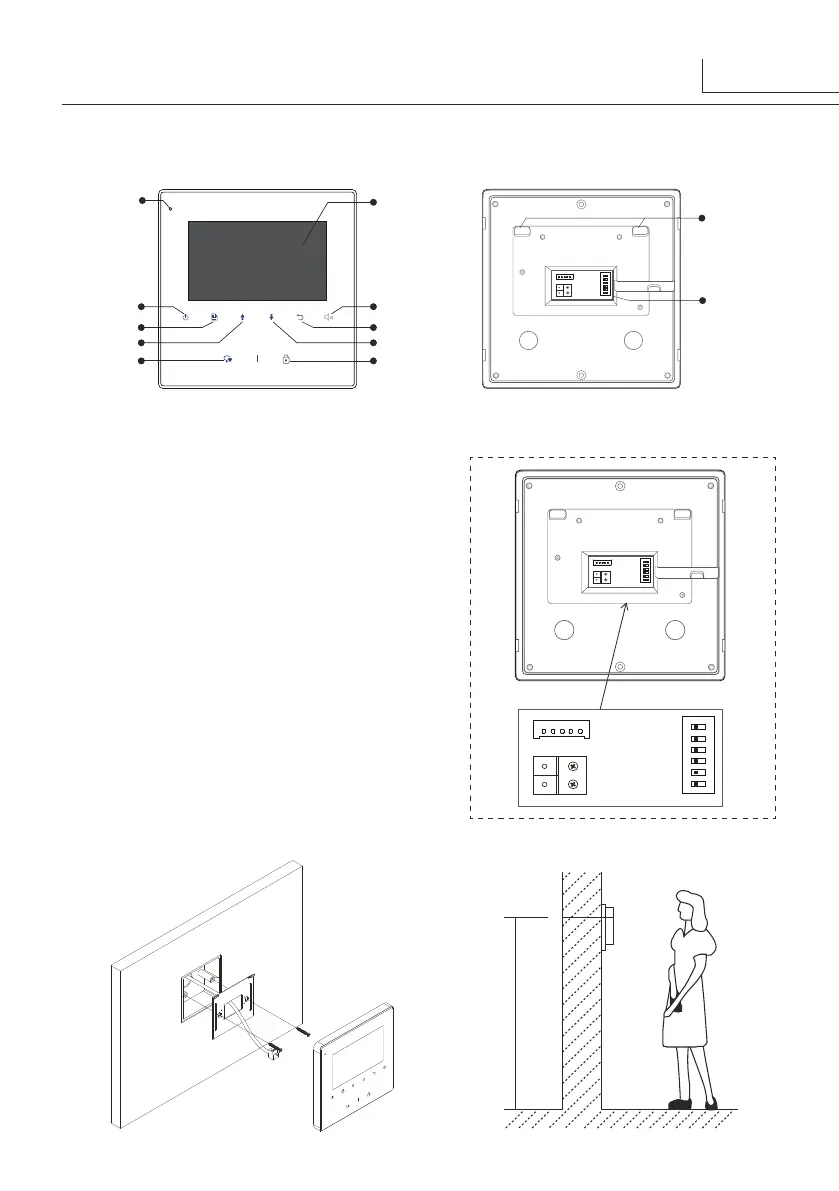
2easy DT43/D4 - Parts and Functions; Terminal Description; Monitor Mounting

Default Icon
12 pages
Print Icon
To Next Page IconTo Next Page
To Previous Page IconTo Previous Page
Loading...
1.Parts and Functions
2.Monitor Mounting
1
145~160 cm
LCD Screen
Microphone
Talk/Mon Button
Menu Button
Up Button
Close Button
Return Button
Down Button
Mute Button/Indicator
Unlock Button
Connection Port
Mounting Hook
1 2
sw+sw-RINGGNDNC
3
ON
L1L2
DIP
4 5 6
SW+,SW-:
Door bell call button
connection port.
Ring,GND:
Extra buzzer connection
port.
NC:
Reserved.
L1,L2:
Bus terminal.
DIP switches:
Total 6 bits can be
configured.
Bit1~Bit5:
Used to User Code setting.
Bit6:
Set to ON if the monitor is at the
end of the line or works with DBC4A.
Otherwise, set to OFF.
Terminal Description
1 2
sw+sw-RINGGNDNC
3
ON
L1L2
DIP
4 5 6
1 2
SW+SW-RINGGNDNC
3
ON
L1L2
DIP
4 5 6

Related product manuals