2 EASY
-27-
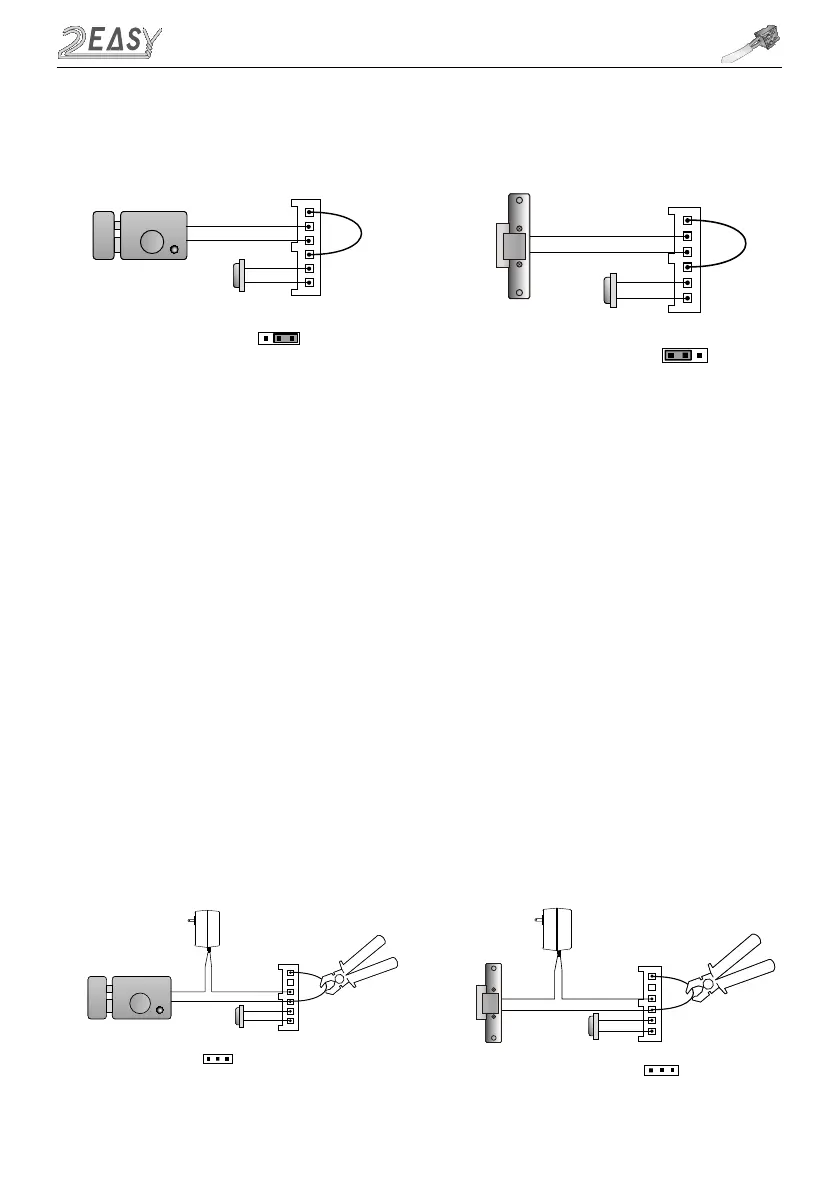
ELECTRIC LOCK CONNECTION
JP_LK
12V 300mA
Exit button
Jumper position in 2-3
+
-
+12V
LK -
LK+
N.O.
EB-
EB+
1 2 3
Power-on-to-Unlock type:
12V 300mA
Jumper position in 1-2
+12V
LK -
LK+
N.O.
EB-
EB+
+
-
1 2 3
Exit button
Power-off-to-Unlock type:
2) Door Lock Controlled with External Power
1. The external power supply must be used according to the lock
2. The jumper must be taken off before connecting
3. Setup the Unlock Mode Parameter for different lock types
• Power-on-to-unlock type:Unlock Mode=0(default)
• Power-off-to-unlock type:Unlock Mode=1
4. Default Unlocking time is 5 sec. See page 12 for different time settings
Power-on-to-Unlock type:
Power-off-to-Unlock type:
+
+
-
-
+12V
LK - (GND)
LK+(COM)
N.O.
EB-
EB+
Take off the Jumper
JP_LK
Cut off the line
1 2 3
Exit button
+12V
LK - (GND)
LK+(COM)
N.O.
EB-
EB+
Take off the Jumper
+
+
-
-
JP_LK
Cut off the line
1 2 3
Exit button



 To Next Page