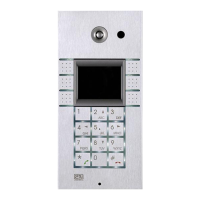
The 2N® Analog Vario is a door communicator designed to replace traditional door entry systems, offering flexible connectivity to any telephone system via an analogue extension or trunk port, or directly to an analogue telephone line. It is a modular unit, allowing for a flexible number of buttons and can be expanded with additional modules.
Function Description
The 2N® Analog Vario is user-friendly. Pressing a call button automatically dials a pre-stored number. The device includes a switch for controlling an electric lock, activated by tone-dialling a password from any telephone keypad. For models equipped with a numerical keypad, it functions as a code lock, allowing direct dialling of numbers or retrieval from 54 available memories. Unused functions can be disabled.
Compared to standard door entry systems, the 2N® Analog Vario offers enhanced features such as call redirection if unanswered, and day/night modes for automatic call redirection (e.g., after working hours). It meets all technical requirements for PSTN connections.
Keypad Functionality:
The numerical keypad offers several functions:
- Traditional Code Lock: Activates the electric lock using a password. Both switches can be controlled (if two are connected). Password length can be 1 to 16 digits, with up to 10 passwords per switch. Switch activation time is 1 to 9 seconds, accompanied by an acoustic continuous tone. Default passwords (00 for switch 1, 11 for switch 2) cannot be entered from the keypad due to security.
- Normal Telephone Set Features: Allows dialling any number. To dial, press
* and then the number, and to hang up, press #. Pulse dialling is supported, with * initiating tone dialling during pulse dialling.
- DTMF Transmission During Outgoing Call: Enables the unit to transmit DTMF tones after a connection is established with a pre-programmed number, useful for interacting with automatic information systems or voice mailboxes.
- Buttons Substitution: Acts as speed dial, allowing calls to pre-programmed numbers by pressing two digits (01-54). This saves space and the need for extender units, ideal for common speed dial options like "Warden" or "Reception."
Automatic Multiple Number Dialling:
This feature allows the 2N® Analog Vario to dial multiple numbers sequentially if the initial call is busy or unanswered. Up to 6 numbers can be stored per button. Three modes are available:
- Without Confirmation: Dials the next number if the line is busy, unanswered, or a continuous tone is detected. It recognizes ringing tones and considers a call successful if the tone ends before a predefined ring count. Type 3 requires the door to be opened for a successful call, while Type 4 considers all such calls successful.
- With Confirmation: Requires the called party to press
1 on their telephone to confirm connection, ensuring maximum reliability for emergency calls. If busy or unanswered, it dials the next number.
- Silent Automatic Multiple Number Dialling: Conceals the fact that a call is being made. The loudspeaker is off until the called subscriber confirms connection, preventing potential intruders from knowing if the resident is home.
DTMF Control (during Automatic Multiple Number Dialling with Confirmation or Silent Mode):
1: Confirmation – indicates successful call, extends call duration.2: Message muting – mutes playback.3: Message re-plays – replays the message once.4 or *: Call extension – extends the call by 30 seconds.5 or #: Call termination.6 to 9, 0: Password beginning – for switch control.
Arrival/Departure, Day/Night Modes:
The 2N® Analog Vario can route calls based on "Day" or "Night" modes, or "Arrival/Departure" status. This is controlled by calling the unit and entering a password (e.g., *password*1* for leaving, *password*0* for returning).
- If Automatic Multiple Number Dialling is OFF, memory 1 is used for Day mode, and memory 3 for Night mode.
- If Automatic Multiple Number Dialling is ON, memories 1-6 are used for Day mode, and memories 3-6 for Night mode. If memories 3-6 are empty in Night mode, memories 1 and 2 are used.
- Buttons assigned to persons using the "Departure" function remain in Night mode until "Arrival" is used.
Important Technical Specifications
Basic Features:
- Exclusive design with high-grade stainless steel finish.
- Water resistant.
- White LED button backlight.
- Modularity: up to 54 buttons + keypad, up to 16 buttons per unit.
- Space for camera and card reader build-in modules.
- Telephone-controlled electronic lock switch.
- Detection of all standard tones; automatic hang-up.
- Easy, voice menu-based remote programming via telephone.
Advantages of Use:
- Flat design for easy installation.
- Hermetically sealed, solid-state buttons.
- Electronics separated from name plates.
- Electronic volume and Hands-Free control without opening the cover.
- Operates on any analogue telephone line.
- Stable line power feeding.
- High acoustic quality.
- Special functions: automatic dialling of multiple numbers, silent dialling, departure/arrival, day/night mode, second switch delay.
Telephone Parameters:
- Minimum required off-hook line current: 15 mA.
- Minimum required on-hook line voltage: 20 V.
- DC voltage drop (off-hook): <8 V to <16 V (at 25 mA and 50 mA).
- Lead current while hang-up: <25 µA (at 60 V).
- Off-hook AC impedance: 220 Ω + 820 Ω in parallel with 115 nF (at 20-60 mA).
- Return loss: >10 dB (at 20-60 mA).
- Bandwidth: 300 to 3500 Hz (at 20-60 mA).
- Ringing impedance: >2 kΩC = 1 µF (at 25-50 Hz).
- Ringing detector sensitivity: 10 to 20 V (at 25-50 Hz).
- Time of response to ringing: Variable.
- Pulse dialling: 40/60 ms (at 20-60 mA).
- DTMF level: -6 and -8 dB ±2 dB (at 20-60 mA).
- DTMF detector sensitivity: Min. -40 dB (at 20-60 mA).
- Dial tone detector sensitivity: Min. -40 dB (at 350-500 Hz).
- Busy tone detection speed: Variable (at 350-500 Hz).
- Continuous tone detection speed: Variable (at 350-500 Hz).
- Ringing tone detection speed: Variable (at 350-500 Hz).
- Overvoltage protection (common mode): 1000 V (8/20 µs).
- Overvoltage protection (between A, B conductors): 1000 V (8/20 µs).
Other Parameters:
- Switch max. voltage: 48 V AC, DC.
- Switch min. voltage: 9 V AC, DC.
- Switch max. current: 2 A AC, DC.
- Backlight rated voltage: 12 V.
- Backlight max. voltage: 14 V.
- Backlight current consumption: Up to 1 A.
- Working temperature: -20 °C to +60 °C.
- Coverage: IP 53.
- Dimensions (1 module): (210 × 100 × 29) mm.
- Weight: up to 500g.
Usage Features
Installation:
- Surface Mounting: Drill holes using the provided template, insert dowels, remove the metal cover with a hexagon key wrench, remove the plastic cover with a cross-head screwdriver. Connect multiple modules by placing the basic module to the left and extenders to the right. Fix the unit to the wall with screws, ensuring supply cables are routed through holes and sealed to prevent water infiltration. If using a roof module, seal its edges with silicone glue. Connect cables as per electrical installation instructions, ensuring they are not squeezed. Remove protective foil from the display (if applicable). Ensure loudspeaker holder feet fit properly for a good seal. Replace the plastic cover, tightening corner screws with a PZ1 cross-head screwdriver to prevent water in-leak. Insert printed foil labels into name plates, then replace name plates and the metal cover.
- Flush Mounting: Follow instructions included with the flush mounting box.
- Outdoor Installation: Requires a roof module (unless weather protection is otherwise provided) and waterproof sealing of all holes and joints to prevent water ingress. Button backlighting should always be connected for heating.
Programming:
- All parameters are set remotely via tone-dialling from any telephone.
- To enter programming mode, call the 2N® Analog Vario and enter the service password (
*12345* by default).
- A voice menu guides programming.
- Parameters are stored in non-volatile EEPROM memory.
- Programming can be barred by a jumper (JP1).
- Password Selection Restrictions: Passwords for switch activation can be restricted to prevent unauthorized access. It is recommended to use complex passwords and avoid easily guessable ones.
- Programming Error Handling: Incorrect values can be re-programmed. Typing errors can be cancelled with
#. An incorrect parameter number or value results in a refusal signal. A 5-second timeout applies if no button is pressed, leading to hang-up.
- Deleting Passwords/Memories/Initialisation:
997: Deletes all switch passwords.998: Deletes all button memories and Arrival/Departure/Day/Night passwords.999: Clears all memory and resets to default values.- These functions require the service password as a value for protection.
- Forget Service Password: Contact the manufacturer to reset it to 12345 remotely.
Call Management:
- Call Extension: During a call, press
* on the telephone to extend the call by 30 seconds. This can be repeated.
- Call Termination: Calls terminate due to busy/continuous tone, ringing tone after predefined rings, subscriber hang-up, max call duration, 30 seconds after switch use, or pressing a button on the 2N® Analog Vario.
Grounding:
- Mandatory connection to protect against electrostatic discharge. The terminal carries charge to ground directly, not through the unit's circuits. If no grounding cable is available, it can be connected to any telephone line terminal (with protective elements in place).
Camera Installation:
- The camera unit (Part No. 9135200E) is a colour CCD camera with 420 TV rows resolution, 2 lux sensitivity, monochrome night mode (infrared backlight), wide-angle pin-hole lens (90° diagonally), and tilting hinge. It requires a stabilised 12 V DC power supply (Part No. 91341481E).
Extending Module Connection:
- Extending button modules are connected in a chain pattern using a single cable (included with each extender). The basic unit is always on the left.
- Extension modules must be interconnected by a mounting jumper (tunnel) made of conductive plastic. If modules are at a distance or the jumper is lost, metallic covers must be interconnected by another method.
Maintenance Features
Cleaning:
- Clean the 2N® Analog Vario, especially the keypad, with a soft cloth moistened with clean water.
- Avoid aggressive detergents (abrasives, strong disinfectants).
- Clean in dry weather to allow waste water to evaporate quickly.
Label Replacement:
- Remove the metal cover, unscrew the plastic cover, remove name plates and inserts, insert new printed foil labels, replace inserts and name plates, then re-attach covers. Name plates can be removed without removing the metal cover, but any damage incurred is not covered by warranty.
General Instructions and Cautions:
- Always use the product for its designed purpose and in compliance with the manual.
- The manufacturer reserves the right to modify the product.
- The product contains no environmentally harmful components; dispose of it according to legal regulations.
- The manufacturer is not liable for failures due to improper installation, undue application, or disobedience of instructions.
- The product is not designed as a burglar protection device unless combined with a standard lock.
- Obey all applicable legal regulations and technical standards for electrical installations.
- The consumer is responsible for obtaining software protection.
- Change the access password immediately after installation.
- The manufacturer is not responsible for additional costs from calls using increased tariff lines.
Electric Waste and Used Battery Pack Handling:
- Do not dispose of used electric devices and battery packs in municipal waste containers.
- Deliver expired appliances and battery packs to dedicated dumpsites, containers, or return them to the dealer/manufacturer for environmentally friendly disposal.
- Do not throw battery packs into fire, disassemble, or short-circuit them.

 Need help?
 General

 To Next Page