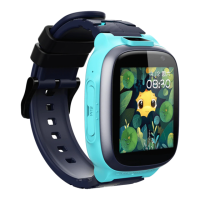
The 360 Kids Watch E1 is a smart wrist phone designed for children, offering a range of features focused on safety, communication, and health monitoring. It functions as a comprehensive device for parents to stay connected with their children and monitor their well-being.
Function Description:
The core functions of the 360 Kids Watch E1 include:
- Pedometer: Monitors the child's physical activity, promoting health.
- Positioning: Accurately tracks the child's location at any time and place, providing peace of mind for parents.
- Large Battery Capacity: Equipped with an 800 mAh battery, ensuring extended usage.
- Camera: Features a 2-megapixel camera for capturing moments.
- HD Screen: A 1.4-inch HD large screen offers clear and vivid color display.
- IPX8 Waterproof: Designed to be waterproof, allowing children to wear it while washing or swimming without needing to take it off.
- Smart PA: Delivers saturated sound for clear audio.
- One-button SOS: A dedicated button for children to quickly ask for help in emergencies.
The device supports 4G network connectivity, requiring a SIM card for full functionality. Key services that need to be activated on the SIM card include calling line identification presentation, internet service (with at least 200 MB data traffic), and 4G service. For new SIM cards, activation can be done by inserting it into the wrist phone or with the help of the carrier. It is crucial to use a standard Nano SIM card and avoid cutting the card independently.
Usage Features:
- Power Button:
- In shutdown state, press and hold to power on.
- In startup state, press to return to the home screen.
- Press and hold for 6 seconds to initiate an SOS alarm.
- SIM Card Loading:
- In shutdown state, use an ejection tool to remove the SIM card tray.
- Place a standard Nano SIM card in the tray with the chip faced up.
- Insert the SIM card tray back into the device.
- App Download and Installation: A QR code is provided to download and install the "360 Kids Smart Watch App," which is essential for managing the watch.
- Activation Process:
- Properly insert the SIM card.
- Ensure sufficient battery. If the watch cannot start due to low battery, charge it for more than 15 minutes using the magnetic charging cable.
- Scan the QR code in the app to activate the Smart watch. If activation fails, check if the watch is powered on and if the SIM card is active and under signal coverage.
- Binding Process: To ensure child safety and enable full phone functions, parents must bind and activate the Smart watch through the app. The first user to activate becomes the admin. Other family members can bind by scanning the QR code in the app and getting approval from the admin, or by being invited by the admin through the app's address book. Admins can grant permissions to other family members. If all admins unbind from the Smart watch, it restores to factory settings.
Important Technical Specifications:
- Battery Capacity: 800 mAh
- Screen Size: 1.4-inch HD
- Camera Resolution: 2 megapixels
- Network Support: 4G
- Waterproof Rating: IPX8 (tested according to IEC60529-2013 standard)
- Operating Temperature Range: -10℃ to 45℃
Maintenance Features:
- General Care:
- Avoid severe shocks or vibrations to prevent damage.
- Stop using the product before cleaning.
- Clean the screen with a clean, dry, and soft cloth.
- Do not disassemble or modify the product or accessories without permission.
- Battery Maintenance:
- Keep the battery charged to extend its lifetime.
- When not in use, charge the product before turning it off and store it in a cool, dry place away from light. Recharge if stored for more than one month.
- Do not disassemble or modify the built-in battery.
- Do not throw the battery into fire or place it in hot areas.
- If the battery shows abnormal phenomena (heating, deformation, discoloration, swelling, liquid leakage), stop use and contact customer service for replacement.
- Charging Precautions:
- Do not allow children to charge the watch or touch charging sockets.
- Disconnect the product from the charger and remove the plug from the power socket after charging or when unnecessary.
- Do not use a damaged charger plug or power cord.
- Avoid charging in high-temperature and high-humidity places like kitchens and bathrooms.
- Do not touch the power cord, product, or charger with wet hands.
- Waterproof Performance:
- The IPX8 rating is not a permanent feature and may deteriorate over time or due to shocks.
- It is not recommended to wear the watch during bathing, sauna, swimming, or hot spring baths.
- Do not replace the SIM card or charge the product when it is wet.
- Avoid placing the watch in environments with flowing water (taps, water guns).
- Do not immerse the watch in water for prolonged periods.
- Wipe sweat from the watch promptly.
- Avoid dropping or shocking the watch, as this can damage waterproof performance.
- Avoid contact with liquids other than clean water (e.g., wine, seawater, saltwater, detergent).
- If the product is used in water, the touch screen and other functions may not work properly.
Safety Issues:
- Medical Devices: The device may interfere with improperly protected medical devices. Consult a doctor or medical equipment manufacturer if concerns arise.
- Cardiac Pacemakers: Keep the watch at least 15.3 cm (6 inches) away from a cardiac pacemaker. Do not place it in a jacket pocket. Turn off the product immediately if interference is suspected.
- Hearing Aids and Cochlear Implants: Digital wireless devices may cause interference. Consult a medical professional or equipment manufacturer if interference occurs.
- Aircraft Use: Turn off the product when the aircraft takes off and during flight to prevent interference with communication systems.
- Operating Environment: Avoid dusty, damp, dirty, or magnetically charged environments. Do not use during thunderstorms.
- Disassembly: Do not attempt to disassemble the product, as improper handling can affect human health or pollute the environment.
- Flammable and Explosive Areas: Do not use the product in gas stations, fuel depots, chemical plants, blasting sites, or potentially explosive atmospheres.
- Electronic Equipment: RF emissions may interfere with poorly shielded electronic equipment, such as in motor vehicles. Consult equipment manufacturers if necessary.
- Children and Pets: Keep all parts (e.g., data cable) out of reach of children and pets to prevent suffocation or other hazards if swallowed.
Hazardous Substance Status:
The manual includes a table detailing toxic and hazardous substances (Lead, Mercury, Cadmium, Hexavalent chromium, Polybrominated biphenyls, Polybrominated Diphenyl Ethers) in various parts (Plastic Casing, PCB Assembly, Power Cord, Battery, Touch Screen). An "O" indicates the substance is below the limit, while an "X" indicates it exceeds the limit. The environmental protection period for components is specified: 10 years for PCB assembly and power cord, and 5 years for the battery.
After-sales Service:
- Warranty Policies: The product includes local maintenance service for one year from the date of purchase. Contact 360 authorized dealers for details.
- Non-warranty Policies: Warranty does not cover:
- Lack of valid purchase/warranty certificate or expired warranty.
- Damage from improper use, maintenance, servicing, or unauthorized disassembling, repairing, or modifying of system software.
- Collision, water intrusion, or bumping.
- Surface damage (outer casing, LCD, antenna) during use, unless due to structural/material factors causing outer casing cracks.
- Damage caused by force majeure, national policy changes, or carrier technology updates/improvements.

 Need help?

 To Next Page
 General