EasyManua.ls Logo

360 E2 - User Manual

360 E2
13 pages
Print Icon
To Next Page IconTo Next Page
Loading...
EN
Instructions
E2
Question and Answer IconNeed help?

Do you have a question about the 360 E2 and is the answer not in the manual?

Summary

Functions of the 360 Kids Watch E2

Large Battery Capacity

Features a large battery capacity of 800 mAh for extended usage.

Positioning Capabilities

Enables accurate real-time positioning of children anytime and anywhere.

Pedometer for Health Tracking

Tracks daily activity, contributing to caring for kids' health.

Dual Cameras for Communication

Supports video chat and allows taking pictures directly from the watch.

IPX8 Waterproof Rating

Offers IPX8 waterproof rating suitable for daily use and protection against water.

One-Button SOS Feature

Provides a quick way for children to ask for help with a single button press.

Smart PA Audio

Delivers saturated sound for an enhanced audio experience.

High-Definition Screen

Features a 1.4-inch HD large screen for clear and vivid visual display.

SIM Card Specifications and Requirements

Button Operation and SIM Card Installation

Power Button Functions

Explains how to use the power button for turning on, returning home, and initiating SOS alarms.

SIM Card Loading Procedure

Step-by-step guide on ejecting the tray, inserting a Nano SIM card, and reinserting the tray.

App Download and Installation Guide

Watch Activation and Binding Processes

Activation Process Steps

Guides through inserting SIM, checking battery, charging, and activating the watch via the app.

Binding Process for Parents

Explains how parents bind the watch via app, manage admin roles, and grant permissions to family members.

Important Safety Introduction

Introduces critical operation instructions and safety information for the 360 Kids Watch.

Safety Precautions and Usage Guidelines

General Safety and Warnings

Emphasizes reading instructions, using original accessories, and avoiding improper use to prevent injury.

Medical Device Interference Concerns

Addresses potential interference with medical devices like pacemakers, hearing aids, and other equipment.

Aircraft Usage Safety

Advises turning off the watch during aircraft takeoff and flight to prevent communication system interference.

Operating Environment and Hazards

Details safe operating temperatures, avoiding hazardous environments, and not disassembling the product.

Battery Safety Precautions

Provides guidelines on handling and charging the built-in battery to prevent damage, heat, or fire.

Waterproof Performance Details

Hazardous Substance Status Description

After-Sales Service and Support

Warranty Policies Overview

Details local maintenance service within one year and conditions for warranty coverage.

Non-Warranty Policy Conditions

Lists situations like improper use, accidents, or unauthorized modifications that void the warranty.

Contact Information

Provides customer service contact details, social media, and website for support.

Declaration of Conformity

Summary

Functions of the 360 Kids Watch E2

Large Battery Capacity

Features a large battery capacity of 800 mAh for extended usage.

Positioning Capabilities

Enables accurate real-time positioning of children anytime and anywhere.

Pedometer for Health Tracking

Tracks daily activity, contributing to caring for kids' health.

Dual Cameras for Communication

Supports video chat and allows taking pictures directly from the watch.

IPX8 Waterproof Rating

Offers IPX8 waterproof rating suitable for daily use and protection against water.

One-Button SOS Feature

Provides a quick way for children to ask for help with a single button press.

Smart PA Audio

Delivers saturated sound for an enhanced audio experience.

High-Definition Screen

Features a 1.4-inch HD large screen for clear and vivid visual display.

SIM Card Specifications and Requirements

Button Operation and SIM Card Installation

Power Button Functions

Explains how to use the power button for turning on, returning home, and initiating SOS alarms.

SIM Card Loading Procedure

Step-by-step guide on ejecting the tray, inserting a Nano SIM card, and reinserting the tray.

App Download and Installation Guide

Watch Activation and Binding Processes

Activation Process Steps

Guides through inserting SIM, checking battery, charging, and activating the watch via the app.

Binding Process for Parents

Explains how parents bind the watch via app, manage admin roles, and grant permissions to family members.

Important Safety Introduction

Introduces critical operation instructions and safety information for the 360 Kids Watch.

Safety Precautions and Usage Guidelines

General Safety and Warnings

Emphasizes reading instructions, using original accessories, and avoiding improper use to prevent injury.

Medical Device Interference Concerns

Addresses potential interference with medical devices like pacemakers, hearing aids, and other equipment.

Aircraft Usage Safety

Advises turning off the watch during aircraft takeoff and flight to prevent communication system interference.

Operating Environment and Hazards

Details safe operating temperatures, avoiding hazardous environments, and not disassembling the product.

Battery Safety Precautions

Provides guidelines on handling and charging the built-in battery to prevent damage, heat, or fire.

Waterproof Performance Details

Hazardous Substance Status Description

After-Sales Service and Support

Warranty Policies Overview

Details local maintenance service within one year and conditions for warranty coverage.

Non-Warranty Policy Conditions

Lists situations like improper use, accidents, or unauthorized modifications that void the warranty.

Contact Information

Provides customer service contact details, social media, and website for support.

Declaration of Conformity

Overview

The 360 Kids Watch E2 is a smart watch phone designed for children, offering a range of features focused on safety, communication, and health monitoring.

Function Description

The watch includes several key functions:
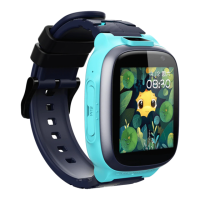
  • Large battery capacity: Equipped with an 800 mAh battery for extended use.
  • Positioning: Accurately tracks the child's location at any time and place.
  • Pedometer: Monitors the child's steps, contributing to health tracking.
  • Dual cameras: Supports video chat and allows the child to take pictures.
  • IPX8 waterproof: Designed for daily use, offering protection against water.
  • One-button SOS: A dedicated button for the child to ask for help in emergencies.
  • Smart PA: Provides saturated sound for clear audio.
  • HD screen: Features a 1.4-inch HD large screen for clear and vivid visuals.

Important Technical Specifications

  • Network: Supports 4G network connectivity.
  • Battery: 800 mAh capacity.
  • Screen: 1.4-inch HD display.
  • Waterproof rating: IPX8.
  • SIM card type: Requires a standard Nano SIM card.
  • Operating temperature range: -10 °C to 45 °C.
  • SAR value: Highest SAR value reported for this device type when tested next to the mouth is 1.70 W/kg (legal limit: 4 W/kg (10g)), and when properly worn on the body is 1.70 W/kg (legal limit: 4 W/kg (10g)).
  • RF standards compliance: Complies with CE RF standards, specifically Directive 2014/53/EU.
  • Transmitting power:
    • GSM900: 31.88 dBm
    • GSM1800: 28.98 dBm
    • WCDMA B1: 22.71 dBm
    • WCDMA B8: 22.20 dBm
    • LTE B1: 22.19 dBm
    • LTE B3: 22.13 dBm
    • LTE B7: 22.10 dBm
    • LTE B8: 22.02 dBm
    • LTE B20: 21.97 dBm
    • LTE B38: 21.96 dBm
    • LTE B40: 21.18 dBm
    • BT: 7.1 dBm
    • BT LE: 1.7 dBm
    • 2.4 b/g/n: 16 dBm, 13 dBm, 11 dBm

Usage Features

  • SIM Card Installation:
    1. In shutdown state, use an ejection tool to remove the SIM card tray.
    2. Place a standard Nano SIM card (chip faced up) into the tray.
    3. Insert the SIM card tray back into the device.
    • Important: Do not cut the SIM card independently; use a standard Nano card. Ensure calling line identification presentation, internet service (with 200 MB+ data), and 4G service are activated. For new SIM cards, activate them by inserting into the watch or with carrier assistance.
  • Power Button Functions:
    • Power on: Press and hold the Power button in shutdown state.
    • Return to home screen: Press the Power button in startup state.
    • SOS alarm: Press and hold the Power button for 6 seconds.
  • App Download and Installation: Scan the provided QR code to download and install the 360 Kids Watch App.
  • Activation Process:
    1. Insert the SIM card properly.
    2. Ensure sufficient battery. If low, charge for at least 15 minutes using the magnetic charging cable.
    3. Scan the QR code in the app to activate the watch.
    • Troubleshooting Activation: Check if the watch is powered on and if the SIM card is active and within signal coverage.
  • Binding Process:
    • Parents must bind and activate the watch through the app to enable full phone functions. The first user to activate becomes the admin.
    • Other users can bind by:
      1. Scanning the QR code in the app and getting admin approval.
      2. Being invited by the admin through the app's address book.
    • The admin can grant admin permissions to other family members. If all admins unbind, the watch restores to factory settings.

Maintenance Features

  • General Care:
    • Use original accessories to prevent damage.
    • Do not disassemble or modify the product or its casing without permission.
    • Avoid severe shocks or vibrations.
    • Clean the screen with a clean, dry, and soft cloth.
    • Stop using the product before cleaning and maintenance.
  • Battery Care:
    • Keep the battery charged to extend its lifetime.
    • If not in use, charge before turning off and store in a cool, dry place away from light. Recharge if stored for over one month.
    • Disconnect from charger once charging is complete or unnecessary.
    • Do not use a damaged charger plug or power cord.
    • Do not charge in high temperature or high humidity areas (e.g., kitchens, bathrooms).
    • Do not disassemble or modify the built-in battery.
    • Caution: Risk of explosion if the battery is replaced with an incorrect type. Contact customer support for battery issues.
  • Waterproof Performance:
    • The IPX8 rating is not a permanent feature and may deteriorate over time or due to shocks.
    • Recommendations:
      • Do not wear during bathing, sauna, swimming, or hot spring baths.
      • Do not replace the SIM card or charge when wet.
      • Avoid placing in environments with flowing water (taps, water guns).
      • Do not immerse in water for long periods.
      • Wipe off sweat promptly.
      • Avoid dropping or shocking the watch.
      • Avoid contact with liquids other than clean water (e.g., wine, seawater, detergents).
      • If used in water, the touch screen and other functions may not work properly.
  • Environmental Considerations:
    • Avoid dusty, damp, dirty, or magnetic environments.
    • Do not use during thunderstorms.
    • Operate within -10 °C to 45 °C.
    • Do not use in flammable or explosive areas (gas stations, fuel depots, chemical plants, etc.).
  • Medical Device Interference:
    • Radio transmitting devices (including this watch) may interfere with improperly protected medical devices. Consult a doctor or medical equipment manufacturer if uncertain.
    • Cardiac Pacemakers: Keep the watch at least 15.3 cm (6 inches) away from pacemakers when enabled. Do not place in jacket pockets; use on the opposite side of the pacemaker. Turn off immediately if interference is suspected.
    • Hearing Aids and Cochlear Implants: Digital wireless devices may cause interference. Consult a medical professional if this occurs.
    • Other Medical Equipment: Consult a medical professional or equipment manufacturer to determine if the equipment can shield surrounding RF signals.
  • Aircraft Use: Turn off the product when the aircraft takes off and do not use during flight to prevent interference with communication systems.
  • Children and Pets: Keep all parts, especially the data cable, out of reach to prevent suffocation or ingestion. Do not allow children to charge wrist phones or touch charging sockets to prevent electric shock.

Warranty and Support

  • Warranty Policies: Local maintenance service within one year from purchase. Contact 360 authorized dealers for details.
  • Non-Warranty Policies:
    • No valid purchase/warranty certificate, or expired warranty.
    • Damage due to improper use, maintenance, servicing in violation of the manual, or malfunctions from unauthorized disassembling/repairing/modifying system software.
    • Collision, water intrusion, bumping.
    • Surface damage (outer casing, LCD, antenna) during use, except for structural/material cracks.
    • Damage from force majeure or changes in national policies/carrier technology.
  • Customer Service: zh-service@360.cn
  • Social Media: Facebook@360smartlife, Youtube@360smartlife, Instagram@360smartlife
  • Website: smart.360.com

360 E2 Specifications

General IconGeneral
Brand360
ModelE2
CategoryWatch
LanguageEnglish

Related product manuals