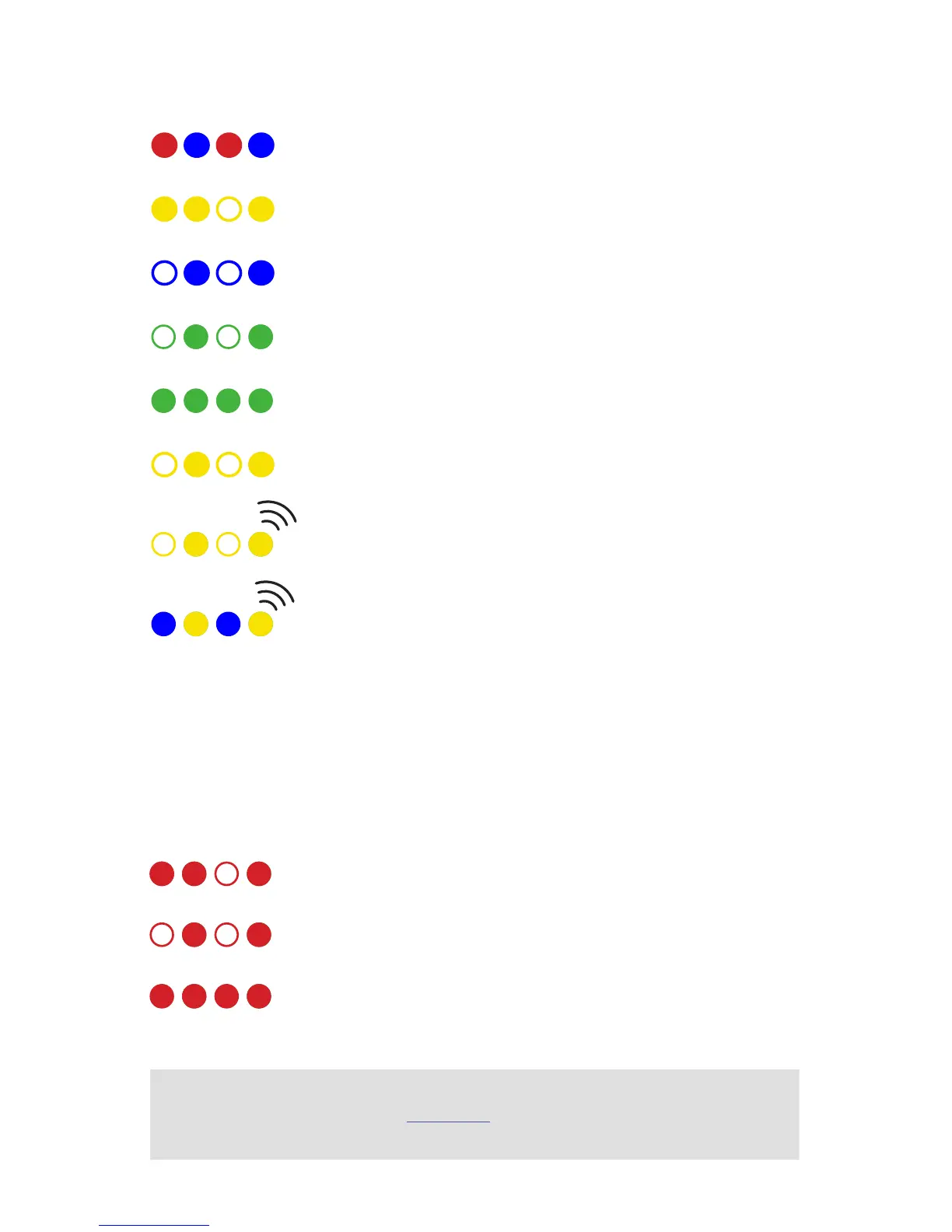
LED MEANINGS
Flashing red and blue: initializing. Please wait.
Double flashing yellow: error. System refuses to arm.
Flashing blue: disarmed, searching for GPS. Autonomous, loiter, and return-to-launch
modes require GPS lock.
Flashing green: disarmed, GPS lock acquired. Ready to arm. Quick double tone when
disarming from the armed state.
Solid green plus single long tone: armed and ready to fly!
Flashing yellow: RC failsafe activated.
Flashing yellow plus quick repeating tone: battery failsafe activated.
Flashing yellow and blue plus high-high-high-low tone: GPS glitch or GPS failsafe
activated.
Quick, constant blinking: performing system check. Please wait.
Solid: ready to arm. Proceed to the arming procedure.
Intermittent blinking: system ready. Press the safety button to activate.
SAFETY SWITCH MEANINGS
Learn more
about LED meanings and buzzer tones at 3dr.com/learn.


 To Next Page