The SlideDriver is a 3-axis control element designed for precise and rapid movement of a microscope stage, offering sensitive positioning capabilities in the sub-µ range. Its adjustable coaxial drive allows for ergonomic adjustment of both friction and height, enhancing user comfort and control. The device features symmetrically arranged function keys on both sides, making it suitable for both left-handed and right-handed operation.
Function Description
The SlideDriver facilitates the movement of samples along the X and Y axes and provides fine adjustment of the Z-focus. The coaxial drive, consisting of the Y-knob and X-knob, allows for movement in the Y and X directions, respectively. The Z-stack wheel is dedicated to fine-tuning the Z-focus, enabling users to achieve the desired alignment by turning it clockwise or counter-clockwise. For coarse adjustment of the Z-focus, a ratchet wheel is provided, offering 12 predefined settings. The current alignment of the ratchet wheel can be read from either the right or left side of the SlideDriver, below the arrow.
The device also incorporates several buttons to streamline operation:
- Next slide button: Moves to the next slide.
- Previous slide button: Moves to the previous slide.
- Annotation button: Creates an annotation.
These buttons are positioned on both the left and right sides and are switched in parallel, ensuring consistent functionality regardless of the user's dominant hand.
Important Technical Specifications
While specific numerical technical specifications like resolution or travel range are not explicitly detailed in the provided manual excerpts, the SlideDriver is characterized by:
- High-resolution, proportional positioning: This indicates its ability to achieve very fine and accurate movements.
- Fast and sensitive positioning across the entire travel range: Suggests efficient and responsive control over the stage's movement.
- 3-axis control element: Controls movement along X, Y, and Z axes.
- 12 predefined settings for Z-focus coarse adjustment: Provided by the ratchet wheel.
- USB port: For connectivity, indicating digital control and power.
Usage Features
- Ergonomic Design: The adjustable coaxial drive for friction and height, along with the symmetrical button layout, contributes to an ergonomic user experience, reducing strain during prolonged use.
- Coaxial Drive Adjustment:
- Height Adjustment: The coaxial drive's height is vertically adjustable. To change the vertical position of the X- and Y-knob, users slide them along the drive axis into the designated position.
- Friction Adjustment (Y-axis): To reduce friction of the Y-knob, firmly hold the Y-knob (1) and adjust the knurled bar (2) clockwise. To increase friction, adjust anti-clockwise.
- Friction Adjustment (X-axis): To reduce friction of the X-knob, shift the X-knob (3) downwards as far as it will go. Then, firmly hold the X-knob (3) and adjust the knurled bar (4) clockwise. To increase friction, adjust anti-clockwise.
- Z-stack Wheel Usage: Turn the Z-stack wheel clockwise or counter-clockwise for fine adjustment of the Z-focus until the desired alignment is achieved.
- Ratchet Wheel Usage: Turn the ratchet wheel to the right or left side to select one of the 12 predefined settings for coarse Z-focus adjustment.
- Button Functionality: The next slide, previous slide, and annotation buttons provide quick access to common operations, enhancing workflow efficiency.
- Connectivity: The device connects via a USB port, suggesting plug-and-play functionality with compatible systems.
Maintenance Features
- Cleaning: The SlideDriver should be cleaned with a lint-free cleaning cloth. For increased pollution, a slightly moistened cloth with water or a mild, solvent-free disinfection/cleaning agent can be used.
- Liquid Entry Precaution: It is crucial to ensure that no liquids enter the inside of the SlideDriver. Users must protect the connector on the rear side of the SlideDriver from liquids to prevent damage.
- Support: For any irregularities or malfunctions, users are advised to contact 3DHISTECH support via email.

 Need help?
 General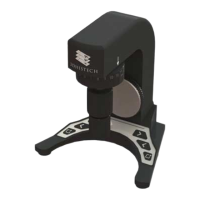

 To Next Page