It is recommended you follow the steps outlined below to successfully conduct the upgrade from XT-1 Basestation to G5 Basestation.
1. Disconnect and Remove XT-1 Basestation off the wall
2. Mount G5 Basestation to the wall
3. Re-wire Lane1 - Speaker, Microphone, Loop
4. Install Vehicle Detector Board and any External Antennas.
5. Timer Greet Event
6. Re-wire any external button to change Order Taking Modes, SPLIT/CROSS, or DAY/NIGHT
7. Alert Message Re-wiring
8. Power up the G5 Basestation
9. Register (G5 and/or XT-1) Headsets
10. Connecting to G5 Basestation Web Server (for configuration)
11. Configuring G5 Basestation for Store Operation, Greeter, Alert and Reminder functionality
12. Save the current G5 Basestation settings
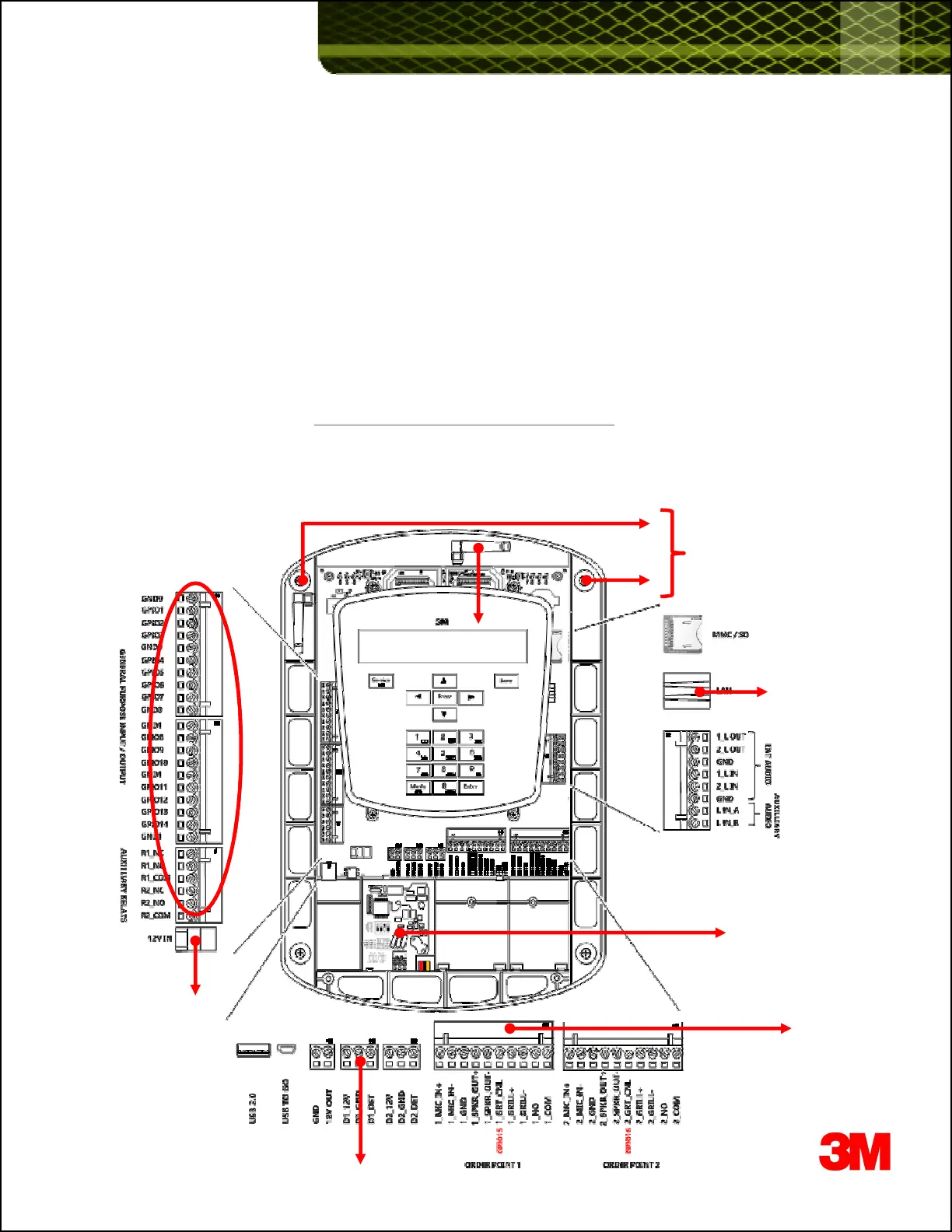
G5 Basestation Wiring Terminals - Reference
The labels on the illustration below correspond to the recommended steps listed above, to properly migrate from XY-1 Basestation to G5
Basestation, outlined in the remainder of this document.
4 & 5
1
2
2
3
6
7
3
2














 To Next Page