13
3.1.3 EXTERNAL BATTERY CARRIER
The external battery carrier DC2032 can be mounted on the back of the main unit. It offers extra energy for longer usage
time. Any standard batteries (6 x 1.5 Volts, type AA) or rechargeable batteries (6 x 1.2 Volts, type AA) can be used.
Notice: It is recommended to extend working time of a main unit used as a portable base, by adding extra energy from
batteries in a battery carrier.
3.1.3.1 MOUNTING OF EXTERNAL BATTERY CARRIER
Remove the attachment clip DC2071, if it is mounted on the back of the main unit.
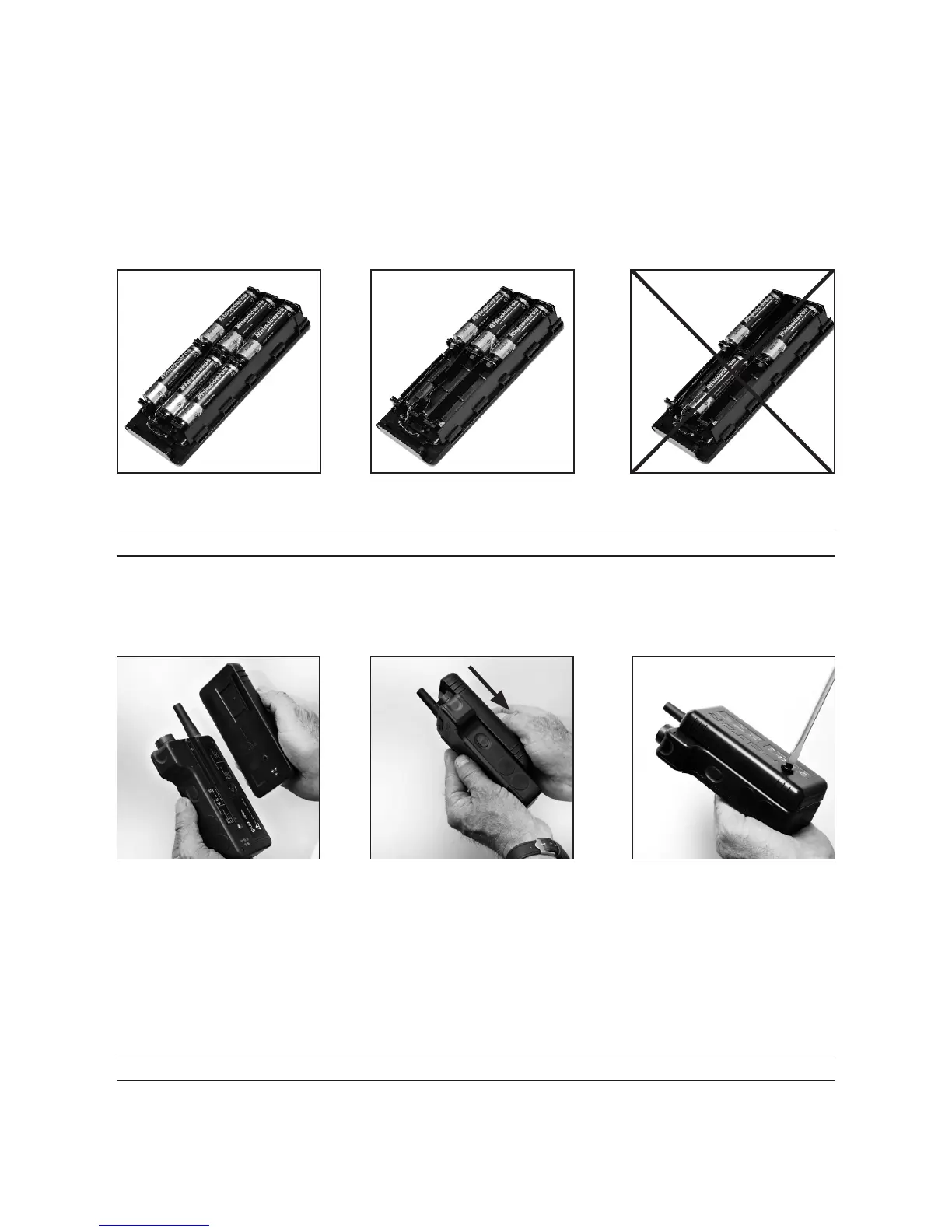
Open the lid and place 3 or 6 batteries inside the battery carrier DC2032, according to the gures below.
Fig.11 Fig.12 Fig.13
NOTICE! Check that the batteries are correctly mounted before closing the battery carrier!
Mount the battery carrier on the main unit according to the gures below.
A voice message “EXTERNAL BATTERY“ indicates that the external battery is in use.
Tighten the screw with a suitable tool. (Caution: When tightening the screw, do not use your ngernail, it can be broken!)
Fig.21 Fig.22 Fig.23
3.1.3.2 CHANGE OF BATTERIES IN EXTERNAL BATTERY CARRIER
Remove the battery carrier according to gures above in the reversed order; Fig.23, g.22, g.21. (Caution: When
loosening the screw, do not use your ngernail, it can be broken!)
Remove the batteries from the battery carrier DC2032.
Place 3 or 6 charged batteries inside the battery carrier DC2032,
NOTICE! Check that the batteries are correctly mounted before closing the battery carrier!
Mount the battery carrier on the main unit according to the gures below.
A voice message “EXTERNAL BATTERY“ indicates that the external battery is in use.


 To Next Page