44
Item Description
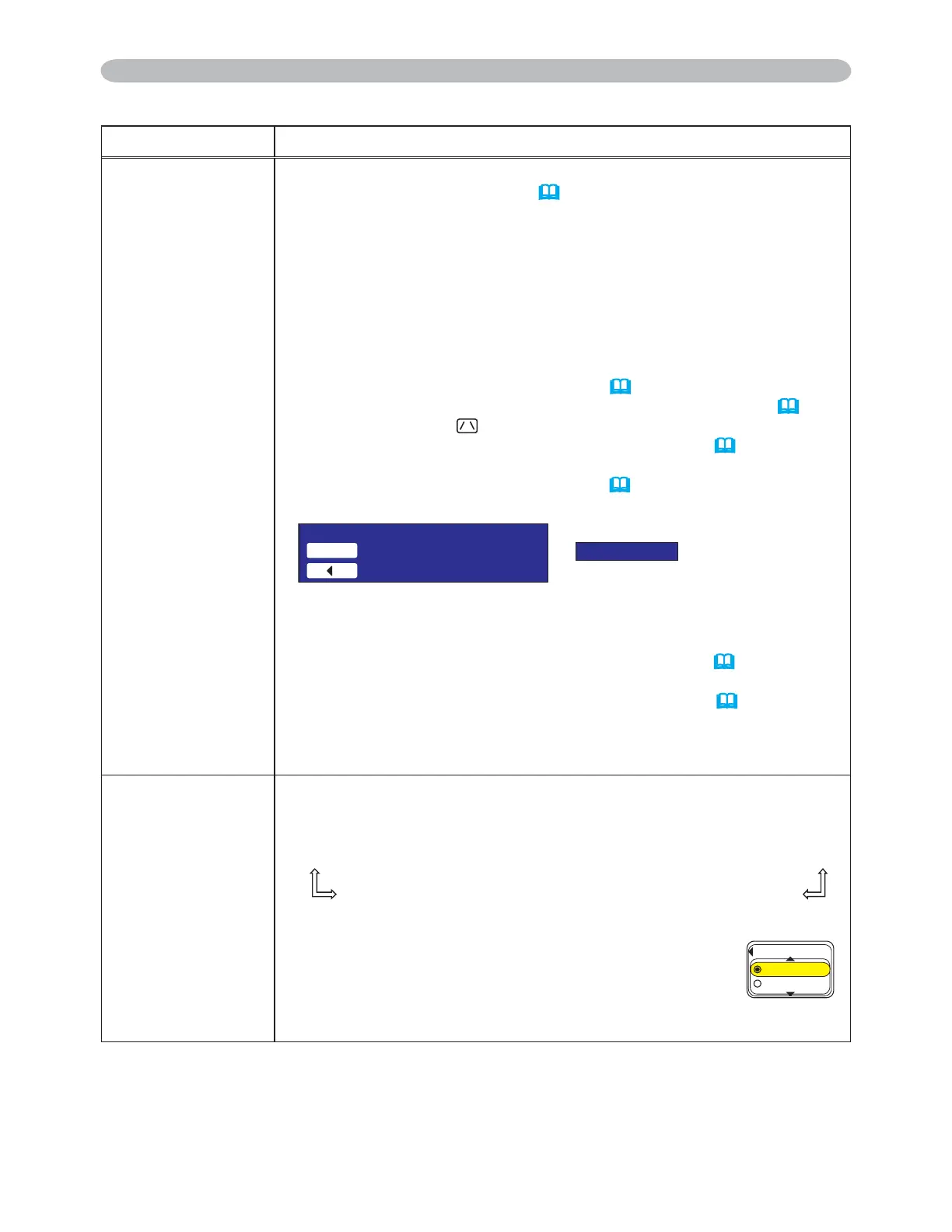
MY BUTTON
This item is to assign one of the following function to MY BUTTON
1 and 2 on the remote control
(
6).
&KRRVHRURQWKH0<%87721PHQXXVLQJWKHŻŹEXWWRQ
¿UVW7KHQXVLQJWKHŸźEXWWRQVVHWVRQHRIWKHIROORZLQJIXQFWLRQV
to the chosen button.
• RGB1: Sets port to RGB1.
• RGB2: Sets port to RGB2.
• M1-D: Sets port to M1-D.
• COMPONENT: Sets port to COMPONENT (Y, C
B/PB, CR/PR).
• S-VIDEO: Sets port to S-VIDEO.
• VIDEO: Sets port to VIDEO.
• e-SHOT: Displays the e-SHOT menu (
54).
•
INFORMATION: Displays a dialog of INPUT INFORMATION
(
46).
• AUTO KEYSTONE
EXECUTE:
Performs automatic keystone distortion correction (
35).
• MY MEMORY:
Loads one of adjustment data stored (
28).
•
When the current adjustment is not saved to memory a dialog is displayed.
,I\RXZDQWWRNHHSWKHFXUUHQWDGMXVWPHQWSOHDVHSUHVVWKHŻ
button to quit. Otherwise the current adjusted condition will be lost
by loading a data.
• PICTURE MODE: Changes the PICTURE MODE (
24).
• FILTER RESET:
'LVSOD\VWKH¿OWHUWLPHUHVHWFRQ¿UPDWLRQGLDORJXH(
43).
• ACTIVE IRIS: Changes the active iris mode.
• VOLUME+: Set the volume up.
• VOLUME-: Set the volume down.
SERVICE
Selecting this item displays the SERVICE menu.
6HOHFWDQLWHPXVLQJWKHŸźEXWWRQVDQGSUHVVWKHŹEXWWRQRU
the ENTER button on the remote control to execute the item.
FAN SPEED
Ù
AUTO ADJUST
Ù
GHOST
Ù
FILTER MESSAGE
Ù
LENS TYPE
Ù
KEY LOCK
FACTORY RESET
Ù
INFORMATION
Ù
REMOTE FREQ.
Ù
REMOTE RECEIV.
FAN SPEED
8VLQJWKHŸźEXWWRQVVZLWFKHVWKHURWDWLRQVSHHG
of the cooling fans. The HIGH is the mode for use at
highlands etc. Note that the projector is noisier when
the HIGH is selected.
HIGH
Ù
NORMAL
OPTION Menu (continued)
OPTION Menu
6GORQTCT[EQPFKVKQP
/'/14;4GECNNUCXGFRCTCOGVGTU
3WKV
0QUCXGFFCVC
(#052''&
*+)*
014/#.
(continued on next page)
3M™ Digital Projector X90
© 3M 2007. All Rights Reserved.



 To Next Page