EasyManua.ls Logo

4DRC 4D-F8 - Page 9

4DRC 4D-F8
16 pages
Print Icon
To Next Page IconTo Next Page
To Previous Page IconTo Previous Page
Loading...
Figure
2
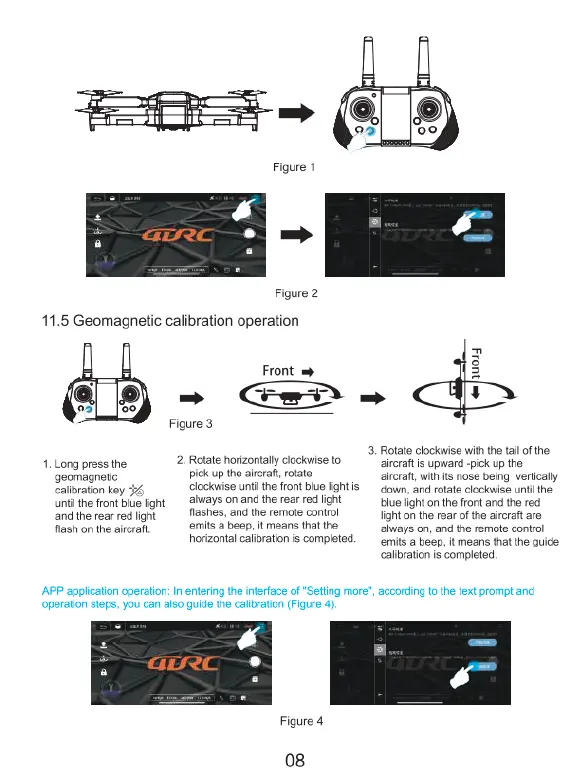
11.5
Geomagnetic
calibration
operation
<8
-
w01y
3.
Rotate
lockwise
with
the
tail
of the:
1.
Long
press
the
2.
Rotate
horizontally
clockwise
to
aircraft
is
upward
-pick
up
the
geomagnetic
pick
up
the
airraf,
otale
aitcrat,
wih
i
nose
being
verlcally
calibration key
clockwise
unti
the
front
blue
light
s
gown, and
rotate
clockwise
unti
the.
until
the
front
blue
light
ahways
on
and
the
rear
red
light
blue
light
on
the
front
and
the red
and
the
rear
red
light
flashes,
and
the
remote
control
light
on
the
rear
of
the
aircraft
are
flash
on
the
aircraft.
emits
a
beep
It
means
that
the
always
on,
and
the
remote
control
horizontal
calibration
is
completed.
emits
a
beep,
it
means
that
the
guide
calbration
s
completed.
APP
application
operation:
In
entering
the
interface
of
"Setling
more,
according
to
the
text
prompt
and
operation
steps,
you
can
also
guide
the
calibration
(Figure
4)
Figure
4
08

Related product manuals