Open '4DRC
PRO" software
"
441
Select Go to enter the
control interface
13. Introduction of remote control function and operation:
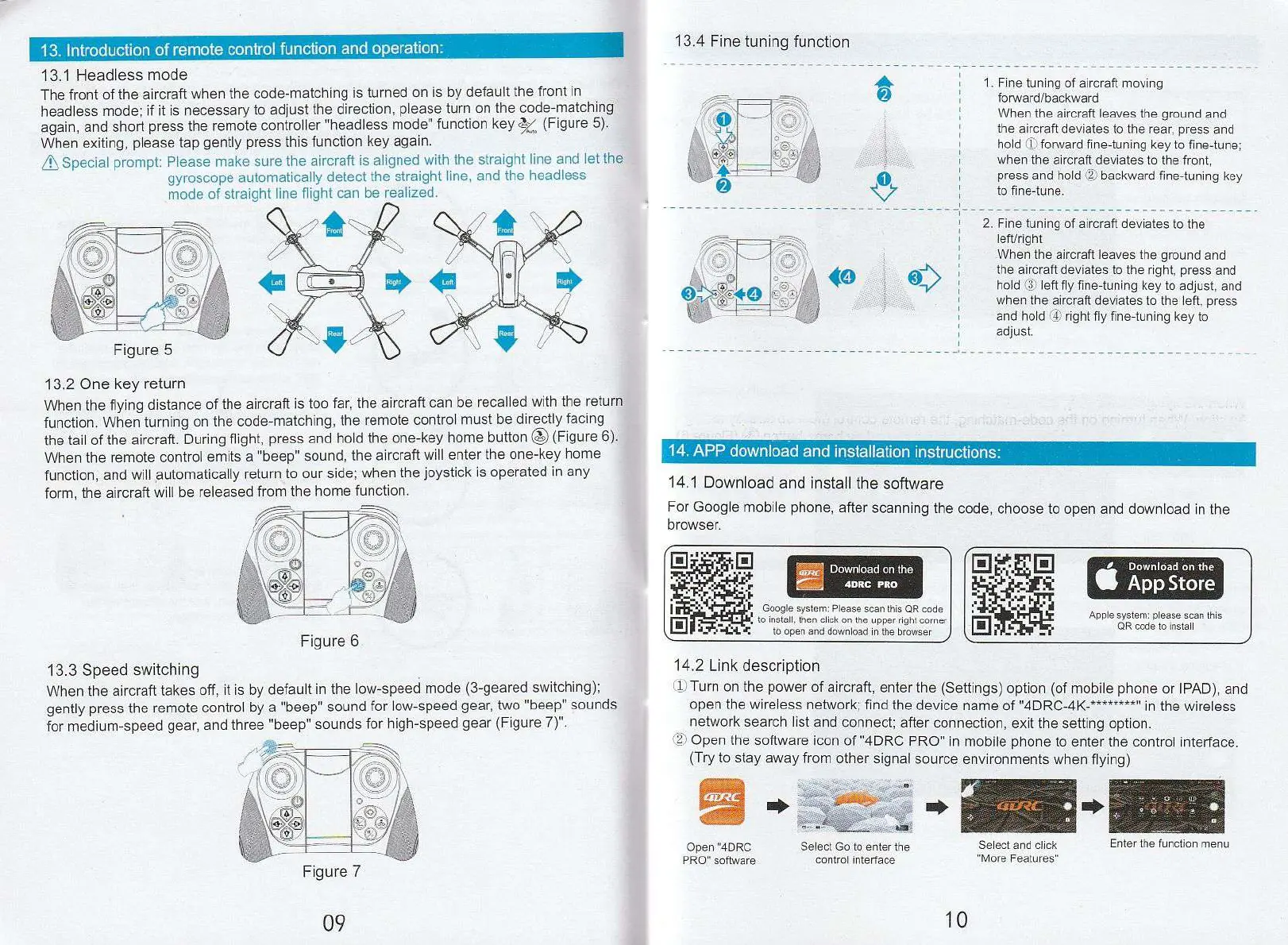
13.1 Headless mode
The front of the aircraft when the code-matching is turned on is by default the front in
headless mode; if it is necessary to adjust the direction, please turn on the code-matching
again, and short press the remote controller "headless mode" function key k (Figure 5).
When exiting, please tap gently press this function key again.
Special prompt: Please make sure the aircraft is aligned with the straight line and let the
gyroscope automatically detect the straight line, and the headless
mode of straight line flight can be realized.
1"
.
1
11
,„
l
opV:
411
Figure 5
13.2 One key return
When the flying distance of the aircraft is too far, the aircraft can be recalled with the return
function. When turning on the code-matching, the remote control must be directly facing
the tail of the aircraft. During flight, press and hold the one-key home button 0 (Figure 6).
When the remote control emits a ''beep" sound, the aircraft will enter the one-key home
function, and will automatically return to our side; when the joystick is operated in any
form, the aircraft will be released from the home function.
Figure 6
13.3 Speed switching
When the aircraft takes off, it is by default in the low-speed mode (3-geared switching);
gently press the remote control by a "beep" sound for low-speed gear, two "beep" sounds
for medium-speed gear, and three "beep" sounds for high-speed gear (Figure 7)".
Figure 7
13.4 Fine tuning function
14. APP
download and installation instructions:
14.1 Download and install the software
For Google mobile phone, after scanning the code, choose to open and download in the
browser.
1
Download on the
j
4DRC PRO
Google system: Please scan this OR code
to install, then click on the upper right corner
to open and download in the browser )
Download on the
App Store
Apple system: please scan this
OR code to install
14.2 Link description
(1) Turn on the power of aircraft, enter the (Settings) option (of mobile phone or IPAD), and
open the wireless network; find the device name of "4DRC-4K-********" in the wireless
network search list and connect; after connection, exit the setting option.
Open the software icon of "4DRC PRO" in mobile phone to enter the control interface.
(Try to stay away from other signal source environments when flying)
Select and click
"More Features'
1.
Fine tuning of aircraft moving
forwardfbackward
When the aircraft leaves the ground and
the aircraft deviates to the rear, press and
hold 11 forward fine-tuning key to fine-tune;
when the aircraft deviates to the front,
press and hold
backward fine-tuning key
to fine-tune.
2.
Fine tuning of aircraft deviates to the
leftiright
When the aircraft leaves the ground and
the aircraft deviates to the right, press and
hold '3J left fly fine-tuning key to adjust, and
when the aircraft deviates to the left, press
and hold
'4,
right fly fine-tuning key to
adjust.
Enter the function menu


 To Next Page
 Loading...