EasyManua.ls Logo

5th Wheel M2 - User Manual

5th Wheel M2
18 pages
Print Icon
To Next Page IconTo Next Page
Loading...
The text and logo of 5TH WHEEL are trademarks or registered trademarks of enterprises affiliated with Invanti. Other company,
product or service names mentioned may be trademarks or registered trademarks of their respective owners.
The illustrations and function descriptions in this user manual are for illustration purposes and reference only, and the products
are subject to the real product. The mentioned technical performance indicators are based on the specific experimental
environment, and the actual indicators may vary depending on the setting and environment. This product needs to be used
with mobile phones or other smart devices. The realization of all functions of this product requires network support, with the
network fee being subject to the supplier’s service rate. This product is only used to assist safety management and cannot
replace other safety measures. Do not use this product for any illegal purpose. Some services are provided and supported by
third parties, which may change at any time. Invanti does not provide any guarantee for third-party services. Please read the
terms of the third-party service and privacy policy carefully before use.
User's Manual of 5th Wheel Electric Scooter M2
The picture is for reference only.
Before using the product, please read this manual.
V1.0
IMPORTANT! Read carefully and keep for future reference.
Original Instructions
Use Camera or QR Scanner to Scan
Or Visit: https://5thwheel.afterservice.vip
© 2021 Invanti (Beijing) Technology Co., Ltd all rights reserved.

Other manuals for 5th Wheel M2

Question and Answer IconNeed help?

Do you have a question about the 5th Wheel M2 and is the answer not in the manual?

Summary

Safety Precautions

General Riding Safety Rules

Covers adult use, protective gear, legal riding, initial practice, safe handling, and environmental limits.

Riding Environment and Conditions

Guidelines for riding on various surfaces, in water, bad weather, and managing loads.

User, Braking, and Operational Safety

Addresses user restrictions, braking in wet conditions, choking hazards, skill acquisition, visibility, and proper usage.

Maintenance and Road Etiquette

Covers brake heat caution, prohibition of modifications, footwear requirements, and adherence to traffic rules.

Accessories and Scooter States

Included Accessories List

Lists all items included in the product package, such as manuals, screws, tools, and power adapter.

Scooter States (Upright and Folded)

Illustrates the electric scooter in its upright riding position and its folded configuration.

Unfolding, Folding, and Carrying

Unfolding Procedure

Step-by-step instructions for unfolding the electric scooter and connecting components.

Folding Procedure

Detailed guide on how to properly fold the electric scooter for storage or transport.

How to Carry the Folded Scooter

Guidance on how to carry the scooter after it has been folded, using one or both hands.

Riding Preparations and Operations

Pre-Ride Preparations

Steps to take before riding, including choosing a location and unfolding the scooter.

Starting and Riding the Scooter

Instructions on how to turn on the scooter, mount, accelerate, and control speed.

Parking Guidelines

Procedures for safely parking the scooter using the left brake or emergency braking.

Control System and Indicators

Handlebar Controls Identification

Identifies key controls on the handlebar: Power, Gear, Throttle, Brakes, LED Display, Bell.

LED Display Indicators

Explains indicators for speed, gear, battery, cruise control, and alerts on the LED display.

Scooter Operation Controls

Details on power switch, gear selection, speed control via throttle, and brake operation.

Safety Features and Settings

Covers emergency braking, tyre pressure, cruise control, and noise emission.

Indicator and Error Information

LED Power and Cruise Control Indicators

Explains power level indicators and the status of cruise control indicators.

Headlight and Gear Indicators

Describes how headlight and gear selection are indicated by LEDs.

Error Code Explanations

Details error codes (E1-E6) and their corresponding causes and solutions.

Battery and Charging

Charger Functionality and Safety

Details the charger's protection features, charging time, and exclusions for damage.

Charging Instructions

Step-by-step guide for charging the scooter's battery, including indicator meanings.

Kinetic Energy Recovery System

Explains how kinetic energy is recovered during braking to enhance endurance.

Battery Care and Maintenance

Provides information on battery capacity, charging frequency, and long-term storage.

App Connectivity and Vehicle Inspection

Downloading and Connecting the App

Instructions for downloading the app, turning on the scooter, and completing the connection.

App Interface Overview

Description of the app's main features and displayed information like speed, gear, and battery.

Vehicle Inspection and Locking Function

Guidance on vehicle inspection and the functionality of the lock switch within the app.

Maintenance and Troubleshooting

Lubrication and Battery Storage

Recommendations for lubricating the scooter and proper battery storage during non-use.

Cleaning and Routine Inspections

Guidelines for cleaning the scooter and performing regular checks on its components.

Troubleshooting Common Issues

Solutions for common problems like black display, inconsistent values, and product malfunction.

Braking Distance and Screw Tightness

Information on measured braking distance and addressing loose handlebar screws.

Commissioning and Specifications

Handlebar and Disc Brake Commissioning

Instructions for adjusting and tightening the handlebar and disc brake components.

Product Specifications

Detailed technical specifications including dimensions, weight, speed, range, and power.

Regulatory and Legal Information

Compliance Certifications

Details on certifications like CSA, UN/DOT 38.3, and FCC compliance statements.

EU Compliance and WEEE Disposal

Information regarding EU compliance, waste electrical and electronic equipment disposal, and recycling.

EU Battery Recycling Information

Guidance on recycling battery compartments in accordance with EU directives.

Trademark and Legal Statements

Information on trademarks, patents, and manufacturer rights for the electric scooter.

Overview

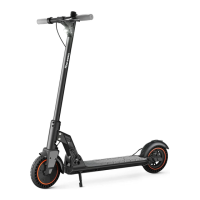
The device is the 5TH WHEEL Electric Scooter M2, model 5LCHM02, designed for adults. It is an electric scooter intended for personal transportation on stable and smooth road surfaces.

Function Description

The M2 electric scooter provides personal mobility with an electric motor, controlled via a thumb accelerator and a brake lever. It features a built-in shock absorption system for a smoother ride and a kinetic energy recovery system that converts braking energy into electrical energy, extending endurance and enhancing emergency braking. The scooter can be connected to a mobile app for additional control and information display.
Important Technical Specifications

  • Model: 5LCHM02
  • Dimensions:
    • Upright: Approx. 43 x 43 x 20 inches (L x W x H)
    • Folded: Approx. 43 x 16 x 28 inches (L x W x H)
  • Net Weight: Approx. 33 lbs
  • Max Load: 220 lbs
  • Max Speed: About 15.5 mph
  • Travel Distance: 16-19 miles (dependent on environmental factors, angle, speed, driving habits)
  • Max Incline: Approx. 14°
  • Applicable Terrain: Stable and smooth road surfaces, with bumps less than 2cm and depressions less than 3cm.
  • Tires: 8.5-inch Honeycomb Tire (Tire pressure range: 2.1-2.8 Kpa)
  • Damping System: Spring Damping + Concealed Damping + Tire Damping
  • Dustproof and Waterproof Grade: IP54
  • Braking System: Motor brake + Disc brake + Foot brake
  • LED Display: Shows Speed, Mileage, Gear
  • Lighting System: LED high-brightness headlight
  • Motor Power: 350W
  • Charger Rated Input Voltage: 100V-240VAC 50/60Hz
  • Lithium Battery: 36V-7.5AH
  • Charging Time: 4-5 hours
  • Certifications: ANSI/CAN /UL-2272, UN/DOT 38.3 (battery), FCC Part 15, EU Compliance (WEEE, Battery Recycling, RoHS).
  • Noise Emission: A-weighted emission sound pressure level less than 70 dB(A).
  • Mechanical Vibrations: Less than 2.5 m/s².

Usage Features

  • Safety First: Users are advised to wear a safety helmet and protective equipment. The scooter is designed for single adult use and should not be ridden with children or others. Riding in unsafe or illegal places is prohibited.
  • Riding Practice: First-time users should practice in open spaces, avoiding traffic lines until familiar with operation.
  • Speed Control: Recommended speed is within 15.5 mph. For night riding, turn on lights and control speed at 9.3 mph or below.
  • Obstacle Avoidance: Avoid crossing bumps higher than 3cm (0.39 inches) and potholes lower than 3cm (0.39 inches).
  • Environmental Conditions: Do not ride in environments below 23°F (-5°C), on slippery roads (ice, oil), or immerse in puddles deeper than 4cm (1.57 inches). Avoid riding in rainy, snowy, windy, or other bad weather.
  • Weight Limit: Do not exceed the maximum weight capacity of 220 lbs.
  • Handlebar Load: Do not attach any load to the handlebar, as it affects vehicle stability.
  • Parking: Engage the kickstand when not in use. Do not park on slopes.
  • User Height/Age: Minimum height 1.4m, maximum height 2.2m. Minimum age 13 years old, maximum age 70 years old.
  • Braking: Braking performance deteriorates in wet conditions; slow down and brake early. The left brake lever provides immediate stopping. In emergencies, stepping on the rear brake activates both front wheel electronic brake and rear wheel friction brake.
  • Non-Zero Start: The throttle only takes effect after the scooter slides forward a certain distance.
  • Folding/Unfolding: The scooter can be easily unfolded for use and folded for carrying. It is recommended to perform folding operations when the scooter is powered off.
  • Control System:
    • Power Switch: Short press for 1 second to turn on, long press for 3 seconds to turn off.
    • Gear Setting: Double-press the power button to switch between Level 1 (pedestrian mode, max 6 km/h), Level 2 (max 16 km/h), and Level 3 (max 25 km/h).
    • LED Headlight: Click the LED headlight switch to turn it on after powering on.
    • Cruise Control: Can be enabled via the mini program. Once enabled, the scooter maintains a constant speed, allowing the user to release the thumb accelerator. Holding the left brake lever disables cruise control.
  • App Connectivity: Download the 5TH WHEEL app, turn on the scooter, register an account, and bind the vehicle by scanning a barcode. The app displays connection status, real-time speed, total mileage, battery indicator, lock switch, speed unit, electronic brake strength, LED display backlight adjustment, cruise control settings, and vehicle self-inspection.

Maintenance Features

  • Lubrication: Add a small amount of white grease or lubricant to the folded part every six months.
  • Screw Tightening: Check for screw loosening every three months and tighten as needed.
  • Battery Charging: Fully charge the battery before first use. The battery can be charged at any time without damage. If unused for long periods, charge every three months. The dedicated charger has charging protection and automatically powers off when fully charged (4-5 hours).
  • Storage: Avoid direct sunlight or humid places.
  • Cleaning: Wipe the body with a damp cloth. For stubborn stains, use toothpaste and a toothbrush, then wipe clean. Do not use alcohol, gasoline, kerosene, or corrosive solvents. Do not wash with a high-pressure water spray. Ensure the scooter is off, charging cable unplugged, and rubber flap closed during cleaning to prevent electric shock.
  • Routine Inspection:
    • Confirm the folding mechanism is locked before riding.
    • Check tire wear; contact an authorized dealer if replacement is needed.
    • Check brake pad wear; contact an authorized dealer if it affects the brake system.
    • Note that self-tightened screws may lose effectiveness after several tightenings.
  • Troubleshooting (Error Indication): The display will flash E1-E6 for various abnormalities (Communication Fault, Brake Failure, Throttle Failure, Motor Fault, Controller Failure, Overheated Motor). Solutions involve checking connections, resetting brakes/throttle, or replacing components. An "Over-speed alert" indicates the need to reduce riding speed.
  • Handlebar Commissioning: If the vertical rod shakes, use a hexagon wrench to tighten the hexagon screw under the left side of the handlebar.
  • Disc Brake Commissioning: If the brake is too loose, tighten clockwise with a hexagon wrench. If too tight or abnormal, loosen counter-clockwise. If braking problems persist, adjust the brake by controlling the length of the exposed end of the brake cable.

5th Wheel M2 Specifications

General IconGeneral
Brand5th Wheel
ModelM2
CategoryScooter
LanguageEnglish

Related product manuals